

Middleware functions are functions that have the access to the request object (req), the response object (res), and the next middleware function in the application’s request-response cycle. The next middleware function is commonly denoted by a variable named "next". If the current middleware function does not end the request-response cycle, it must call next() to pass control to the next middleware function. Otherwise, the request will be left hanging.
- Node.js: V8 JavaScript Engine - Day One
- Node.js: Modules - Day Two
- Node.js: Event And Event Emitter - Day Three
- Node.js: Callbacks - Day Four
- Node.js: File System - Day Five
- Node.js: Buffer - Day Six
- Node.js - Prototype Inheritance - Day Seven
- Node.JS - Web Server - Day Eight
- Node.JS - Express - Day Nine
- End the Request Response Cycle
- Execute any code
- Make changes to Request-Response Cycle
- Call next Middleware function.
Let’s take a simple example of middleware function.
Example
- var express = require('express');
- var app = express();
- var fun1 = function (req, res, next) {
- console.log("This is Fun1 Middleare funcion");
- next();
- };
- var fun2 = function (req, res, next) {
- console.log("This is Fun2 Middleare funcion");
- next();
- };
- app.use('/', fun1);
- app.use('/', fun2);
- app.get('/', function (req, res) {
- res.send("Hello! World");
- })
- app.listen(1400);
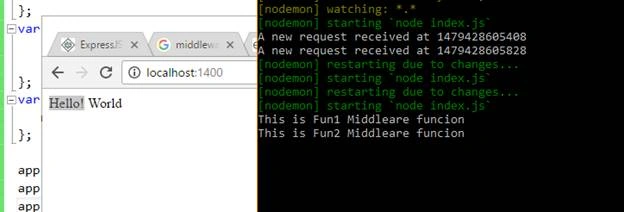
In this example. we have created two middleware functions that execute or run before the response is sent to the client. Each middleware function contains three parameters. First parameter denotes the request object, second parameter denotes the response object, and the last parameter denotes the next middleware function.
Order of the execution of middleware function will be similar to the order in which they are used or included in file.
Change in Request or Response Objects
As I said, the middleware function can be used to change the request or response object. Let’s take an example.
Example
- var express = require('express');
- var app = express();
- var fun1 = function (req, res, next) {
- console.log("This is Fun1 Middleare funcion");
- req.requestTime = Date.now()
- next();
- };
- app.use('/', fun1);
- app.get('/', function (req, res) {
- res.send("<h2>Requested At: "+ req.requestTime+"</h2>");
- })
- app.listen(1400);
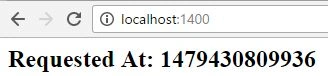
In this example, we have created a middleware function that takes the request object and attaches the requestTime property to request object.
Types of Middleware function
Express supports five types of middleware functions.
- Application Level Middleware function
- Router Level Middleware function
- Exception Handling Middleware function
- Built-In Middleware function
- Third-Party Middleware function
Application Middleware Function
In application level middleware functions, functions are bound to an instance of the app object, by using the app.use() and app.METHOD() functions, where METHOD is the HTTP method of the request that the middleware function handles (such as, GET, PUT, or POST) in lowercase.
Example
- var express = require('express');
- var app = express();
- var fun1 = function (req, res, next) {
- console.log("This is Fun1 Middleare funcion");
- next();
- };
- var fun2 = function (req, res, next) {
- console.log("This is Fun2 Middleare funcion");
- next();
- };
- var fun3 = function (req, res, next) {
- res.send("Hello! World")
- };
- app.use('/', fun1);
- app.use('/', fun2);
- app.use('/', fun3);
- app.listen(1400);
Router Level Middleware
Router level middleware function works in a similar way to application level middleware, except it binds to the express.Router() object.
Example
Create a router.js file and add the following code into that file.
- var express = require('express')
- var routes = express.Router();
- //Middleware function
- var fun1 = function (req, res, next) {
- console.log("This is Fun1 Middleare funcion");
- next();
- };
- var fun2 = function (req, res, next) {
- console.log("This is Fun2 Middleare funcion");
- next();
- };
- routes.use('/', fun1);
- routes.use('/', fun2);
- //routing
- routes.get('/', function (req, res) {
- res.send("<html><head></head><body><h1>This is demo App</h1></body></html>");
- });
- routes.get('/:id', function (req, res) {
- res.send("Your Id is: " + req.params.id);
- });
- routes.get('/api/:name', function (req, res) {
- res.send("Your Id is: " + req.params.name);
- });
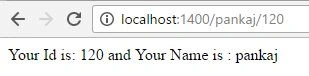
- routes.get('/:name/:id', function (req, res) {
- res.send("Your Id is: " + req.params.id + " and Your Name is : " + req.params.name);
- });
- routes.get('*', function (req, res) {
- res.send("Sorry! URL not found");
- });
- module.exports = routes;


Anu VPosted Nov 21, 2016, 12:26 AM
Nice article.. Thanks for sharing.