Introduction
A reader should be aware of TDD, and have a solid understanding of C# basics which include,
- Implementing an interface
- Applying attributes to classes and methods
- Classes being passed by reference
- NUnit
TL;DR
Make a class that implements IEnumerable<ITestCaseData> and another that impelements ITestCaseData. Either add to an existing TestFixture or create a new TestFixture a new method which is decorated with the TestCaseSourceAttribute using Type overload and passing the typeof of your TestCaseDataProvider.
When and why
When should we use TestCaseSource? Simply put it when we have a class that manipulates our data, and setting up the data is more than just 1 or 2 simple primitives that can be passed in as parameters. This is why I chose the Gilded rose as an example. It has 3 properties on its class and has a class that manipulates an Item. It allows you to pass in something other than a compile time constant into test as a parameter and you can be very descriptive with your tests with little effort. Setup is a little tedious at first since you’ll have a minimum of 2 classes that you’ll have to create, but once they are setup and working you’ll see how powerful it is and why it is worth the extra effort.
Preparation
You will need to have a C# editor such as Visual Studio, or Sharp Edit, or MonoEdit. You will also need to have the ability to run NUnit tests either from your IDE of choice or from NUnit’s test runner. I will be using the following,
- Visual Studio 2015 community edition.
- NUnit 2.6.4 (3.0.0 beta-5 is currently available but I have had trouble getting it to run consistently for me).
- NUnit Test Adapter extension for Visual Studio 2015 version 2.0.
- FluentAssertions since I like the way it reads. Really I’m only using it in one place so switching to use Assert from NUnit is trivial.
The source code I’ll be building is from the Gilded Rose Kata. It is available on GitHub and is easily searchable, and the concept of it is easy to understand. So with all those in place let’s get started.
Setup
The first test is always the one that is easiest to implement that is almost brainless. The easiest one we will work on first is “When a day passes the item quality is degraded by 1”. Since TestCaseSource is built with data we’ll need a test case data provider, and some test case data. Let's create our ItemTestCaseDataProvider. NUnit specifies that the class should implement IEnumerable<ITestCaseData>.
- internal class ItemTestCaseProvider : IEnumerable<ITestCaseData>
- {
- public IEnumerator<ITestCaseData> GetEnumerator()
- {
- throw new NotImplementedException();
- }
-
- IEnumerator IEnumerable.GetEnumerator()
- {
- throw new NotImplementedException();
- }
- }
Implementing this provider will be trivial, so since that is the case we’ll revisit this guy here shortly. First lets hook up our test to this test provider. In the TestFixture of your choice you will create a new method with the TestSourceAttribute and point it to our provider by giving it the type of our provider.
- [TestFixture]
- public class TestAssemblyTests
- {
- [TestCaseSource(typeof(ItemTestCaseProvider))]
- public void TestTheTruth()
- {
- true.Should().BeTrue();
- }
- }
Now with those two things in place the NUnit test adapter will start to be able to pick up on new tests. Before I make a class that implements the ITestCaseData NUnit does provide you with a nice Fluent TestCaseData. Here is an example of how it is used.
- internal class ItemTestCaseProvider : IEnumerable<ITestCaseData>
- {
- public IEnumerator<ITestCaseData> GetEnumerator()
- {
- yield return new TestCaseData(1, "1", "More Objects").Returns(42).SetName("I am a cool test");
- }
-
- IEnumerator IEnumerable.GetEnumerator()
- {
- return GetEnumerator();
- }
- }
You’ll see in the constructor of TestCaseData that it accepts any number of objects that will be passed into the method of your test. By setting returns to a value you can make the test return a value that you can compare. It is similar to using
Assert.That(someObject,
Is.EqualTo(whatYouReturned). Lastly by setting the name you’ll see in my test adapter the name of the test.
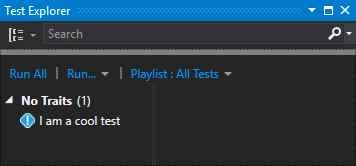
Using that way is valid, and useful to get you started. I do however prefer to have a bit more control over my tests at times. I also want my test name to display exactly what is being tested. Also since this particular Kata already has a method that works for the most part I won’t go and refactor the class in this article so that it is the best scenario, instead I will just show that all my tests pass as expected and you can use it as an exercise to refactor. First off I want to make my test case data have a single item, and tell me what I want it to return. So lets get that started. I made a class called ItemTestCaseData that implements ITestCaseData, change most all of the properties to have AutoProperties with a private set. Certain properties I set to return a constant value (such as Explicit, HasExpectedResult, and Ignored). I don’t want my test skipped because I didn’t click on it to explicitly run it, I am returning a result, and I am not going to ignore any of my tests. I prefer the fluent way of writing things so I will make a single static entry point to set my Item, then have another method to set my expected result. The class looks like this (without the method fluent methods).
- internal class ItemTestCaseData : ITestCaseData
- {
- public object[] Arguments { get; private set; }
- public string Description { get; private set; }
- public object Result { get; private set; }
- public string TestName
- {
- get
- {
- return string.Format("{0} with quality {1} to be sold in {2} days should have quality of {3} tomorrow",
- _item.Name ?? "Any Item",
- _item.Quality,
- _item.SellIn,
- Result);
- }
- }
-
- public bool Explicit { get { return false; } }
- public bool HasExpectedResult { get { return true; } }
- public bool Ignored { get { return false; } }
-
- public Type ExpectedException { get; private set; }
- public string ExpectedExceptionName { get; private set; }
- public string IgnoreReason { get; private set; }
- }
Now here is my fluent part.
- private readonly Item _item;
-
- private ItemTestCaseData(Item item)
- {
- _item = item;
- Arguments = new[] { _item };
- }
-
- public static ItemTestCaseData CreateWithItem(Item item)
- {
- return new ItemTestCaseData(item);
- }
-
- public ItemTestCaseData ShouldByTomorrowHaveQualityOf(int quality)
- {
- Result = quality;
- return this;
- }
As you can see it is rather straight forward. I put what I expect to be returned as a result, and I made my constructor private. Now to start adding tests to my provider, and as I go I should start seeing some green tests. Granted if I was writing this thing from scratch I would see failing tests first. So lets start.
First Test
With my ItemTestCaseData in place I now would yield return a new instance of that and I should see that test show up in my test explorer. My method in my ItemTestCaseProvider now looks like the following,
- public IEnumerator<ITestCaseData> GetEnumerator()
- {
- yield return ItemTestCaseData.CreateWithItem(new Item { Quality = 1, SellIn = 1 }).ShouldByTomorrowHaveQualityOf(0);
- }
I probably could stand to fix the CreateWithItem method to read slightly better, but for now I think this gets the point across. Here is what my TestExplorer shows.
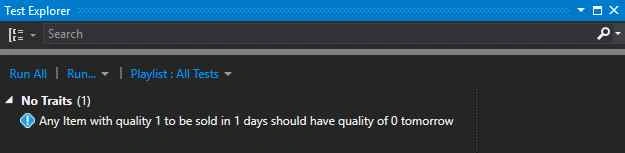
And when I run it:
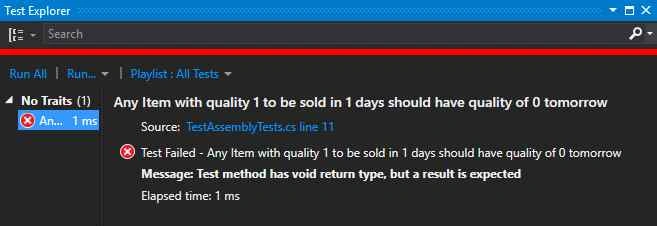
Oh no! What is wrong? Simple. We didn’t set the method to accept in an Item as a parameter, nor did we make it have a return type, and the item wasn’t being sent in to the class that adjusts the item. So let’s adjust our test.
- [TestCaseSource(typeof(ItemTestCaseProvider))]
- public int TestItemQualityAdjustments(Item item)
- {
- var program = new Program();
- program.AddItem(item);
- program.UpdateQuality();
-
- return item.Quality;
- }
And with that, let’s re-run that test,
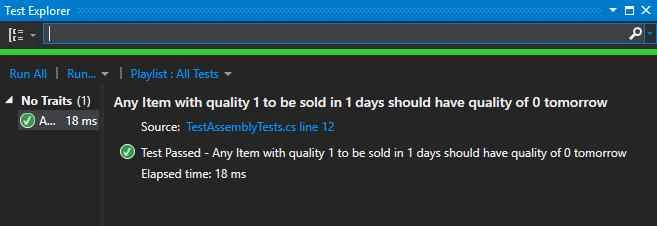
Great! Now for the rest of the tests including the one that fails,
- public IEnumerator<ITestCaseData> GetEnumerator()
- {
- yield return ItemTestCaseData.UsingAnyItem().WithInitialQuality(1).ToBeSoldIn(1).ShouldByTomorrowHaveQualityOf(0);
- yield return ItemTestCaseData.UsingAnyItem().WithInitialQuality(2).ToBeSoldIn(0).ShouldByTomorrowHaveQualityOf(0);
- yield return ItemTestCaseData.UsingAnyItem().WithInitialQuality(0).ToBeSoldIn(0).ShouldByTomorrowHaveQualityOf(0);
- yield return ItemTestCaseData.UsingAgedBrie().WithInitialQuality(0).ToBeSoldIn(1).ShouldByTomorrowHaveQualityOf(1);
- yield return ItemTestCaseData.UsingAgedBrie().WithInitialQuality(0).ToBeSoldIn(0).ShouldByTomorrowHaveQualityOf(2);
- yield return ItemTestCaseData.UsingAgedBrie().WithInitialQuality(50).ToBeSoldIn(1).ShouldByTomorrowHaveQualityOf(50);
- yield return ItemTestCaseData.UsingAgedBrie().WithInitialQuality(50).ToBeSoldIn(0).ShouldByTomorrowHaveQualityOf(50);
- yield return ItemTestCaseData.UsingSulfuras().ToBeSoldIn(0).ShouldByTomorrowHaveQualityOf(80);
- yield return ItemTestCaseData.UsingBackstagePass().ToBeSoldIn(11).ShouldByTomorrowHaveQualityOf(1);
- yield return ItemTestCaseData.UsingBackstagePass().ToBeSoldIn(10).ShouldByTomorrowHaveQualityOf(2);
- yield return ItemTestCaseData.UsingBackstagePass().ToBeSoldIn(5).ShouldByTomorrowHaveQualityOf(3);
- yield return ItemTestCaseData.UsingBackstagePass().WithInitialQuality(50).ToBeSoldIn(0).ShouldByTomorrowHaveQualityOf(0);
- yield return ItemTestCaseData.UsingConjuredItem().WithInitialQuality(2).ToBeSoldIn(1).ShouldByTomorrowHaveQualityOf(0);
- yield return ItemTestCaseData.UsingConjuredItem().WithInitialQuality(4).ToBeSoldIn(0).ShouldByTomorrowHaveQualityOf(0);
- }
And as you can see as expected the ConjustredItems fail. I also decided to change how I “
make” a new item, but as you can see all but 2 of those tests pass, and the read out is nice,
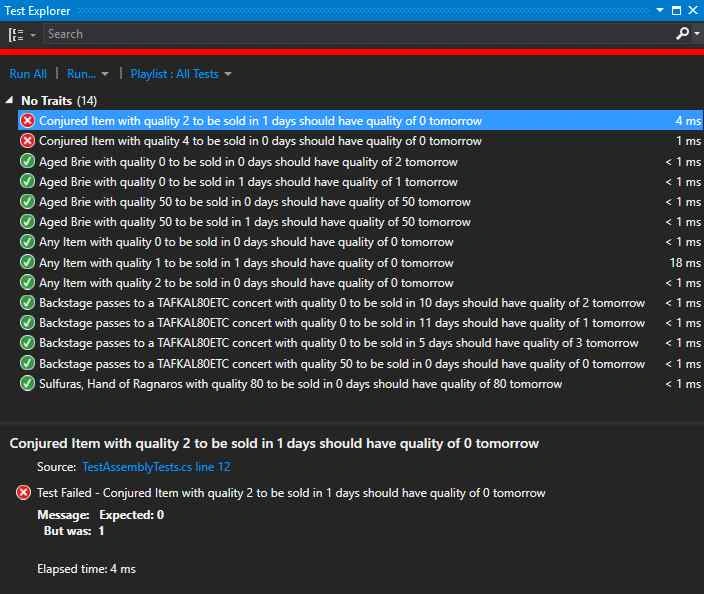
What I especially like is that now the error message of
“Expected: 0 But was: 1” makes sense. Just read the name of the test and you’ll see what was expected to be zero.
Wrapping Up
As you can see using the TestCaseSource is great when you have a way of easily making Data, or by going and getting said data from some type of repository. It allows you to use real objects in a clean and easy to understand fashion. There are a few caveats to using this, and I will make another article just for that. A few things that I’ve learned along the way that you might also encounter. I hope you enjoyed this article as much as I enjoyed writing it.


Reshma DeepakPosted Dec 23, 2019, 11:49 PM
Can we have "XmlDocument" parameter for the testcase ??? and how do we compare the two XML files in Nunit?
Reshma DeepakPosted Dec 23, 2019, 11:48 PM
Hello Robert,
Debasis SahaPosted Nov 23, 2015, 7:06 AM
Good One.
Sibeesh VenuPosted Nov 23, 2015, 4:08 AM
Nice Share
Santhakumar MunuswamyPosted Nov 11, 2015, 6:32 AM
Good one
Banketeshvar NarayanPosted Nov 8, 2015, 11:11 PM
*Harshad
Banketeshvar NarayanPosted Nov 8, 2015, 11:10 PM
thnx Harsad
Harshad PansuriyaPosted Nov 8, 2015, 11:05 PM
Nice one
Mukesh KumarPosted Nov 8, 2015, 12:30 PM
Good Job
Gowtham KPosted Nov 8, 2015, 6:59 AM
Good Share
Banketeshvar NarayanPosted Nov 8, 2015, 5:27 AM
Good one