

Introduction
In ASP.NET Core, middleware components are used to handle requests and responses as they flow through the application's pipeline. These middleware components can be chained together to process requests and responses in a specific order. Transferring data between middleware components can be achieved using various techniques. Here are a few commonly used methods.
HttpContext.Items
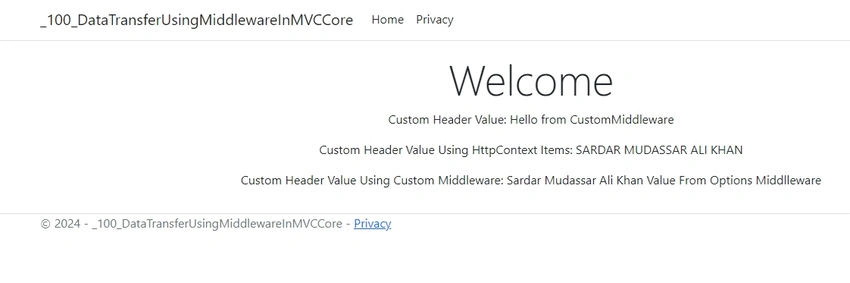
The HttpContext class in ASP.NET Core provides a dictionary-like collection (Items) that allows you to store and retrieve data within the scope of a single HTTP request. This data can be accessed by any middleware component in the request pipeline.
namespace _100_DataTransferUsingMiddlewareInMVCCore.CustomMiddlewares
{
    public class CustomMiddleware
    {
        private readonly RequestDelegate _next;

        public CustomMiddleware(RequestDelegate next)
        {
            _next = next;
        }

        public async Task Invoke(HttpContext context)
        {
            context.Items["SMAK"] = "SARDAR MUDASSAR ALI KHAN";
            // Add a custom header to the response
            context.Response.Headers.Append("X-Custom-Header", "Hello from CustomMiddleware");

            await _next(context);
        }
    }
}
Using constructor injection
You can pass data between middleware components using constructor injection. This approach is useful when you need to share data that is not specific to a single request.
namespace _100_DataTransferUsingMiddlewareInMVCCore.CustomMiddlewares
{
    public class MyMiddlewareOptions
    {
        public string OptionValue { get; set; }
    }
}
using Microsoft.Extensions.Options;

namespace _100_DataTransferUsingMiddlewareInMVCCore.CustomMiddlewares
{
    public class MyMiddlewareValues
    {
        private readonly RequestDelegate _next;
        private readonly MyMiddlewareOptions _options;

        public MyMiddlewareValues(RequestDelegate next, IOptions<MyMiddlewareOptions> options)
        {
            _next = next;
            _options = options.Value;
        }

        public async Task Invoke(HttpContext context)
        {
            // Use _options.OptionValue here
            await _next(context);
        }
    }
}
Using request and response objects
You can also pass data between middleware components by adding or modifying properties of the HttpRequest and HttpResponse objects.
namespace _100_DataTransferUsingMiddlewareInMVCCore.CustomMiddlewares
{
    public class CustomMiddleware
    {
        private readonly RequestDelegate _next;

        public CustomMiddleware(RequestDelegate next)
        {
            _next = next;
        }

        public async Task Invoke(HttpContext context)
        {
            // Add a custom header to the response
            context.Response.Headers.Append("X-Custom-Header", "Hello from CustomMiddleware");

            await _next(context);
        }
    }
}
Custom middleware options
If you have a significant amount of data to transfer between middleware components, you can create custom middleware options and configure them when registering your middleware in the application startup.
namespace _100_DataTransferUsingMiddlewareInMVCCore.CustomMiddlewares
{
    public class MyMiddlewareOptions
    {
        public string OptionValue { get; set; }
    }
}
using Microsoft.Extensions.Options;

namespace _100_DataTransferUsingMiddlewareInMVCCore.CustomMiddlewares
{
    public class MyMiddlewareValues
    {
        private readonly RequestDelegate _next;
        private readonly MyMiddlewareOptions _options;

        public MyMiddlewareValues(RequestDelegate next, IOptions<MyMiddlewareOptions> options)
        {
            _next = next;
            _options = options.Value;
        }

        public async Task Invoke(HttpContext context)
        {
            // Use _options.OptionValue here
            await _next(context);
        }
    }
}
Now we will create the New Project in the asp.net core Mvc Project and will use this technique to transfer the data between controllers.
Create a new ASP.NET Core MVC project
You can create a new ASP.NET Core MVC project using Visual Studio or the .NET CLI.
dotnet new mvc -n _100_DataTransferUsingMiddlewareInMVCCore
Define a custom middleware component
Create a new class for your custom middleware. This middleware will add a custom header to the HTTP response.
Join the conversation! Your thoughts help the community grow.