

Collections
In many applications we need to create and manage groups of related objects. There are two ways to do it, either by creating an array of objects or by creating a collection of objects.
Arrays are most useful for creating a fixed number of strongly typed objects.
Collections provide a more flexible way to work with groups of objects and the group of objects you work with can grow and shrink dynamically as the needs of the application change. It also allows access to a list of items using an index. C# collections classes are defined as part of the System.Collections. So first we need to use the System.Collections namespace.
Various Collections Classes and Their Usage
The following are the various commonly used classes of the System.Collections namespace.

ArrayList
ArrayList represents an ordered collection of a specified object that can be indexed individually. It allows dynamic memory allocation, adding, searching and sorting items in the list.
The following are the properties of the ArrayList class:
- Capacity: Gets or sets the number of elements that the ArrayList can contain.
- Count: Returns the number of elements present in the ArrayList.
- IsFixedSize: Returns a value indicating whether the ArrayList has a fixed size.
- IsReadOnly: Returns a value indicating whether the ArrayList is read-only.
- Item: Gets or sets the element at the specified index position.
- public virtual int add(object value); Inserts the object at the end of the ArrayList.
- public virtual void AddRange(Icollection c); Adds the elements of a collection to the end of the ArrayList.
- public virtual void Clear(); Removes all the elements from the ArrayList. Does not affect the capacity of the ArrayList.
- public virtual bool Contains(object item); Determines whether an element is present or not in the ArrayList.
- public virtual ArrayList GetRange( int index, int count ); Returns an ArrayList that represents a subset of the elements in the source ArrayList.
- public virtual int IndexOf(object); Returns the index of the first occurrence of a value in the ArrayList or in a portion of it.
- public virtual void Insert(int index, object value); Inserts an element into the ArrayList at the specified index.
- public virtual void InsertRange(int index, ICollection c); Inserts the element of a collection into the ArrayList at the specified index.
- Public virtual void Remove(object obj); Removes the first occurrence of a specified object from the ArrayList.
- public virtual void RemoveAt(int index); Removes the element at the given specified index of the ArrayList.
- public virtual void RemoveRange(int index,int count); Removes a range of elements from the ArrayList.
- public virtual void Reverse(); Reverses the order of the elements in the ArrayList.
- public virtual void Sort(); Sorts all the elements in the ArrayList.
- public virtual void TrimToSize(); Sets the capacity to the actual number of elements present in the ArrayList. Basically the capacity is not increased one by one. Capacity is just doubled each time whenever the size reaches the threshold. So the TrimToSize() method sets the capacity to the exact the size of the ArrayList.
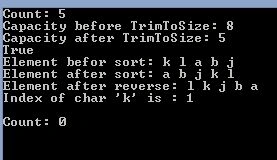
The following is the example,
- using System;
- using System.Collections;
- namespace Collection_Example
- {
- class Program
- {
- static void Main(string[] args)
- {
- ArrayList al = new ArrayList();
- ArrayList al1 = new ArrayList();
- // Adding object into the ArrayList
- al1.Add('a');
- al1.Add('b');
- al.Add('k');
- al.Add('l');
- al.Add('j');
- // Adding Arraylist at specific position into the ArrayList
- al.InsertRange(2,al1);
- //Get the Capacity and number of element present in the ArrayList
- // Note that Capacity and Count are not equal
- Console.WriteLine("Count: {0}", al.Count);
- Console.WriteLine("Capacity before TrimToSize: {0} ", al.Capacity);
- al.TrimToSize();
- Console.WriteLine("Capacity after TrimToSize: {0} ", al.Capacity);
- Console.WriteLine(al.Contains('b'));
- Console.Write("Element befor sort: ");
- foreach (object obj in al)
- Console.Write(obj + " ");
- Console.Write("\nElement after sort: ");
- al.Sort();
- foreach (object obj in al)
- Console.Write(obj + " ");
- al.Reverse();
- Console.Write("\nElement after reverse: ");
- foreach (object obj in al)
- Console.Write(obj + " ");
- Console.WriteLine("\nIndex of char 'k' is : {0}", al.IndexOf('k'));
- // clear the ArrayList
- al.Clear();
- Console.WriteLine("\nCount: {0}", al.Count);
- Console.ReadKey();
- }
- }
- }
HashTable
The Hashtable class represents a collection of key-and-value pairs organized based on the hash code of the key. It uses the key to access the elements in the collection. Hash table is used when you need to access elements using a key. Each item in the hash table has a key/value pair. The key is used to access the items in the collection.
The following are the properties of HashTable class,
- Count: Returns the number of elements present in the Hashtable.
- IsFixedSize: Returns a value indicating whether the Hashtable has a fixed size.
- IsReadOnly: Returns a value indicating whether the Hashtable is read-only.
- Item: Gets or sets the value with the specific key.
- Keys: Returns an ICollection containing the keys in the HashTable.
- Values: Returns an ICollection containing the values in the HashTable.
The following are the methods of the HashTable Class,
- public virtual void add(object key,object value); Adds a value with the specified key into the HashTable.
- public virtual void Clear(); Clears the HashTable.
- public virtual bool ContainsKey(object key); Determines whether the HashTable contains a specific key, if Yes then returns true otherwise it returns false.
- public virtual bool ContainsValue(object key); Determines whether the HashTable contains a specific value, if Yes then returns true otherwise it returns false.
- public virtual void Remove(object key); Removes an element with the specific key from the HashTable.
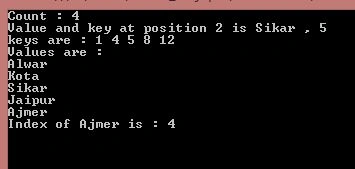
The following is the example:
- using System;
- using System.Collections;
- namespace Collection_Example
- {
- class Program
- {
- static void Main(string[] args)
- {
- Hashtable ht = new Hashtable();
- //Adding item into HashTable
- ht.Add(1, "Alwar");
- ht.Add(12, "Ajmer");
- ht.Add(8, "Jaipur");
- ht.Add(4, "Kota");
- Console.WriteLine("Count : {0}", ht.Count);
- if (ht.ContainsValue("Sikar"))
- Console.WriteLine("Sikar is already exist in the HashTable");
- else
- ht.Add(5, "Sikar");
- //Get a collection of values
- Console.WriteLine("Values are :");
- ICollection values = ht.Values;
- foreach (string str in values)
- Console.WriteLine(str);
- //Get a collection of Keys
- Console.WriteLine("Keys are :");
- ICollection keys = ht.Keys;
- foreach (int i in keys)
- Console.WriteLine(i);
- ht.Remove(3);
- ht.Clear();
- Console.ReadKey();
- }
- }
- }

SortedList
SortedList represents a collection of key-value pairs sorted by the keys and are accessible by key and by index. A sorted list is a combination of an array and a hash table. It contains a list of items that can be accessed using a key or an index. Note that SortedList is always sorted by the key value.
The following are the properties of the SortedList class,
- Capacity: Gets or sets the number of elements that the SortedList can contain.
- Count: Returns the number of elements present in the SortedList.
- IsFixedSize: Returns a value indicating whether the SortedList has a fixed size.
- IsReadOnly: Returns a value indicating whether the SortedList is read-only.
- Item: Gets or sets the value associated with a specific key in the SortedList.
- Keys: Returns an ICollection containing the keys in the SortedList.
- Values: Returns an ICollection containing the values in the SortedList.
Method of the SortedList Class

onyango ogollaPosted Mar 26, 2022, 4:34 PM
Thanks for this article. SortedList is my best, especially when implementing from (System.Collections.Generic;) eg SortedList<string, string> MySortedList = new SortedList<string, string>();Nice to know the difference between (List/ArrayList/SortedList/Hashtable/Dictionary/SortedDictionary/LinkedList/Queue/Stack) Also, performance speed and memory should be considered while choosing. SortedList might be slow but memory usage is best, and fast if input is pre-sorted and large input data https://www.linkedin.com/in/ogolla/
Rahul PrajapatPosted Aug 18, 2015, 8:01 AM
Thanks Sandeep Kumar sir
Sandeep KumarPosted Aug 18, 2015, 7:53 AM
Nice article rahul sir :)
Rahul PrajapatPosted Jul 5, 2015, 10:19 PM
Thanks Santhakumar Munuswamy sir
Santhakumar MunuswamyPosted Jul 5, 2015, 4:39 AM
Good show
Pankaj Kumar ChoudharyPosted Jul 4, 2015, 8:42 PM
Really Nice Explain Rahul Keep It Up......................