

Introduction
Content
- Remote Data Source for Kendo Grid
- Building a Kendo Grid with remote datasource
- Pager Visibility in Kendo Grid
Remote Data Source for Kendo Grid
I am going to use the API response given below to construct my remote data source for Kendo Grid which was created in my previous article.
- API - http://github-ci-staging.azurewebsites.net/api/Technologies/TechnologiesLimitedList
- Type - GET.
Test the APIs using POSTMAN.
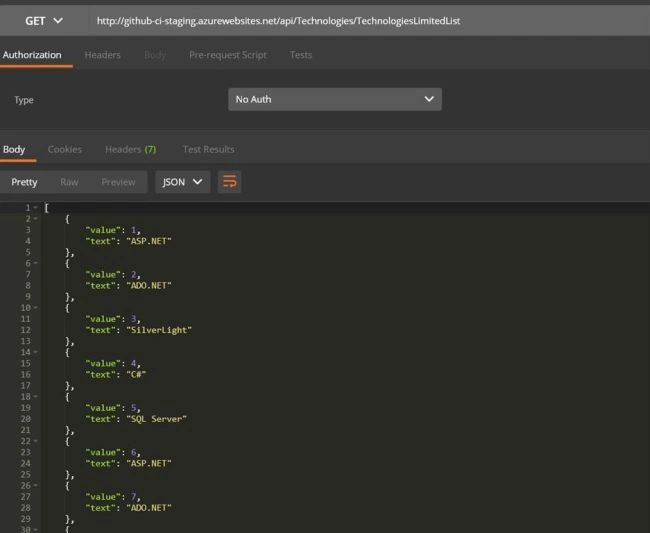
Build a Kendo Grid with remote datasource
Create a new HTML page. In my case, I named it KendoPaging.cshtml
KendoPaging.cshtml- <!DOCTYPE html>
- <html>
- <head>
- <base href="http://demos.telerik.com/kendo-ui/sortable/integration-grid">
- <style>
- html {
- font-size: 14px;
- font-family: Arial, Helvetica, sans-serif;
- }
- </style>
- <title></title>
- <link rel="stylesheet" href="https://kendo.cdn.telerik.com/2017.3.913/styles/kendo.common-material.min.css" />
- <link rel="stylesheet" href="https://kendo.cdn.telerik.com/2017.3.913/styles/kendo.material.min.css" />
- <link rel="stylesheet" href="https://kendo.cdn.telerik.com/2017.3.913/styles/kendo.material.mobile.min.css" />
- <script src="https://kendo.cdn.telerik.com/2017.3.913/js/jquery.min.js"></script>
- <script src="https://kendo.cdn.telerik.com/2017.3.913/js/kendo.all.min.js"></script>
- </head>
- <body>
- <div id="example">
- <div id="grid"></div>
- <script>
- $(document).ready(function() {
- var grid = $("#grid").kendoGrid({
- dataSource: {
- type: "json",
- transport: {
- read: "http://github-ci-staging.azurewebsites.net/api/Technologies/TechnologiesLimitedList"
- },
- schema: {
- model: {
- fields: {
- value: { type: "number" },
- text: { type: "string" },
- }
- }
- },
- pageSize: 20,
- },
- pageable: {
- refresh: true,
- pageSizes: [20, 40, 60, 80,100],
- },
- height: 500,
- columns: [
- { field: "value", title: "S No", width: "130px" },
- { field: "text", title: "Technology", width: "130px" },
- ]
- }).data("kendoGrid");
- });
- </script>
- </div>
- </body>
- </html>
From the above code, you can notice that the Kendo Grid is constructed based on our remote datasource which is formed from REST API.
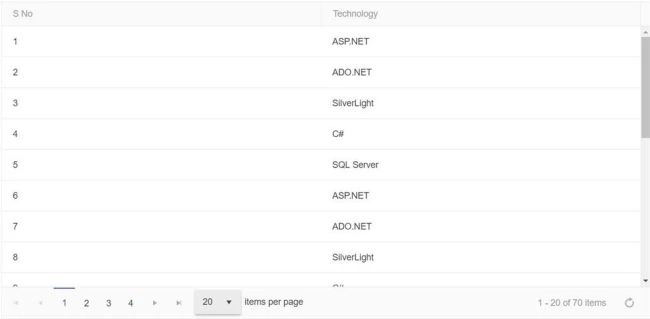
Figure 2
Pager Visibility in Kendo Grid
Pager Visibility attribute in a page-able property is used to make the pager visible or not, based on its requirement, just by changing the status of the attribute.
By default, the pager visibility will be true, which means that the pager is always visible in Grid even when the total amount of items in the datasource is less than a pageSize.
The Pager will be hidden when the total amount of items in the datasource is less than pageSize, by setting pager visibility as false.
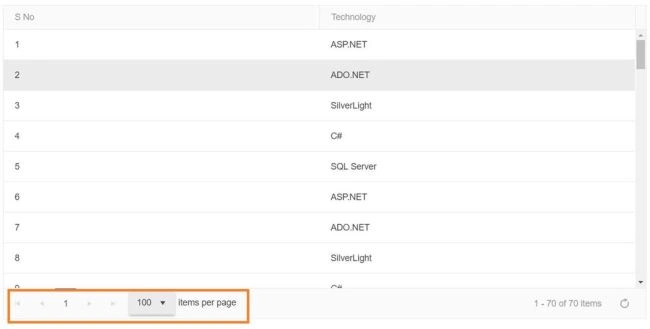
FIgure 3
- <!DOCTYPE html>
- <html>
- <head>
- <base href="http://demos.telerik.com/kendo-ui/sortable/integration-grid">
- <style>
- html {
- font-size: 14px;
- font-family: Arial, Helvetica, sans-serif;
- }
- </style>
- <title></title>
- <link rel="stylesheet" href="https://kendo.cdn.telerik.com/2017.3.913/styles/kendo.common-material.min.css" />
- <link rel="stylesheet" href="https://kendo.cdn.telerik.com/2017.3.913/styles/kendo.material.min.css" />
- <link rel="stylesheet" href="https://kendo.cdn.telerik.com/2017.3.913/styles/kendo.material.mobile.min.css" />
- <script src="https://kendo.cdn.telerik.com/2017.3.913/js/jquery.min.js"></script>
- <script src="https://kendo.cdn.telerik.com/2017.3.913/js/kendo.all.min.js"></script>
- </head>
- <body>
- <div id="example">
- <div id="grid"></div>
- <script>
- $(document).ready(function() {
- var grid = $("#grid").kendoGrid({
- dataSource: {
- type: "json",
- transport: {
- read: "http://github-ci-staging.azurewebsites.net/api/Technologies/TechnologiesLimitedList"
- },
- schema: {
- model: {
- fields: {
- value: { type: "number" },
- text: { type: "string" },
- }
- }
- },
- pageSize: 20,
- },
- pageable: {
- refresh: true,
- alwaysVisible:false,
- pageSizes: [20, 40, 60, 80,100],
- },
- height: 500,
- columns: [
- { field: "value", title: "S No", width: "130px" },
- { field: "text", title: "Technology", width: "130px" },
- ]
- }).data("kendoGrid");
- });
- </script>
- </div>
- </body>
- </html>
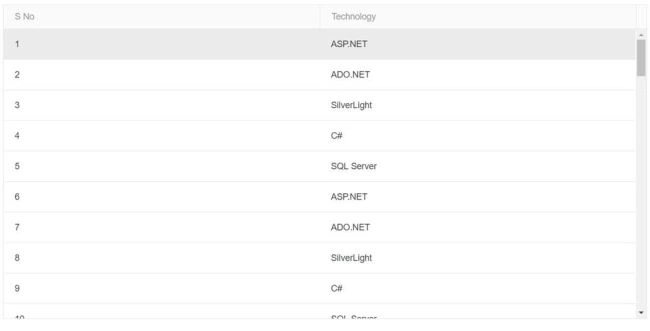
Figure 4
I hope you have enjoyed this article. Your valuable feedback, questions, or comments about this article are always welcome.
Download the source code here.
Sanjay SharmaPosted Feb 5, 2018, 4:34 AM
Wel you can go here http://jsfiddle.net/alexyu/jwr4Y/.you notice no data is in popup as well as footer. I just don't "no data" text in footer.
Sanjay SharmaPosted Jan 31, 2018, 2:31 AM
Is it possible to put "No items to display" text at center when no records for grid.