


Introduction
PLINQ is a parallel implementation of LINQ in C#. By simply calling .AsParallel(), we can enable concurrent execution of queries across multiple threads. It abstracts away the complexity of thread management, making parallel programming more approachable while still being powerful.
PLINQ is useful when:
we need to run CPU-bound operations
The dataset is large
Operations on each element are independent
Example Walkthrough
Let’s look into the example below:
internal class ParallelLinqDemo
{
 public static void Run()
 {
 var stopwatch = new Stopwatch();
 stopwatch.Start();
List<int> items = [0, 1, 2, 3, 4, 5, 6, 7, 8, 9];
items
 .AsParallel()
 .WithDegreeOfParallelism(4)
 .ForAll(index =>
 {
 Thread.Sleep(1000); // cpu heavy task
 Console.WriteLine("Current index: {0}", index);
 });
stopwatch.Stop();
 Console.WriteLine("Time taken: {0}", stopwatch.Elapsed);
 }
}
Let’s analyze what’s happening in the above code.
.AsParallel()
This converts the collection into a parallel query.
.WithDegreeOfParallelism(4)
This will limit execution to 4 concurrent threads (for controlling resource usage).
.ForAll(…)
This will executes the action in parallel without preserving order.
Thread.Sleep(1000)
We’re simulating a time-consuming (CPU-bound) operation.
Since execution is parallel, order is not guaranteed. Output may look like:
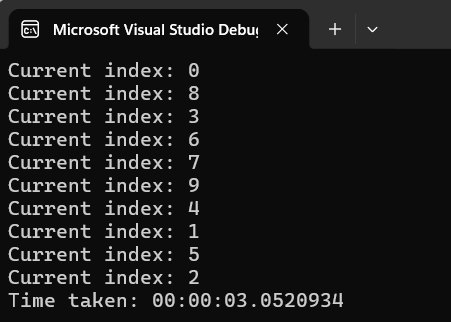
If we look into a time taken, if it was a sequential it should consume ~10 seconds to execute, but here we are executing in parallel (4 threads at a time), so it is taking ~3 seconds to complete.
This demonstrates how PLINQ can reduces execution time by processing multiple items concurrently.
Advantages of PLINQ
Improved Performance: It can significantly reduce execution time for CPU-bound tasks by utilizing multiple cores.
Minimal Code Changes: we can parallelize existing LINQ queries with just .AsParallel().
Automatic Thread Management: PLINQ automatically handles partitioning and scheduling of threads.
Scalability: We can scale the performance with the number of available processor cores.
Parallelism Control: With the help of .WithDegreeOfParallelism(), we can control number of threads.
Disadvantages of PLINQ
Order not guaranteed.
Shared state must be handled carefully.
Not an ideal solution for the I/O bound task.
Conclusion
PLINQ is a powerful tool for leveraging multi-core processors with minimal effort. In scenarios involving like CPU-intensive operations over large datasets, this can dramatically improve performance. However, like any optimization, it should be used carefully where we need to manage the sequential state from multiple threads.
Above example clearly demonstrates how easily a sequential loop can be transformed into a parallel operation.
Join the conversation! Your thoughts help the community grow.