


Modern applications are expected to process large volumes of data quickly. Whether we’re building ETL pipelines, background workers, financial systems, or data-intensive APIs, performance becomes a first-class concern.
In this article, we’ll explore Task Parallel Library (TPL) using a simple but powerful example built with Parallel.For().
Problem with Sequential Execution
Imagine running 20 independent operations where each task takes one second.
A traditional sequential implementation would look like this:
for (int i = 0; i < 20; i++)
{
    int value = Compute(i);
    Console.WriteLine(value);
}
If each operation takes 1 second, total execution time becomes:
20 tasks x 1 = ~20 seconds
This might waste modern CPU capabilities because today’s machines have multiple cores designed for parallel workloads.
Task Parallel Library (TPL)
.NET introduced the Task Parallel Library (TPL) to simplify parallel programming without manually managing threads.
TPL provides:
Automatic thread management
Work scheduling
Load balancing
Efficient CPU utilization
One of the simplest implementations is Parallel.For()
Let’s analyze the following implementation:
internal class TaskParallelDemo
{
    public static void Run()
    {
        Stopwatch stopwatch = new();
        var option = new ParallelOptions
        {
            MaxDegreeOfParallelism = 10
        };
        stopwatch.Start();
        Parallel.For(0, 20, option, index =>
        {
            int value = Compute(index);
            Console.WriteLine(value);
        });
        stopwatch.Stop();
        Console.WriteLine("Time taken: {0}", stopwatch.Elapsed);
    }

    private static int Compute(int index)
    {
        Thread.Sleep(1000); // simulate long task
        return index;
    }
}
Here we define ParallelOptions and set MaxDegreeOfParallelism = 10, which controls how many tasks can execute simultaneously. Parallelism does not mean running unlimited threads, doing so can lead to CPU oversubscription, excessive context switching, and reduced system stability.
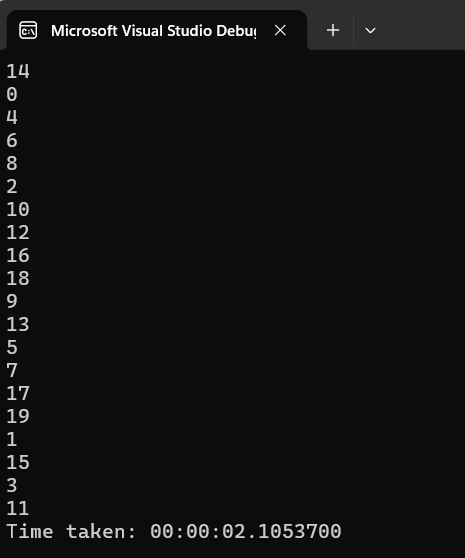
The Parallel.For() loop distributes iterations across multiple worker threads managed automatically by the .NET ThreadPool, removing the need for manual thread handling. Each iteration runs independently, execution order is not guaranteed, and scheduling is handled dynamically by the runtime.
Given 20 total tasks and a maximum of 10 concurrent workers, execution occurs in two batches, the first 10 tasks complete in one second, followed by the remaining 10 tasks in another second. As a result, the total runtime drops to roughly two seconds instead of twenty, demonstrating nearly a 10× performance improvement achieved through controlled parallel execution.
We can use Parallel.For() When
Operations are independent
Work is CPU-bound
No shared mutable state
Large datasets require processing
We should avoid TPL when tasks are I/O bound.
Conclusion
TPL helps developers to fully utilize multi-core processors without introducing unnecessary complexity. It enables engineers to move beyond sequential thinking and design systems that efficiently distribute workloads across available computing resources.
Join the conversation! Your thoughts help the community grow.