

Introduction:
This article describes three approaches to parsing the sentences from a body of
text; three approaches are shown as a means of describing the pros and cons for
performing this task using each different approach. The demonstration
application also describes an approach to generating sentence count, word count,
and character count statistics on a body of text.
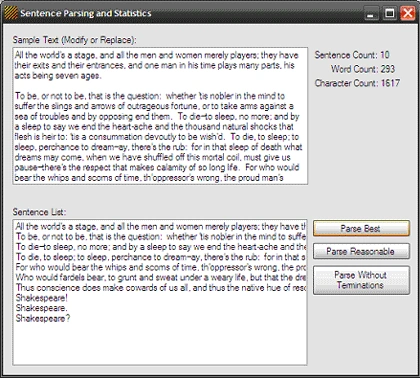
Figure 1: The test application running
The three approaches to parsing out the sentences from the body of text
include:
- Parse Reasonable: an approach
based on splitting the text using typical sentence terminations where the
sentence termination is retained,
- Parse Best: an approach based on
the use of splitting the text based upon the use of a regular expression and
where the sentence termination is retained, and
- Parse Without Endings: an approach to splitting the text using typically sentence terminations where the terminations are not retained as part of the sentence.
The demonstration application contains some default
text in a text box control; three buttons used to parse the text using one of
the three approaches mentioned, and three label controls used to display the
summary statistics generated on the body of text. Once the application is run,
clicking on any of the three buttons will result in the display of each of the
parsed sentences within the list box control at the bottom of the form, and will
result in the display of the summary statistics using the three labels in the
upper right hand side of the form.
Getting Started:
In order to get started, unzip the included project and open the solution in the
Visual Studio 2008 environment. In the solution explorer, you should note these
files (Figure 2):
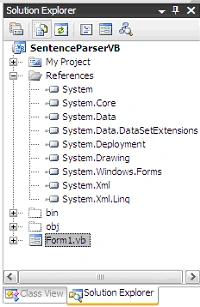
Figure 2: Solution Explorer
As you can see from Figure 2; there is a single Win Forms project
containing a single form. All code required of this application is included in
this form's code.
The Main Form (Form1.vb).
The main form of the application, Form1, contains all of the code necessary. The
form contains default text within a text box control; the three buttons are used
to execute each of the three functions used to parse the body of text into a
collection of strings; one per sentence. You may replace, remove, or add to the
text contained in the text box control to run the methods against your own text.
Three label controls are used to display summary statistics (sentence, word, and
character counts) on the text contained in the text box control. These summary
statistics are updated each time the text is parsed into sentences.
If you'd care to open the code view up in the IDE you will see that the code
file begins with the following library imports:
Imports System
Imports
System.Collections
Imports
System.ComponentModel
Imports
System.Data
Imports
System.Drawing
Imports
System.Text
Imports
System.Windows.Forms
Imports
System.Text.RegularExpressions
Note that the defaults have been altered and
now include the reference to the regular expressions library.
Following the imports, the class and constructor are defined:
Public
Class Form1
Public Sub
New()
' This call is required by the Windows Form Designer.
InitializeComponent()
' Add any initialization after the InitializeComponent() call.
End Sub
Next up is a region entitled, "Best Sentence Parser"; this region contains a
function entitled, "SplitSentences" which accepts a string as an argument. This
method tends to yield the best results in terms of parsing sentences but may
issue inaccurate values if the text contains errors. The region also contains a
button click event handler used to evoke the SplitSentences function.
The code is annotated and reading through the notes will explain what is going on within the function.
#Region
"Best Sentence Parser"
''' <summary>
''' This is generally the most accurate approach to
''' parsing a body of text into sentences to include
''' the sentence's termination (e.g., the period,
''' question mark, etc). This approach will handle
''' duplicate sentences with different terminations.
''' </summary>
''' <param name="sSourceText"></param>
''' <returns></returns>
''' <remarks></remarks>
Private Function SplitSentences(ByVal sSourceText As String) As ArrayList
' create a local string variable
' set to contain the string passed it
Dim sTemp As String = sSourceText
' create the array list that will
' be used to hold the sentences
Dim al As New ArrayList()
' split the sentences with a regular expression
Dim RegexSentenceParse As String() = _Regex.Split(sTemp, "(?<=['""A-Za-z0-9][\.\!\?])\s+(?=[A-Z])")
' loop the sentences
Dim i As Integer = 0
For i = 0 To RegexSentenceParse.Length - 1
' clean up the sentence one more time, trim it,
' and add it to the array list
Dim sSingleSentence As String = _
RegexSentenceParse(i).Replace(Environment.NewLine, String.Empty)
al.Add(sSingleSentence.Trim())
Next
' update the statistics displayed on the text
' characters
lblCharCount.Text = "Character Count: " & _GenerateCharacterCount(sTemp).ToString()
' sentences
lblSentenceCount.Text = "Sentence Count: " & _GenerateSentenceCount(RegexSentenceParse).ToString()
' words
lblWordCount.Text = "Word Count: " & _GenerateWordCount(al).ToString()
' return the arraylist with
' all sentences added
Return al
End Function
''' <summary>
''' Calls the SplitSentences (best approach) method
''' to split the text into sentences and displays
''' the results in a list box
''' </summary>
''' <param name="sender"></param>
''' <param name="e"></param>
''' <remarks></remarks>
Private Sub btnParseNoEnding_Click(ByVal sender As System.Object, ByVal e As System.EventArgs) Handles btnParseNoEnding.Click
lstSentences.Items.Clear()
Dim al As New ArrayList()
al = SplitSentences(txtParagraphs.Text)
Dim i As Integer
For i = 0 To al.Count - 1
'populate a list box
lstSentences.Items.Add(al(i).ToString())
Next
End Sub
#End
Region
Next up is a region entitled,
"Reasonable Sentence Parser"; this region contains a function entitled,
"ReasonableParser" which accepts a string as an argument. This method tends to
yield fair results in terms of parsing sentences but does not apply the proper
sentence terminations if the input string contains duplicate sentence with
different terminations. This issue could be resolved by use of a recursive
function to continue to move through each instance of the duplicate sentence
however it is less work to use the method indicated in the previous code region.
The region also contains a button click event handler used to evoke the
ReasonableParser function.
The code is annotated and reading through the notes will explain what is going
on within the function.
#Region
"Reasonable Sentence Parser"
''' <summary>
''' This does a fair job of parsing the sentences
''' unless there are duplicate sentences
''' you'd have to resort to recursion in order
''' to get through the issue of multiple duplicate sentences.
''' </summary>
''' <param name="sTextToParse"></param>
''' <returns></returns>
''' <remarks></remarks>
Private Function ReasonableParser(ByVal sTextToParse As String) As ArrayList
Dim al As New ArrayList()
' get a string from the contents of a textbox
Dim sTemp As String = sTextToParse
sTemp = sTemp.Replace(Environment.NewLine, " ")
' split the string using sentence terminations
Dim arrSplitChars As Char() = {".", "?", "!"} ' things that end a
sentence
'do the split
Dim splitSentences As String() = sTemp.Split(arrSplitChars,StringSplitOptions.RemoveEmptyEntries)
' loop the array of splitSentences
Dim i As Integer
For i = 0 To splitSentences.Length - 1
' find the position of each sentence in the
' original paragraph and get its termination ('.', '?', '!')
Dim pos As Integer = sTemp.IndexOf(splitSentences(i).ToString())
Dim arrChars As Char() = sTemp.Trim().ToCharArray()
Dim c As Char = arrChars(pos + splitSentences(i).Length)
' since this approach looks only for the first instance
' of the string, it does not handle duplicate sentences
' with different terminations. You could expand this
' approach to search for later instances of the same
' string to get the proper termination but the previous
' method of using the regular expression to split the
' string is reliable and less bothersome.
' add the sentences termination to the end of the sentence
al.Add(splitSentences(i).ToString().Trim() & c.ToString())
Next
' Update the show of statistics
lblCharCount.Text = "Character Count: " & _GenerateCharacterCount(sTemp).ToString()
lblSentenceCount.Text = "Sentence Count: " & _GenerateSentenceCount(splitSentences).ToString()
lblWordCount.Text = "Word Count: " & _GenerateWordCount(al).ToString()
Return al
End Function
''' <summary>
''' Calls the ReasonableParser method and
''' displays the results
''' </summary>
Join the conversation! Your thoughts help the community grow.