

Background
MVC controller returns many types of output to the view according to the data we need for the application. In this article we will learn about PartialView result type of MVC. So instead of going into the depth on the subject, let us start with its practical implementation.
MVC controller returns many types of output to the view according to the data we need for the application. In this article we will learn about PartialView result type of MVC. So instead of going into the depth on the subject, let us start with its practical implementation.
To know more about the Action result types please refer my previous article,
What is ActionResult
It is the type of output format which is shown to the client.
What is PartialViewResult
PartialViewResult is used to return the partial view. Basically, it is a class which implements the ViewResultBase abstract class that used to render partial view.
PartialViewResult class inherit from ViewResultBase class. So it implements the properties and methods of ViewResultBase class which are used to work and render partial views. The following are the properties of PartialViewResult which are inherited from ViewResultBase.
It is the type of output format which is shown to the client.
What is PartialViewResult
PartialViewResult is used to return the partial view. Basically, it is a class which implements the ViewResultBase abstract class that used to render partial view.
PartialViewResult class inherit from ViewResultBase class. So it implements the properties and methods of ViewResultBase class which are used to work and render partial views. The following are the properties of PartialViewResult which are inherited from ViewResultBase.
Here are the key points,
Step 1 : Create an MVC application.
- It does not uses layout page since it render in to the main view which has already layout page.
- It used to return the portion of web page instead of whole page.
- It does not fire all page events like main view.
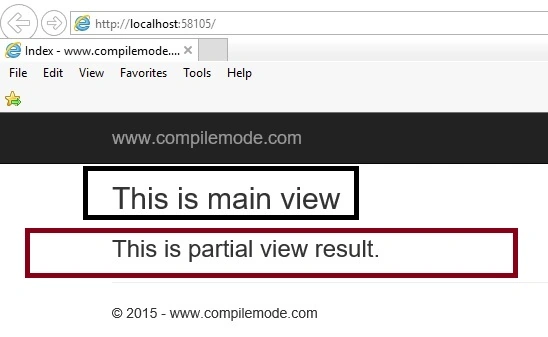
- It is called into the main view to show list of records and other data to the user.
- Model
- TempData
- View
- ViewBag
- ViewData
- ViewEngineCollection
- ViewName
- ExecuteResult
- FindView
- Equals()
- Finalize()
- GetHashCode()
- GetType()
- MemberwiseClone()
- ToString()
Step 1 : Create an MVC application.
- "Start", then "All Programs" and select "Microsoft Visual Studio 2015".
- "File", then "New" and click "Project" then select "ASP.NET Web Application Template", then provide the Project a name as you wish and click on OK.
- Choose MVC empty application option and click on OK
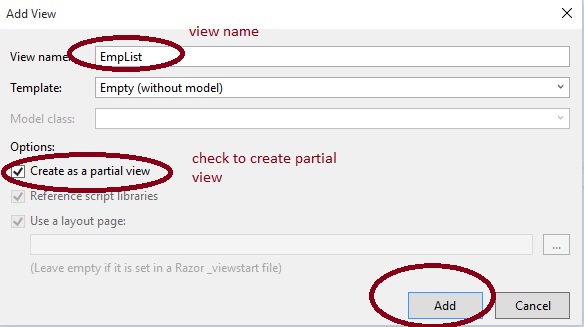
Right click on Controller folder in the created MVC application, give the class name Home or as you wish and click OK.
HomeControlle.cs
- public class HomeController : Controller
- {
- // GET: for main view
- public ActionResult Index()
- {
- return View();
- }
- [HttpGet]
- public PartialViewResult EmpList()
- {
- //for partial view
- return PartialView();
- }
- }


Kishore MadanapaliPosted Jun 27, 2017, 7:56 AM
Sir can we post data into database by using partial view page
Vithal WadjePosted Nov 27, 2015, 3:49 PM
thanks
Muhammad Aqib ShehzadPosted Nov 27, 2015, 6:11 AM
good one
Vithal WadjePosted Nov 25, 2015, 1:12 AM
Thanks
Humayun Kabir MamunPosted Nov 25, 2015, 12:58 AM
Nice...
Vithal WadjePosted Nov 24, 2015, 10:14 AM
Thanks
Upendra Pratap ShahiPosted Nov 24, 2015, 10:13 AM
nice share sir...
Vithal WadjePosted Nov 24, 2015, 9:35 AM
Thanks Mukesh Kumar sir
Vithal WadjePosted Nov 24, 2015, 5:08 AM
Thanks Banketeshvar Narayan sir
Vithal WadjePosted Nov 24, 2015, 4:58 AM
Thanks Harshad Pansuriya sir
Vithal WadjePosted Nov 24, 2015, 4:50 AM
Thanks Raja Tn sir
Mukesh KumarPosted Nov 24, 2015, 4:46 AM
Great One
Akash MalhotraPosted Nov 24, 2015, 4:35 AM
Nice
Banketeshvar NarayanPosted Nov 24, 2015, 4:14 AM
Nice Article
Harshad PansuriyaPosted Nov 24, 2015, 3:22 AM
Nice one
Raja TPosted Nov 24, 2015, 3:18 AM
Nice Sir, thanks for sharing