Here we will see how to pass data from controller to view. Before going to controller and view we need to do couple of things here.
Step 1: Create model class.
I have created Employee model class.

Step 2: Create Controller
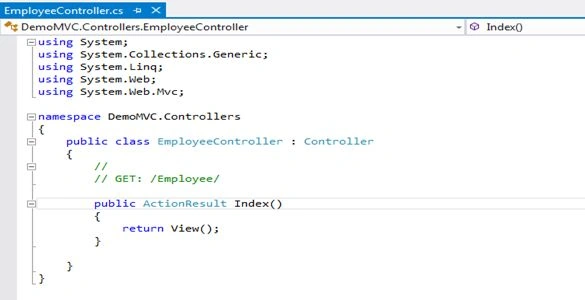
This is my EmployeeController class. Maybe its different your side:
Step 3: Create View
Here you can see I have created strongly typed view.

Step 4: Now we are ready to pass data from controller to view. In MVC we have four ways to pass data from controller to view.
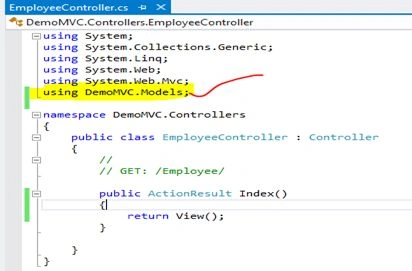
- Go to Controller class which you have already created in previous step. Add namespace of model in controller class.
- In MVC we have four ways to pass data from controller to view.
Option 1: In this way we pass model class object to the view. This is more appropriate option.
Here you can see I have just put some hard coded value to the employee class property and pass it to the view.
- using System;
- using System.Collections.Generic;
- using System.Linq;
- using System.Web;
- using System.Web.Mvc;
- using DemoMVC.Models;
-
- namespace DemoMVC.Controllers {
- public class EmployeeController: Controller {
-
-
-
- public ActionResult displayrecord() {
- Employee objemp = new Employee {
- EmployeeID = 1001,
- Name = "Priti kumari",
- MobileNo = 8816705931,
- Address = "Delhi"
- };
-
- return View("Employee", objemp);
- }
-
- }
- }
Now we need to access these data in View. I will go to my Employee.cshtml view and write code to access employee class property value.
->We need to ensure that view is strongly typed.
- @using DemoMVC.Models
- @model DemoMVC.Models.Employee
-
- @{
- Layout = null;
- }
-
- <!DOCTYPE html>
-
- <html>
- <head>
- <meta name="viewport" content="width=device-width" />
- <title>Employee</title>
- </head>
- <body>
- <div>
- <b>Employee name:</b> @Model.EmployeeID
- <br />
- <b> Employee Name:</b> @Model.Name
- <br />
- <b> Mobile No:</b> @Model.MobileNo
- <br />
- <b> Address:</b> @Model.Address
- <br />
-
- </div></body></html>
In above code you can see how I access employee class property using
@Model keyword. This the way to access model class property in razor view (.cshtml file).
After writing code we need to test its working or not. So now I am going to press F5 - Run application.
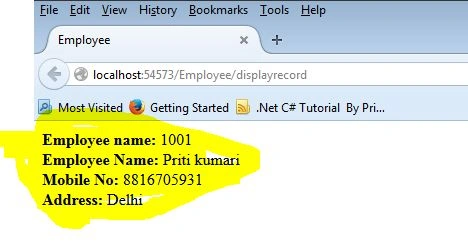
Here you can see output in browser window.
Option 2: Viewbag/ViewData –Using Viewbag/ViewData we can only pass data from controller action method to view. We can store data in ViewBag/ViewData for a single browser request.
Limitation
- You can only pass data from controller to view.
- Your data persist for a single browser request.
Let’s see this with example.
How to store data in ViewData/ViewBag
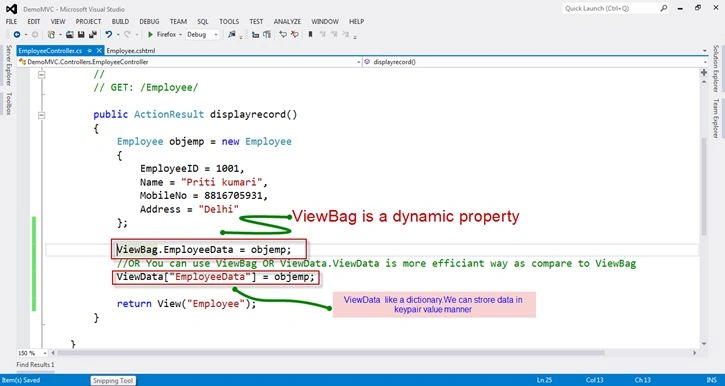
Here I have just assigned employee object to ViewBag/ViewData in controller class.
- ViewBag.EmployeeData = objemp;
-
- ViewData["EmployeeData"] = objemp;
Now we will see how we can retrieve data from
ViewBag/ViewData.
In data access process you don't need to worry about how data is stored in action method ViewBag or Viewdata. You can just use any one process of accessing data.
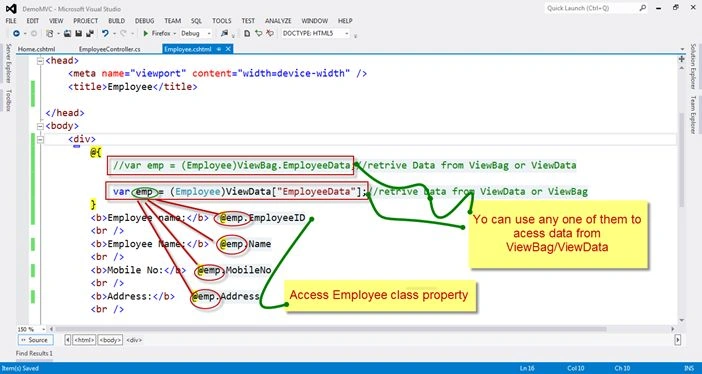
Here is code:
I have cast ViewBage/ViewData to employee class because stored value is object type. In case of simple string value no need to cast ViewBage/ViewData.
- @{
- var emp1 = (Employee)ViewBag.EmployeeData;
-
- var emp = (Employee)ViewData["EmployeeData"];
- }
Tempdata- This is another important storage and data passing technique. We can use this technique for two different purpose.
- Passing data from Action Method to another action method like ViewState in ASP.NET Web form.
- Passing data from controller/Action method to the view.
TempData syntax for storing data in controller and retrieve data in View same as ViewData which I have shown in previous option 2.
Store value in Controller action method
- TempData["EmployeeTempData"] = objemp;
- @{
- var emp = (Employee)TempData["EmployeeTempData"];
- }
Now, here's last Session variable technique to store data. Using session variable you can store data for a single session and multiple request you persist for every request.
Syntax for session is same as ViewData/Tempdata . So you can refer Option 2 for more detail.
Store value in Controller action method: - Session["EmployeeSessionData"] = objemp;
- @{
- var emp = (Employee)Session["EmployeeSessionData"];
- }
Thanks for reading my article.


Scott PendletonPosted Dec 20, 2018, 4:32 PM
This was so clear and concise! I want to read all of your blog posts!
Suraj KumarPosted Jun 11, 2018, 1:00 AM
Very useful article...
satyesh soniPosted Nov 7, 2017, 7:16 AM
Nice article ..keep it up...
Fahim AshfakPosted Mar 31, 2016, 2:16 AM
nice
Om PrakashPosted Feb 9, 2016, 1:37 AM
very fine article for MVC..
Raja TPosted Jan 20, 2016, 10:53 PM
Nice, Thanks for sharing
Debasis SahaPosted Jan 20, 2016, 12:15 AM
Nice one..
Humayun Kabir MamunPosted Jan 19, 2016, 10:58 PM
Nice...
Pankaj Kumar ChoudharyPosted Jan 19, 2016, 7:39 PM
Nice Explain Mam.......
Santhakumar MunuswamyPosted Jan 19, 2016, 2:02 PM
Thanks for nice article. Keep it up