

So for beginning with this example we need to create a table named Emp in our database. I've created Test as a database. These are the following SQL queries.
- create database Test
- use Test
- create table Emp
- (
- EmpName varchar(20) not null,
- EmpAge int not null,
- EmpSalary money not null
- )
- select * from Emp.
The following design needs to be done.
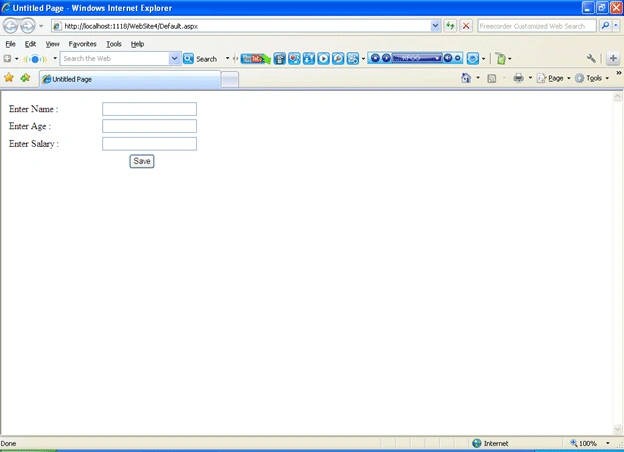
By default there are no records in the emp table; that's why the GridView will not display any records. Now fill the table with the required fields and then click on the save button. Like in the following:
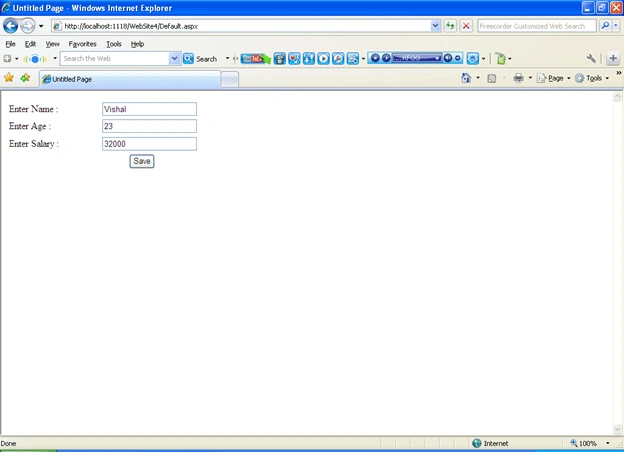
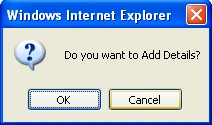
Once you click on the save button a message will be ask if you want to add these details? If you click on ok it will check whether your age is greater than or equal to 25 or not. If it is not then it will display an error message or else it will add the details to the database and display it in GridView.
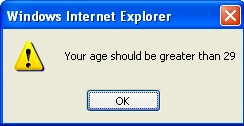
In this case my age was 23 so it is not greater than 25 so it displayed the error message.
The following is the source code of our Default.aspx and Default.aspx.cs.
- <%@ Page Language="C#" AutoEventWireup="true" CodeFile="Default.aspx.cs" Inherits="_Default" %>
- <!DOCTYPE html PUBLIC "-//W3C//DTD XHTML 1.0 Transitional//EN" "http://www.w3.org/TR/xhtml1/DTD/xhtml1-transitional.dtd">
- <html xmlns="http://www.w3.org/1999/xhtml" >
- <head runat="server">
- <title>Untitled Page</title>
- <script type="text/javascript">
- function ValidateAge()
- {
- //var a=document.getElementById('<%= //TextBox2.ClientID%>').value; // or //var a=document.forms[0]["TextBox2"].value;
- var a=document.forms[0]["TextBox2"].value;
- var control=a;
- var x=confirm("Do you want to Add Details?");
- if(a>=29 && x==true)
- {
- //get the client Id of the hidden field and store the value of a in it.
- document.getElementById('<%= inpHide.ClientID%>').value=control;
- // document.all("Button1").click();//to Call asp Button click event from javascript.
- }
- else
- {
- alert("Your age should be greater than 29");
- //to open a new web page you can use the following command.
- //window.open("Pop.aspx","List","scrollable =no,resizeable=no,width=400,height=250");
- }
- }
- </script>
- </head>
- <body>
- <form id="f1" runat="server">
- <div>
- <table width="45%">
- <tr>
- <td>
- <asp:Label ID="Label1" runat="server" Text="Enter Name :"></asp:Label></td>
- <td>
- <asp:TextBox ID="TextBox1" runat="server"></asp:TextBox>
- </td>
- </tr>
- <tr>
- <td>
- <asp:Label ID="Label2" runat="server" Text="Enter Age :"></asp:Label></td>
- <td>
- <asp:TextBox ID="TextBox2" runat="server"></asp:TextBox>
- <asp:HiddenField ID="inpHide" runat="server" />
- </td>
- </tr>
- <tr>
- <td style="height: 26px">
- <asp:Label ID="Label3" runat="server" Text="Enter Salary :"></asp:Label></td>
- <td style="height: 26px">
- <asp:TextBox ID="TextBox3" runat="server"></asp:TextBox></td>
- </tr>
- <tr>
- <td align="center" colspan="2">
- <asp:Button ID="Button1" runat="server" OnClick="Button1_Click" Text="Save" OnClientClick="ValidateAge()" /></td>
- </tr>
- </table>
- </div>
- <asp:GridView ID="GridView1" runat="server">
- </asp:GridView>
- </form>
- </body>
- </html>
First LastPosted Jan 14, 2019, 9:37 AM
To me the The title does not make sense. You are not passing anything. You are simply setting a value in HTML (a hidden field) that the code behind can access. Am I wrong?
Gowtham RajamanickamPosted May 26, 2015, 9:00 AM
Good one..
bhaskarareddy mulePosted Jul 13, 2012, 11:41 PM
thanks .great post with example The simple explanation available in this link http://csharpektroncmssql.blogspot.com/2011/11/java-script-variable-values-are-passed.html
Mayur GujrathiPosted Jun 22, 2011, 8:17 AM
Dear vishal you arr getting value on button click through javascript, instead of getting on button click can you get it in code behind function directly fro javascript, i mean to say i dont want to execute server side code on button click event
Brent SmithPosted Jun 16, 2011, 4:17 PM
This is brilliant and just what I needed! Thank you!