

Introduction
AngularJS is a Superheroic JavaScript MVW (Model-View-Whatever) /Binding Framework that is used for making rich and extensible web applications. It is especially used for Single Page Application (SPA) projects. It extends HTML DOM with additional attributes and makes it more responsive to user actions. The AngularJS is open source.
Note - "AngularJS helps us binding HTML elements to JavaScript objects."
Data Binding
AngularJS uses two-way data-binding. Data-binding is an automatic process of updating the View whenever a Model changes, as well as updating the Model whenever a View changes.
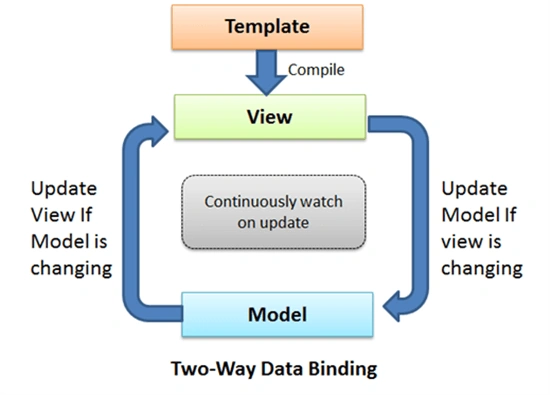
Figure 1: AngularJS Binding
Controller
AngularJS defines Controller using ng-controller directive. AngularJS creates a new instance object internally and binds it. Controller is attached to the DOM via the ng-controller directive. $scope is a special JavaScript object which plays the role of joining Controller to the Views. $scope refers to the application which is desired to use the Controller object.
Services
Services are JavaScript functions and are responsible to perform specific tasks only. AngularJS services are:
- Lazily instantiated
AngularJS only instantiates a service when an application component depends on it. - Singletons
Each component dependent on a service gets a reference to the single instance generated by the service factory.
$scope is Angular service for Angular scope management. $scope is defined as parameter. Angular will automatically come and inject the $scope. This term is call Dependency Injection (DI). AngularJS provides many in-built services. For example, $https:, $route, $window, $location etc. Each service is responsible for a specific task - $https is used to make AJAX call to get the server data; $route is used to define the routing information and so on. Inbuilt services are always prefixed with $ symbol.
Let's code
We are creating a sample web application in C# along with AngularJS, using Visual Studio 2017. This application will have the following features.
- Binding the data and showing in table list.
- Create, Edit and Update user.
- Create a Controller, services, and modules.
First of all, we will create a new web application in VS2017. We will install AngularJS using nuGet package, as shown below.
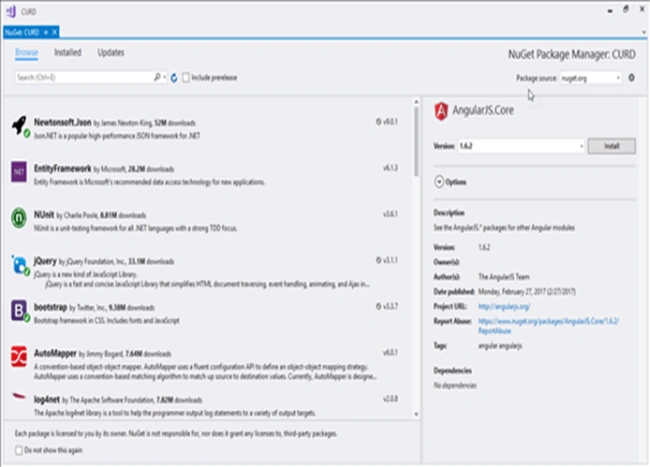
Figure 2: Nuget for AngularJS
We need to create UserViewModel class in C#.
- var userApp = angular.module("userApp", []);
- We Create UserServices.js file
- userApp.service("userService", function ($http) {
- var $this = this;
- $this.AddEdit = function (user) {
- var request = $http({
- method: 'POST',
- url: Domain + 'AddEditUser',
- data: JSON.stringify(user),
- dataType: "json"
- });
- return request;
- }
- $this.Delete = function (id) {
- var request = $http({
- method: 'POST',
- url: Domain + 'DeleteUser',
- data: "{ id:" + id + " }",
- dataType: "json"
- });
- return request;
- }
- $this.GetAll = function () {
- var request = $http({
- method: 'GET',
- url: Domain + 'GetAllUsers',
- });
- return request;
- }
- $this.GetUser = function (id) {
- var request = $http({
- method: 'GET',
- url: Domain + 'GetUser/' + id,
- });
- return request;
- }
- });
Create UserController.js file
- userApp.controller("userController", function ($scope, userService) {
- GetUsers();
- $scope.SaveUser = function () {
- var UserModel = {
- Id: $scope.id,
- Email: $scope.email,
- FirstName: $scope.firstName,
- LastName: $scope.lastName,
- Phone: $scope.phone
- };
- if (!CheckIsValid()) {
- alert('Please fill the detail!');
- return false;
- }
- var requestResponse = userService.AddEdit(UserModel);
- Message(requestResponse);
- };
- $scope.editUser = function (id) {
- var getData = userService.GetUser(id);
- getData.then(function (user) {
- var userData = user.data;
- $scope.id = userData.Id;
- $scope.email = userData.Email;
- $scope.phone = userData.Phone;
- },
- function () {
- alert('Error in getting records');
- });
- }
- $scope.DeleteUser = function (id) {
- var requestResponse = userService.Delete(id);
- Message(requestResponse);
- };
- function GetUsers() {
- var requestResponse = userService.GetAll();
- requestResponse.then(function (response) {
- $scope.employees = response.data;
- }, function () {
- })
- };
- function Message(requestResponse) {
- requestResponse.then(function successCallback(response) {
- GetUsers();
- $('#addEditUser').modal('hide');
- // this callback will be called asynchronously
- // when the response is available
- }, function errorCallback(response) {
- // called asynchronously if an error occurs
- // or server returns response with an error status.
- });
- }
- function CheckIsValid() {
- var isValid = true;
- if ($('#email').val() === '' || $('#phone').val() === '' || $('#email').val() === '' || $('#phone').val() === '') {
- isValid = false;
- }
- return isValid;
- }
- });
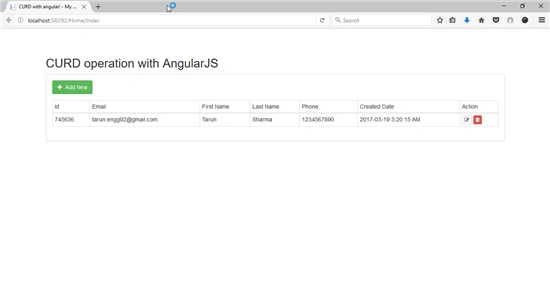
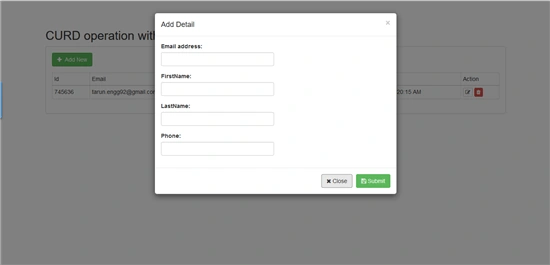
Dennis OsagiedePosted Sep 21, 2018, 10:25 PM
Download link for source code not working
Former memberPosted Mar 31, 2017, 4:59 AM
I have one request that can you please show how to work with angular smart table when web api or mvc will provide data to smart table with in line edit/delete and insert data. thanks
Sandeep Singh ShekhawatPosted Mar 24, 2017, 12:39 PM
Welcome @Tarun, Great job ! keep it up :)