

Introduction
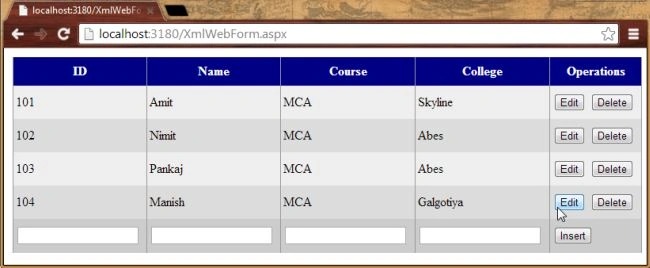
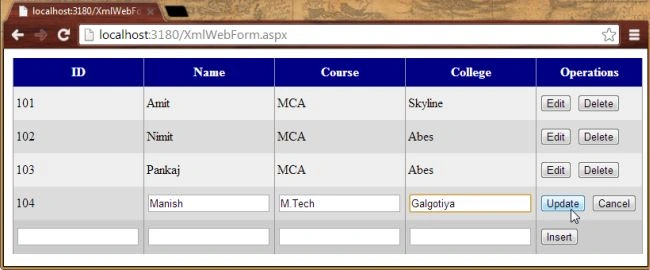
This article explains the binding of a XML file in a Grid View and how to do insert, update and delete operations in the XML file.
Use the following procedure to create an ASP.NET Web Application in which we add a XML file first and then we'll bind the XML file to a Grid View and perform the IUD (Insert, Update, Delete) operations.
Step 1: Open Visual Studio.
Step 2: Create a new ASP.NET Web Application with the Empty Project Template.
Step 3: Add an XML file named MyXmlFile.xml.
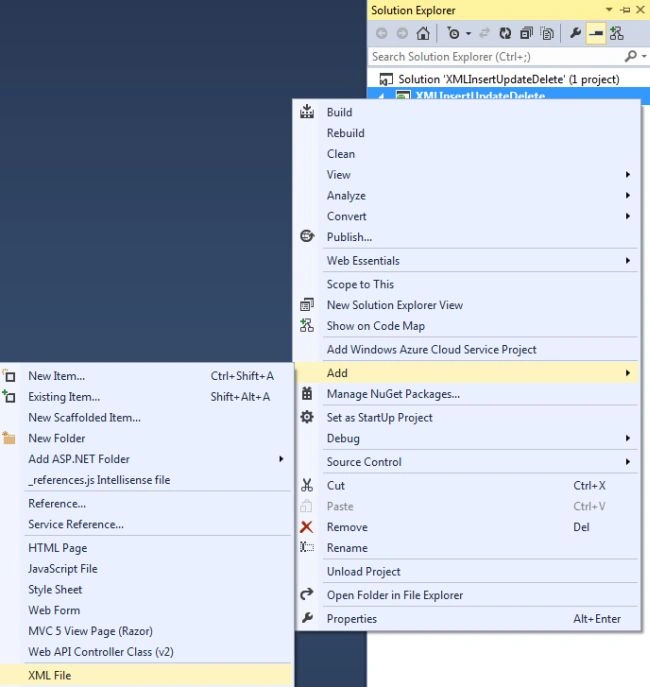
Step 4: Now create some content in the file as shown below:
- <?xml version="1.0" standalone="yes"?>
- <StudentDetails>
- <Student>
- <ID>101</ID>
- <Name>Amit</Name>
- <Course>MCA</Course>
- <College>Skyline</College>
- </Student>
- <Student>
- <ID>102</ID>
- <Name>Nimit</Name>
- <Course>MCA</Course>
- <College>Abes</College>
- </Student>
- </StudentDetails>
Step 5: We'll now add a WebForm to our application by adding a new item to the project.
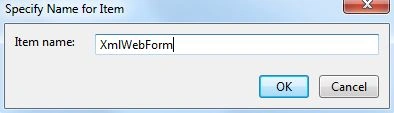
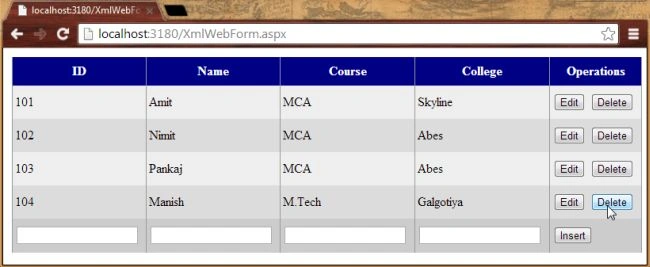
Step 6: Create a Grid View control in the body of your Web Form.
- <table>
- <tr>
- <td>
- <asp:GridView ID="XmlGridView" runat="server" AutoGenerateColumns="false"
- Height="247px" Width="795px" BackColor="White" BorderColor="#999999"
- BorderStyle="None" BorderWidth="1px" CellPadding="3"
- GridLines="Vertical" ShowFooter="true"
- OnRowCancelingEdit="XmlGridView_RowCancelingEdit" OnRowDeleting="XmlGridView_RowDeleting"
- OnRowEditing="XmlGridView_RowEditing" OnRowUpdating="XmlGridView_RowUpdating">
- <AlternatingRowStyle BackColor="#DCDCDC" />
- <Columns>
- <asp:TemplateField HeaderText="ID">
- <ItemTemplate>
- <asp:Label ID="LblStuID" runat="server" Text='<%# Bind("ID")%>'></asp:Label>
- </ItemTemplate>
- <FooterTemplate>
- <asp:TextBox ID="TxtStuID" runat="server"></asp:TextBox>
- </FooterTemplate>
- </asp:TemplateField>
- <asp:TemplateField HeaderText="Name">
- <ItemTemplate>
- <asp:Label ID="LblStuName" runat="server" Text='<%# Bind("Name") %>'></asp:Label>
- </ItemTemplate>
- <EditItemTemplate>
- <asp:TextBox ID="TxtEditStuName" runat="server"></asp:TextBox>
- </EditItemTemplate>
- <FooterTemplate>
- <asp:TextBox ID="TxtStuName" runat="server"></asp:TextBox>
- </FooterTemplate>
- </asp:TemplateField>
- <asp:TemplateField HeaderText="Course">
- <ItemTemplate>
- <asp:Label ID="LblStuCourse" runat="server" Text='<%# Bind("Course") %>'></asp:Label>
- </ItemTemplate>
- <EditItemTemplate>
- <asp:TextBox ID="TxtEditStuCourse" runat="server"></asp:TextBox>
- </EditItemTemplate>
- <FooterTemplate>
- <asp:TextBox ID="TxtStuCourse" runat="server"></asp:TextBox>
- </FooterTemplate>
- </asp:TemplateField>
- <asp:TemplateField HeaderText="College">
- <ItemTemplate>
- <asp:Label ID="LblStuCollege" runat="server" Text='<%# Bind("College") %>'></asp:Label>
- </ItemTemplate>
- <EditItemTemplate>
- <asp:TextBox ID="TxtEditStuCollege" runat="server"></asp:TextBox>
- </EditItemTemplate>
- <FooterTemplate>
- <asp:TextBox ID="TxtStuCollege" runat="server"></asp:TextBox>
- </FooterTemplate>
- </asp:TemplateField>
- <asp:TemplateField HeaderText="Operations">
- <ItemTemplate>
- <asp:Button ID="BtnEdit" runat="server" CommandName="Edit" Text="Edit" />
- <asp:Button ID="BtnDelete" runat="server" CommandName="Delete" Text="Delete" />
- </ItemTemplate>
- <EditItemTemplate>
- <asp:Button ID="BthUpdate" runat="server" CommandName="Update" Text="Update" />
- <asp:Button ID="BtnCancel" runat="server" CommandName="Cancel" Text="Cancel" />
- </EditItemTemplate>
- <FooterTemplate>
- <asp:Button ID="BtnInsert" runat="server" Text="Insert" OnClick="BtnInsert_Click" />
- </FooterTemplate>
- </asp:TemplateField>
- </Columns>
- <FooterStyle BackColor="#CCCCCC" ForeColor="Black" />
- <HeaderStyle BackColor="#000084" Font-Bold="True" ForeColor="White" />
- <PagerStyle BackColor="#999999" ForeColor="Black" HorizontalAlign="Center" />
- <RowStyle BackColor="#EEEEEE" ForeColor="Black" />
- <SelectedRowStyle BackColor="#008A8C" Font-Bold="True" ForeColor="White" />
- <SortedAscendingCellStyle BackColor="#F1F1F1" />
- <SortedAscendingHeaderStyle BackColor="#0000A9" />
- <SortedDescendingCellStyle BackColor="#CAC9C9" />
- <SortedDescendingHeaderStyle BackColor="#000065" />
- </asp:GridView>
- </td>
- </tr>
- </table>


Sidharth MahapatraPosted Jan 2, 2018, 3:04 AM
On edit the text doesn't reflect on the textbox.
Gowtham RajamanickamPosted Apr 7, 2016, 4:26 AM
Good Show.