

Introduction
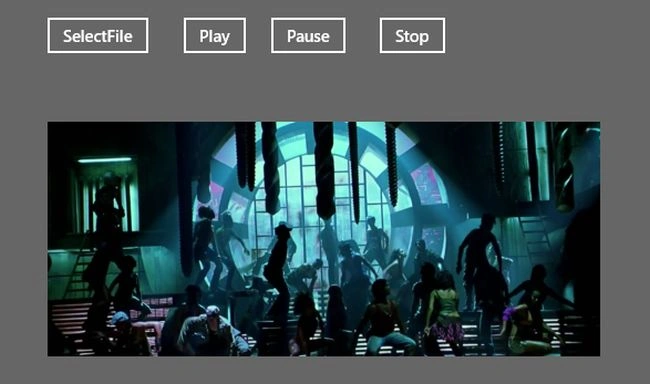
Today we will explain how to play a media file (such as MP4, WMV etc) in Windows Store apps using C# and XAML. In a Windows Store app you can implement media playback using the MediaElement class. The Source property of MediaElemt specifies the media file that you want to play. The MediaElement control can play local media files and media files on the network. In a Windows Store app you can also use the HTML5 Audio and Video tag to play a media file when you are using JavaScript.
In this application we are using the namespaces Windows.Storage and Windows.Storage.Pickers to select the media file from the local drive.
Step 1
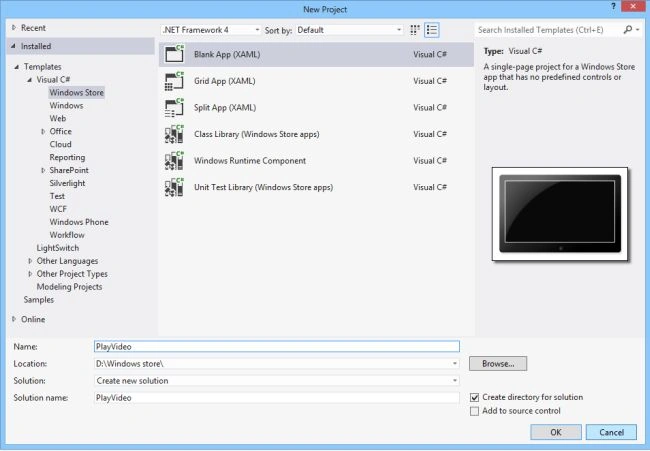
Open Visual Studio 2012 and start a new Windows Store project.
Step 2
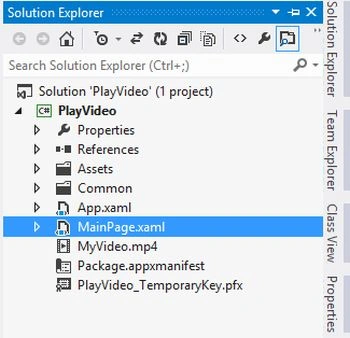
Go to the Solution Explorer and double-click on "MainPage.xaml".
Step 3
Create a MediaElemet and define a media file path to the source.
<MediaElement x:Name="MyMedia" Width="500" Source="MyVideo.mp4" Height="300"/>
Step 4
The "MainPage.xaml" is as the followoing code:
<Page
x:Class="PlayVideo.MainPage"
xmlns="http://schemas.microsoft.com/winfx/2006/xaml/presentation"
xmlns:x="http://schemas.microsoft.com/winfx/2006/xaml"
xmlns:local="using:PlayVideo"
xmlns:d="http://schemas.microsoft.com/expression/blend/2008"
xmlns:mc="http://schemas.openxmlformats.org/markup-compatibility/2006"
mc:Ignorable="d">
<Grid Background="{StaticResource AppBarItemDisabledForegroundThemeBrush}">
<MediaElement x:Name="MyMedia" Width="500" Source="MyVideo.mp4" Height="300" Margin="396,410,470,58" />
<Button x:Name="Stop" Content="Stop" Margin="970,357,0,373" Click="Stop_Click" />
<Button x:Name="Pauses" Content="Pause" Margin="872,357,0,373" Click="Pauses_Click" />
<Button x:Name="Play" Content="Play" Margin="793,357,0,373" Click="Play_Click" />
<Button Content="SelectFile" x:Name="SelectBtn" Margin="670,357,0,373" Click="SelectBtn_Click"/>
</Grid>
</Page>
Join the conversation! Your thoughts help the community grow.