

Introduction
Patterns and Practices (PnP) provides a list of reusable React controls to developers for building solutions such as webparts and extensions using SharePoint Framework.
Refer to this link to get the list of React controls for SPFx.
You will see how to use PnP List Item Picker control in an SPFx webpart.
PnP List Item View control
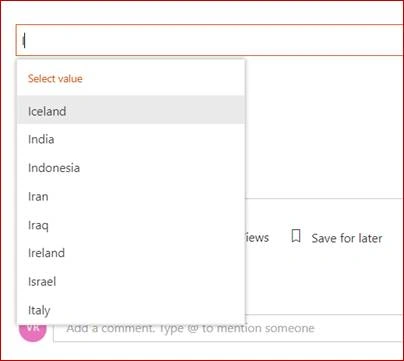
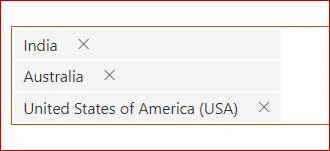
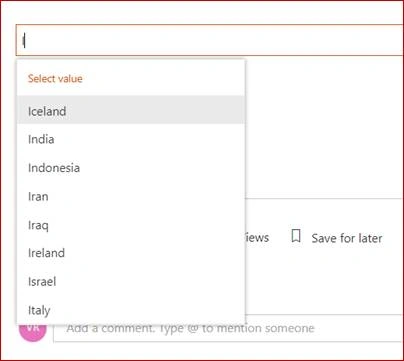
This control allows you to select one or more items from a list. The List can be filtered to allow select items from a subset of items. The item selection is based from a column value. The control will suggest items based on the inserted value. Refer to this link for more details.
Note
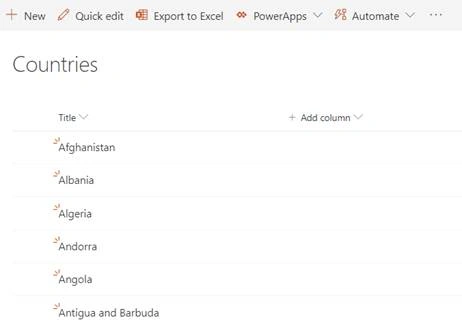
I have created a custom list named Countries and added the items as shown below. Title field values will be considered as the column value.
In this article, you will see how to perform the following tasks:
- Create an SPFx solution
- Implement List Item Picker solution
- Deploy the solution
- Test the webpart
Prerequisites
Create SPFx solution
Open Node.js command prompt.
Create a new folder.
>md spfx-pnpreact-listitempicker
Navigate to the folder.
> cd spfx-pnpreact-listitempicker
Execute the following command to create an SPFx webpart.
>yo @microsoft/sharepoint
Enter all the required details to create a new solution as shown below.

Yeoman generator will perform scaffolding process and once it is completed, lock down the version of project dependencies by executing the following command.
>npm shrinkwrap
Execute the following command to open the solution in the code editor.
>code .
Implement List Item Picker solution
Execute the following command to install the PnP React Controls NPM package.
>npm install @pnp/spfx-controls-react --save
Open “src\webparts\pnPListItemPicker\components\IPnPListItemPickerProps.ts” file and update the code as shown below.
Note
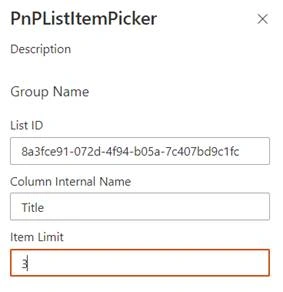
List ID, column internal name, and item limit is configurable in the webpart property pane. That’s why we are adding in props.
- import { WebPartContext } from '@microsoft/sp-webpart-base';
- export interface IPnPListItemPickerProps {
- listId: string;
- columnInternalName: string;
- itemLimit: number;
- context: WebPartContext;
- }
Open “src\webparts\pnPListItemPicker\loc\mystrings.d.ts” file and update the code, as shown below.
- declare interface IPnPListItemPickerWebPartStrings {
- PropertyPaneDescription: string;
- BasicGroupName: string;
- ListIdFieldLabel: string;
- ColumnInternalNameFieldLabel: string;
- ItemLimitFieldLabel: string;
- }
- declare module 'PnPListItemPickerWebPartStrings' {
- const strings: IPnPListItemPickerWebPartStrings;
- export = strings;
- }
Open “src\webparts\pnPListItemPicker\loc\en-us.js” file and update the code as shown below.
- define([], function () {
- return {
- "PropertyPaneDescription": "Description",
- "BasicGroupName": "Group Name",
- "ListIdFieldLabel": "List ID",
- "ColumnInternalNameFieldLabel": "Column Internal Name",
- "ItemLimitFieldLabel": "Item Limit"
- }
- });
Open “src\webparts\pnPListItemPicker\PnPListItemPickerWebPart.ts” file and update the following.
- Update the interface
- Update the render method
- Update the getPropertyPaneConfiguration method
Update the interface:
- export interface IPnPListItemPickerWebPartProps {
- listId: string;
- columnInternalName: string;
- itemLimit: number;
- }
Update the render method:
rupali nirmalePosted Jan 17, 2022, 8:06 AM
For me control is not working if the list has more than 5000 records