

Table of Contents
Introduction
What Is Binary-to-Decimal Conversion?
Real-World Scenario: Decoding Live IoT Sensor Data
Methods to Convert Binary to Decimal in Python
Building a Robust Binary Decoder for IoT Streams
Complete Implementation with Test Cases
Best Practices and Performance Tips
Conclusion
Introduction
Binary-to-decimal conversion is a foundational concept in computing—yet it’s far from obsolete. In today’s world of smart devices, every heartbeat from an IoT sensor, every pixel from a satellite image, and every command in embedded firmware often arrives as a stream of 1s and 0s. Converting these binary strings into meaningful decimal values is essential for real-time decision-making.
This article explores binary-to-decimal conversion through the lens of a live industrial IoT monitoring system, where engineers must decode raw sensor packets on the fly. You’ll learn multiple Python techniques, build a production-ready decoder, and understand how to handle edge cases like malformed data or variable-length payloads.
What Is Binary-to-Decimal Conversion?
At its core, binary-to-decimal conversion translates a base-2 number (composed of 0s and 1s) into its base-10 equivalent—the standard numbering system humans use. For example:
Binary
1010→ Decimal10Binary
11111111→ Decimal255
Each binary digit (bit) represents a power of 2, starting from the rightmost bit (2⁰). The decimal value is the sum of all powers of 2 where the bit is 1.
This conversion is trivial for small values—but becomes critical when processing high-frequency data from real-world devices.
Real-World Scenario: Decoding Live IoT Sensor Data
Imagine you’re working with a smart factory that uses wireless vibration sensors on industrial motors. Each sensor transmits a 16-bit binary packet every 100 milliseconds:
1100101001111001This packet encodes:
First 8 bits: Temperature (in °C offset by 50)
Next 8 bits: Vibration intensity (0–255 scale)
To monitor machine health in real time, your Python backend must:
Split the binary string into fields
Convert each 8-bit segment to decimal
Apply calibration (e.g., subtract 50 from temperature)
Trigger alerts if values exceed thresholds
A single misconversion could mean missing an overheating motor—leading to costly downtime. Accuracy and speed are non-negotiable.
Methods to Convert Binary to Decimal in Python
Python offers several built-in ways to convert binary strings to integers:
# The binary string to convert
binary_input = "101101" # This should convert to 45 (32 + 8 + 4 + 1)

print(f"--- Conversion of Binary String: {binary_input} ---")

# --- Method 1: Using int() with base=2 (Recommended) ---
def convert_using_int(binary_str):
    """Converts binary string to decimal using the built-in int() function."""
    try:
        decimal = int(binary_str, 2)
        return decimal
    except ValueError:
        return "Error: Invalid binary string"

# --- Method 2: Manual Conversion (for learning) ---
def bin_to_dec_manual(binary_str):
    """Converts binary string to decimal by summing powers of 2."""
    total = 0
    # Use enumerate on the reversed string to get (power, bit) pairs
    for power, bit in enumerate(reversed(binary_str)):
        if bit == '1':
            # Add 2 raised to the power (i.e., position)
            total += 2 ** power
    return total

# --- Method 3: Using Bit Manipulation (advanced) ---
def bin_to_dec_bitwise(binary_str):
    """Converts binary string to decimal using left-shift and OR operations."""
    result = 0
    for bit in binary_str:
        # 1. Left Shift (result << 1): Multiplies the current result by 2
        # 2. OR operation (|): Adds the new bit (1 or 0)
        #    Note: '1' is converted to integer 1, '0' to 0
        result = (result << 1) | (1 if bit == '1' else 0)
    return result

# ----------------- Execution and Output -----------------

# Test Method 1
result_1 = convert_using_int(binary_input)
print(f"\nMethod 1 (int(..., 2)): {result_1}")

# Test Method 2
result_2 = bin_to_dec_manual(binary_input)
print(f"Method 2 (Manual):        {result_2}")

# Test Method 3
result_3 = bin_to_dec_bitwise(binary_input)
print(f"Method 3 (Bitwise):       {result_3}")

# Final Check
if result_1 == result_2 == result_3:
    print("\n All methods returned the same correct result!")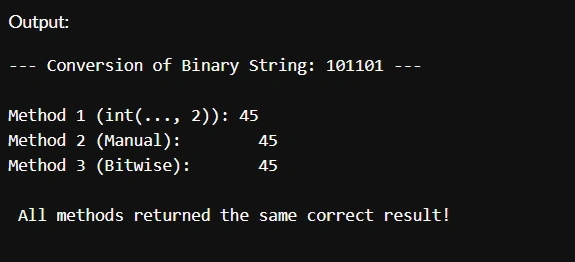
Join the conversation! Your thoughts help the community grow.