Introduction
Recently there are so many people asking in forums how to preview the uploaded image, before saving it to the database. In this article, let us see how to preview the uploaded image in ASP.NET before saving it to the database. Also this will explain how to feed a byte array into an image control. We are going to do that using IhttpHandler.
Using the code
1. Create a new website. Add a File Upload control, a button and an image control.
Aspx code
[code]
<table>
<tr>
<td class="style3">
<asp:Label ID="Label1" runat="server" Text="Photo upload" />
</td>
<td class="style4">
<asp:FileUpload runat="server" ID="PhotoUpload" />
</td>
<td class="style4">
<asp:Button runat="server" ID="btnPhotoPreview" Text="Preview" />
</td>
<td class="style1">
<asp:Image runat="server" ID="ImagePreview" Height="164px" Width="125px" />
</td>
</tr>
</table>
[/code]
2. Now add a button click event for the "btnPhotopreview":
[code]
<asp:Button runat="server" OnClick="btnPreview_Click" ID="btnPhotoPreview" Text="Preview" />
[/code]
3. We have to add a handler class to show the image. We will a session variable for FileBytes for the upload control. In the new handler class, get the session variable and generate the image.
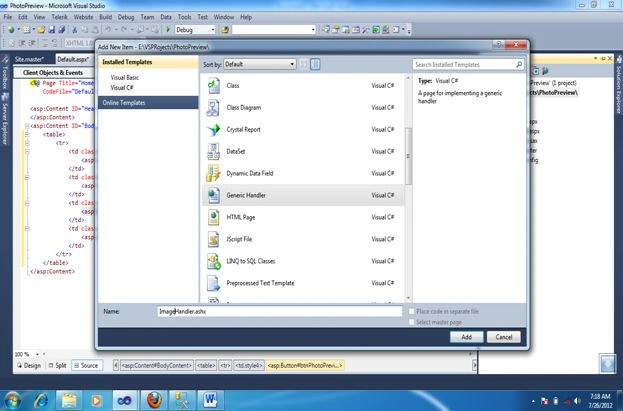
When we add the .ashx file, it will have some code inside it:
[code]
<%@ WebHandler Language="C#" Class="ImageHandler" %>
using System;
using System.Web;
public class ImageHandler : IHttpHandler {
public void ProcessRequest (HttpContext context) {
context.Response.ContentType = "text/plain";
context.Response.Write("Hello World");
}
public bool IsReusable {
get {
return false;
}
}
}
[Code]
<%@ WebHandler Language="C#" Class="ImageHandler" %>
using System;
using System.Web;
public class ImageHandler : IHttpHandler, System.Web.SessionState.IRequiresSessionState
{
public void ProcessRequest (HttpContext context) {
//Checking whether the imagebytes session variable have anything else not doing anything
if ((context.Session["ImageBytes"]) != null)
{
byte[] image = (byte[])(context.Session["ImageBytes"]);
context.Response.ContentType = "image/JPEG";
context.Response.BinaryWrite(image);
}
}
public bool IsReusable {
get {
return false;
}
}
}
[/Code]
4. Now inside the button click in our page, get the filebytes from the FileUpload control and save it in a session variable:
[code]
protected void btnPreview_Click(object sender, EventArgs e)
{
Session["ImageBytes"] = PhotoUpload.FileBytes;
ImagePreview.ImageUrl = "~/ImageHandler.ashx";
}
[/code]
Now run the application and browse the image and preview it:
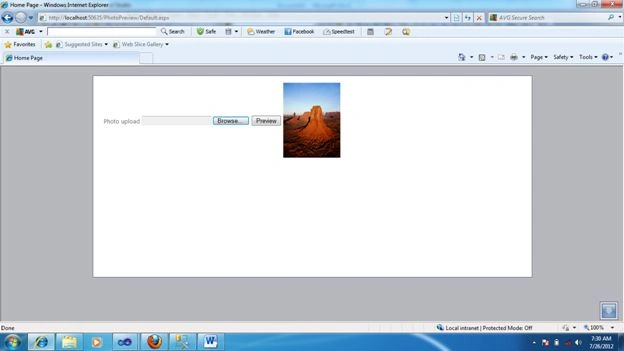
I have attached the complete source code also.


Lalit RaghuvanshiPosted Jun 14, 2014, 1:51 PM
Another useful solution is:Show image preview before uploading through asp.net fileupload control using jQuery http://www.webcodeexpert.com/2014/02/show-image-preview-before-uploading.html
nihal singhPosted Nov 10, 2012, 5:10 AM
How to save image, after getting preview, Because FileUpload control would be blanked
sakshi sharmaPosted Sep 6, 2012, 2:05 PM
thnx......
Venkatesh KumarPosted Aug 4, 2012, 1:01 AM
Is that possible to preview the image, at the movement user selects the image, without preview button click...
Santhosh Kumar JayaramanPosted Jul 27, 2012, 6:52 AM
I mentioned it in the previous comment. Nothing will happen, no preview and no error
Rahul BhattPosted Jul 27, 2012, 6:51 AM
@santhosh: what happen if you upload pdf,doc extension file instead of image file?
Santhosh Kumar JayaramanPosted Jul 27, 2012, 6:13 AM
Nothing will happen, since doc,pdf are not of type image,it wont display it as well as it wont throw any error..
Rahul BhattPosted Jul 27, 2012, 6:10 AM
@santhosh, what happen if you upload pdf,doc extension file instead of image file?
Rahul BhattPosted Jul 27, 2012, 6:09 AM
@santhosh, what happen if you upload pdf,doc extension file instead of image file?
Megha GoyalPosted Jul 27, 2012, 5:29 AM
ya i have checked i will work on this thanks
Santhosh Kumar JayaramanPosted Jul 27, 2012, 3:23 AM
I just now checked . You have to convert ur image to xml using Deep Zoom composer. Download deep zoom composer from here. http://www.microsoft.com/en-us/download/details.aspx?id=24819 To create a Deep Zoom image Download and install Deep Zoom Composer. Start Deep Zoom Composer and create a new project. In the Import workspace, click Add image and add a high-resolution image to the project. Click the Compose workspace. On the Images tab, drag the image onto the artboard. Size the image as needed. Click the Export workspace. Click the Custom tab. In the Output type section, select Silverlight Deep Zoom. In the Name box, type dzc_output. In the Location box, specify a location. In the Image settings section, select Export as a composition (single image). Leave the other settings as their defaults. Click the Export button to export the Deep Zoom image files. After that sourceUrl set the value to the xml created using DZC
Santhosh Kumar JayaramanPosted Jul 27, 2012, 3:15 AM
@Megha..Have you checked this? sourceUrl - The path for all UI images. This can be absolute or relative. If relative, it must be relative to the HTML page. A change to this value will only affect new viewers. Default is "img/".
Santhosh Kumar JayaramanPosted Jul 27, 2012, 1:44 AM
Actually i dont think that is required. I have tried with all formats of image including png,jpg gif,all are working fine with the existing code.
Rahul BhatteditedPosted Jul 27, 2012, 1:34 AMEdited Jul 27, 2012, 1:36 AM
Don't mind I have one suggestion. Store content type in Session. Session["ContentType"] = PhotoUpload.PostedFile.ContentType; use this content type in Handler Page
Megha GoyaleditedPosted Jul 26, 2012, 11:59 PMEdited Jul 27, 2012, 3:13 AM
Thanx Santosh would plz tell me in the seadragon control there is the property called Sourceurl how would i set the image url in it which i want to zoom.
Santhosh Kumar JayaramanPosted Jul 26, 2012, 11:49 PM
You have to use ajax toolkit for this. Check the below link. http://www.asp.net/ajaxlibrary/AjaxControlToolkitSampleSite/Seadragon/Seadragon.aspx
Megha GoyalPosted Jul 26, 2012, 11:08 PM
Can i see the image by zooming it in ASP.net
Sharad GuptaPosted Jul 26, 2012, 10:56 PM
can i show rotated image (one by one after some time)in asp page before it lode in database.