

Introduction
In this chapter, we will continue discussing topics related to structural data and the ability to create queries using LINQ expressions. Let me remind you that the LINQ abbreviation stands for language-integrated query. This time, we will use these queries to pre-select data from the relational database.
However, I must emphasize here that we will focus only on issues related to the programming language, i.e. its syntax and semantics. Unfortunately, we cannot completely avoid topics related to the design environment used, namely Visual Studio and the dedicated libraries. Anticipating questions about why I chose this and not another approach, I would like to emphasize that, in my opinion, it guarantees minimization of the costs of entering the subject. If the priority is different then most of what we will talk about also applies in another environment, e.g. Entity Framework.
At run-time, the text of our program (in the following illustration) has been compiled, entered into memory, and become a process managed by the computer's operating system. The operating system strongly defends the integrity of resources committed to the process. This defense is encapsulation, which forces you to use the operating system when you need to exchange data with the external environment.
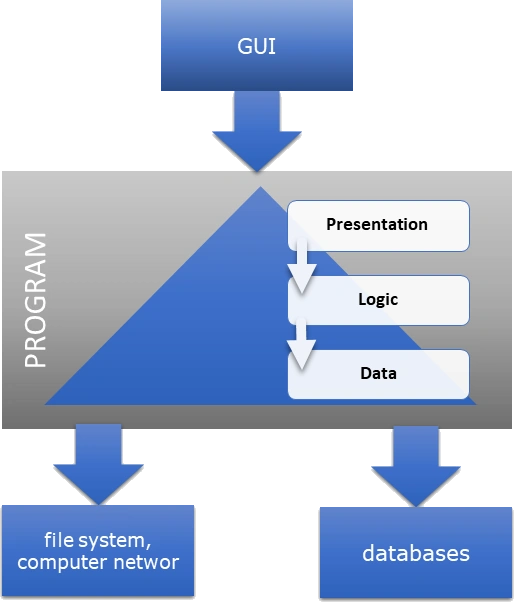
The figure also shows the layered architecture of the program. The reasons for introducing layers have already been discussed. I suggest not returning to this topic now. Currently, our goal is to discuss issues related to external data management. External data means that it has to be accessed from outside of the process hosting the program.
Now our goal is to discuss issues related to the interaction of the process executing the program with databases, i.e. with an external database management system (Database Management System, DBMS for short). The purpose of a DBMS is to consistently store and archive data according to a scheme that manages data structures. Data is made available and processed by the DBMS using a query language that should be widely known and accepted to guarantee the scalability of solutions. Examples include the relational database and SQL (sequential query language). Other examples that can be treated as equivalent in this context are Triple Store and SharePoint databases. However, in further analysis, we will refer only to relational databases although the topic of how to use the discussed mechanisms to gain access to other types of databases will also be the subject of discussion.
In the figure above, two places can be distinguished where data can be located. Of course, this is the database itself, but also the data layer of the program. To make this possible, in the data layer of the program we must have a kind of process data buffer and an interface enabling management of the database itself. A typical operation directly related to the DBMS, but only indirectly related to the process data, is opening and closing a connection to the database. From time to time the local data has to be synchronized with a database storage.
Database operations are executed and data between the stakeholders is transferred using the.
- custom application in concern
- local system software, and libraries referred to by the program
- operating system
- communication protocols - this is usually also part of the operating system
- query language interpreter in DBMS software, for example, SQL language processor
It's a very diverse environment, so the real challenge is how to.
- ensure proper training of programmers
- minimize the possibility of making mistakes
- ensure a consistent diagnostic system
- ensure portability - the possibility of transferring solutions between various environments, for example changing the operating system
LINQ expression, i.e. language integrated query, is a technology integrated with a programming language that allows addressing many of the mentioned goals. Therefore, I devote this section to familiarizing ourselves with this mechanism in the context of relational databases as an example that can also be expanded and used for other external data repositories.
Database Deployment
To have something to practice on, we will start by creating a sample database and connection setup using the Visual Studio design environment. To make the example useful, we also need to create metadata describing the structure of the data in the database. We call this metadata database schema. By design, the database schema is a logical representation of how data should be organized and stored within a database system. It acts as a blueprint that defines the structure and relationships of data parts. Think of it as the skeleton of the database, outlining the essential components.
Since the database functionality is implemented as an independent external process called Database Management System (DBMS) the program we have developed cannot directly use its functionality. Instead, it uses the intermediary of the operating system by using a local data snapshot to indirectly operate on the database. As a result, we have a solution similar to the well-known proxy pattern. Additionally, for local program needs, the local snapshot represents the schema and is a process data buffer. Typically, partially this is a replica that is not fully functionally equivalent to the DBMS and contains only selected data. Here we have an issue with how to define a condition that can be applied to select data in the buffer. These issues will be our concern in this section.
The next issue is using the database in a custom program. We will examine selected issues related to this topic using unit tests. For a local snapshot to be useful, it must be interconnected with the database. In addition to creating appropriate communication channels between the replica and the DBMS, they are connected by a session responsible for user authentication and authorization of operations performed on the database. Operations on the database and the data deposited in it are performed based on a formal description, in this case, compliant with the SQL language. Creating error-free SQL queries in the context of a custom program written using another programming language is another challenge we have to face. If we use expressions written using query syntax in a selected programming language, we can automatically translate them into any other language, including SQL. How to do it? An attempt to answer this question is included in this part, which will concern mapping definitions in the local snapshot and remote database schema.
Since the examples discussed require access to a database, it is necessary to provide a server that acts as a DBMS and publishes data following a previously designed scheme for testing purposes. Since the program text is in a public repository and can be used in various environments, the unified use of a real SQL server is difficult to fulfill. One way to solve this problem is to use the Visual Studio environment in the server role. This requires creating a database file and then making it available for testing in such a way that the conditions of our tests do not differ significantly from the real production environment in which an external server is natural.
So we'll start by creating a sample database file. The example is located in the unit test project in a separate folder Instrumentation. The folder name doesn't matter. Our library is indeed educational, not production-oriented, but this approach allows us to design a library implementing the data layer in such a way that it is completely independent of the DBMS implementation method and does not contain elements dedicated to the test environment. Thanks to this, it can be later used in production without modification of the program text.
Therefore, in the selected place in the project, from the context menu, select add a new element. A window appears with a vast variety of components that we can potentially add to the project. Let's limit the list of proposals by selecting Date from the list of available categories. The component we need is a Service-based Database. It has already been added to the project under the name CDCatalog. As a result, two files are attached to the project. Select the option copy always to ensure they are copied to the output folder after the program build is completed.
The condition for using tools available in Visual Studio is to establish a connection and, as a result, create an imitation of a SQL server. For this purpose, we will use the Server Explorer and Data Connection windows in the server type selection tree. The context menu allows us to add a new connection. You must select Microsoft SQL Database File as the data source. This will permit us to select a file with the .mdf extension in the next step. We can test the correctness of the connection to this development database server. The result is a new multi-component tree node that, when expanded, has content identical to that of a typical relational database.

For the example to be useful, we also need to create metadata describing the structure of the database. We call this metadata the database schema. Designing a database schema is beyond the scope of this document. However, this will not be a big divergence from the real scenario if we assume that the database already exists and is compatible with the purpose it is intended to serve. According to our needs, a schema was created assuming the creation of, as before, a primitive CD catalog, which consists of two tables: CDCatalogEntity and Person. Stepping into these tables - colloquially speaking - shows their structure and the SQL scripts that can be used to create them. It is worth paying attention to the foreign key defining their mutual relationship.
For the program to process data stored under the control of an external repository, i.e. an independent process, it must be fetched to local memory first. This means that a local memory snapshot is used to store relevant data. It is like a database mirroring feature. The replication may be partial or complete. In addition to buffering process data, it is also responsible for providing the functionality of data synchronization with the repository. The mentioned functionality and process data structures require their implementation using types. To meet this requirement, two mutually consistent areas can be distinguished. The first area consists of typical solutions that are repeatable for every program using a DBMS. The second area includes the need to meet individual requirements. An example of individual requirements is the local mapping of data structures. As a result, from the program's point of view, the obtained snapshot creates an additional abstract layer, i.e. it hides the implementation details of the actual mechanism of interaction with external repositories of structural data.
Repeatable solutions are offered in the form of dedicated features in the design environment (for example, Visual Studio and its server explorer), libraries, and additional tools. These tools can be used, for example, to automate the process of managing program text related to meeting individual needs. One of such needs is the automatic generation of types that will represent a similar process data structure to that in the repository. The whole thing usually creates a complex infrastructure, often referred to as a framework. Our main goal is to focus on solutions integrated with a programming language that can be used in any case. Discussing the selected infrastructure is beyond the scope of the article, but something must be chosen to ensure that relevant content is placed in a practical context. Since we're discussing LINQ expressions, LINQ to SQL seems like a natural choice.
To start working with the database, in a selected place in the project add the LINQ to the SQL classes component, which can be found in the set of available Visual Studio components. It is easier to find this component if we limit the number of displayed components by selecting Date in the category tree. As you can see, the LINQ to SQL classes technology is not the only implementation that enables cooperation with external repositories for archiving and processing data. Let's call this component similar to the previous one, namely Catalog.

Once created, the new multi-component item appears in the selected location. By double-clicking on the node grouping these components, the graphical editor appears.
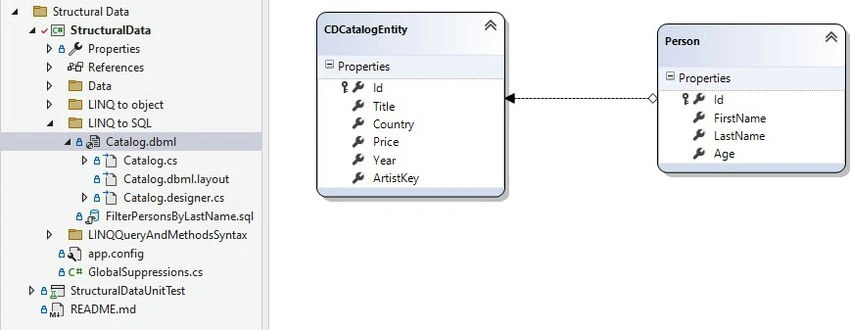
This editor allows you to transfer tables from a previously connected SQL server to the working tab of the graphical editor. Using the schema defined in the database, we can drag and drop two previously designed tables on the graphical editor surface. The structure diagram created this way contains appropriate properties for table columns and relationships between tables. It is worth noting here that the types of these properties were automatically selected based on the component types used in the tables.
The created diagram resembles a UML class diagram. In this diagram, as I mentioned, the classes were automatically connected using references. These references in the diagram are a consequence of the foreign key used to define the relationship between table entities in the database. It must therefore be implemented in the program code as a reference value to introduce similar structural dependencies into the program. We can edit relationship properties in a separate editor window, which we open from the context menu.

Designing this structure results in automatically generated program text that implements it in partial classes. The database is represented by the CatalogDataContext class. The author is represented by a class called Person, and the CD is represented by the CDCatalogEntity class. It is worth noting that all classes are partial so that additional definitions can be added in a separate file, thus meeting individual needs related to the implemented data processing.
The CatalogDataContext class inherits from DataContext from the .NET library. This inheritance shows how polymorphism was used to meet individual needs and the base class to implement common requirements for functionality dedicated to operating on the database as one whole. This class also implements the IDisposable interface, which should be used to properly manage the lifetime and state of an object created from this class.
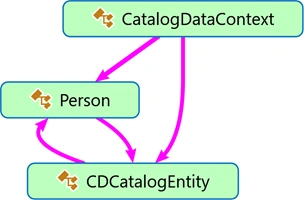
Since the auto-generated text contains several hundred lines, I suggest analyzing it using the Show on Code Map function. The resulting graphical representation of the text, i.e. the diagram, describes the content of the generated classes and shows the relationships between them. The goal of the analysis is to find similar relationships that we had previously in classes created manually. The generated text contains three classes presented in the diagram. After filtering out the elements that are unnecessary for this analysis, it can be seen that the Person class representing the author of the disc and CDCatalogEntity representing the disc are recursively connected.
Join the conversation! Your thoughts help the community grow.