Introduction

This article explains how to use a Progress Bar.

Progress Bar

A Progress Bar is a graphical user interface that shows the progress of a task. Initially, the Progress Bar does not show the progress in the form of a percentage. But now a Progress Bar shows progress in the form of a percentage. There are two types of Progress Bars.
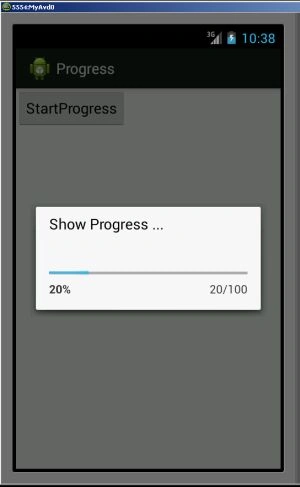
ProgressDialogue Style Spinner
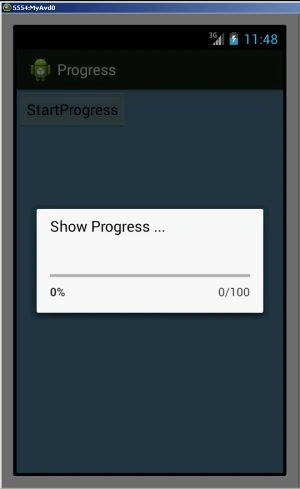
ProgressDialogue Style Horizontal
ProgressDialogue Style_Spinner
11-290x300.jpg
ProgressDialogue Style_Horizontal
1.jpg
In this, you will use a button to start the progress bar in a click event. Inside the click event you will write this:
  1. progress = new ProgressDialog(v.getContext());
  2. progress.setMessage("Show Progress ...");
  3. progress.setProgressStyle(ProgressDialog.STYLE_HORIZONTAL);
  4. progress.setProgress(0);
  5. progress.setMax(100);
  6. progress.show();
  7. progressStatus = 0;
  8. fileSize = 0;
  9. new Thread(new Runnable()
  10. {
  11. public void run() {
  12. while (progressStatus < 100) {
  13. progressStatus = doSomeTasks();
  14. try {
  15. Thread.sleep(1000);
  16. } catch (InterruptedException e) {
  17. e.printStackTrace();
  18. }
  19. progressBarHandler.post(new Runnable() {
  20. public void run() {
  21. progress.setProgress(progressStatus);
  22. }
  23. });
  24. }
  25. if (progressStatus >= 100) {
  26. try {
  27. Thread.sleep(2000);
  28. } catch (InterruptedException e)
  29. {
  30. e.printStackTrace();
  31. }
  32. progress.dismiss();
  33. }
  34. }
  35. }).start();
Step 1
Create an XML file and write this:
  1. <?xml version="1.0" encoding="utf-8"?>
  2. <LinearLayout xmlns:android="http://schemas.android.com/apk/res/android"
  3. android:layout_width="fill_parent"
  4. android:layout_height="fill_parent"
  5. android:orientation="vertical" >
  6. <Button
  7. android:id="@+id/btnStartProgress"
  8. android:layout_width="wrap_content"
  9. android:layout_height="wrap_content"
  10. android:text="StartProgress" />
  11. </LinearLayout>
Step 2
Create a Java file and write this:
  1. package com.progress;
  2. import android.app.Activity;
  3. import android.app.ProgressDialog;
  4. import android.os.Bundle;
  5. import android.os.Handler;
  6. import android.widget.Button;
  7. import android.view.View;
  8. import android.view.View.OnClickListener;
  9. public class MainActivity extends Activity {
  10. Button btnshowprogress;
  11. ProgressDialog progress;
  12. private int progressStatus = 0;
  13. private Handler progressBarHandler = new Handler();
  14. private long fileSize = 0;
  15. @Override
  16. public void onCreate(Bundle savedInstanceState) {
  17. super.onCreate(savedInstanceState);
  18. setContentView(R.layout.activity_main);
  19. btnshowprogress = (Button) findViewById(R.id.btnStartProgress);
  20. btnshowprogress.setOnClickListener(
  21. new OnClickListener() {
  22. @Override
  23. public void onClick(View v) {
  24. // prepare for a progress bar dialog
  25. progress = new ProgressDialog(v.getContext());
  26. progress.setMessage("Show Progress ...");
  27. progress.setProgressStyle(ProgressDialog.STYLE_HORIZONTAL);
  28. progress.setProgress(0);
  29. progress.setMax(100);
  30. progress.show();
  31. //reset progress bar status
  32. progressStatus = 0;
  33. //reset filesize
  34. fileSize = 0;
  35. new Thread(new Runnable() {
  36. public void run() {
  37. while (progressStatus < 100) {
  38. // process some tasks
  39. progressStatus = doSomeTasks();
  40. // your computer is too fast, sleep 1 second
  41. try {
  42. Thread.sleep(1000);
  43. } catch (InterruptedException e) {
  44. e.printStackTrace();
  45. }
  46. // Update the progress bar
  47. progressBarHandler.post(new Runnable() {
  48. public void run() {
  49. progress.setProgress(progressStatus);
  50. }
  51. });
  52. }
  53. // ok, file is downloaded,
  54. if (progressStatus >= 100) {
  55. // sleep 2 seconds, so that you can see the 100%
  56. try {
  57. Thread.sleep(2000);
  58. } catch (InterruptedException e) {
  59. e.printStackTrace();
  60. }
  61. // close the progress bar dialog
  62. progress.dismiss();
  63. }
  64. }
  65. }).start();
  66. }
  67. });
  68. }
  69. // file download simulator... a really simple
  70. public int doSomeTasks() {
  71. while (fileSize <= 1000000) {
  72. fileSize++;
  73. if (fileSize == 100000) {
  74. return 10;
  75. } else if (fileSize == 200000) {
  76. return 20;
  77. } else if (fileSize == 300000) {
  78. return 30;
  79. }
  80. // ...add your own
  81. }
  82. return 100;
  83. }
  84. }
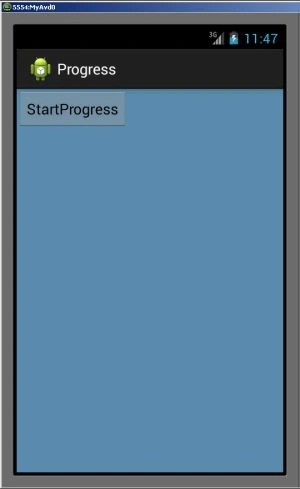
Step 3
Clipboard04.jpg
Step 4
When you will click on a button:
Clipboard10.jpg