

I am assuming that you already know how to declare a variable and assign a value in a class. If you need more details, check out this free ebook - Beginning C# Object Oriented Programming.
In this article, I will answer the following three basic questions.
- What property is
- How can we implement a property
- How do we use a property
Introduction
C# properties are members of a C# class that provide a flexible mechanism to read, write, or compute the values of private fields, in other words, by using properties, we can access private fields and set their values. Properties in C# are always public data members. C# properties use get and set methods, also known as accessors to access and assign values to private fields.
Now the question is what are accessors?
The get and set portions or blocks of a property are called accessors. These are useful to restrict the accessibility of a property, the set accessor specifies that we can assign a value to a private field in a property, and without the set accessor property, it is like a read-only field. By the get accessor we can access the value of the private field, in other words, it returns a single value. A Get accessor specifies that we can access the value of a field publically.
We have three types of properties: Read/Write, ReadOnly and WriteOnly. Let's see each one by one.
Declare and read/write examples of property
We create an example that is used for the Name and Age properties of a Person. So first of all, create a Person class then we will use this class in an executable program.
Person. cs
namespace PropertyExample
{
    public class Person
    {
        private string mName = string.Empty;
        private int mAge = 0;

        public string Name
        {
            get
            {
                return mName;
            }
            set
            {
                mName = value;
            }
        }

        public int Age
        {
            get
            {
                return mAge;
            }
            set
            {
                mAge = value;
            }
        }
    }
}
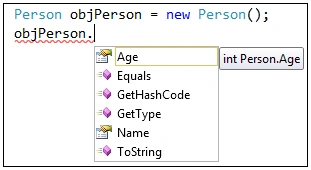
Now, we use this class in an executable program by creating an object of the Person class. It is Visual Studio IntelliSense that automatically shows object properties when we enter the dot (. ) operator after an object. In the following figure, we can see the Age and Name properties of a Person.
Now we read and write values for the property.
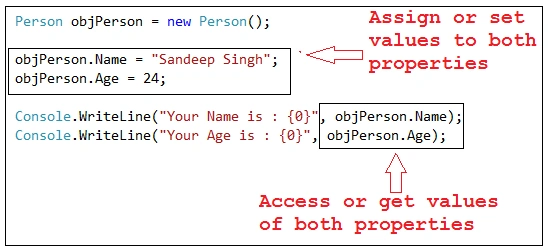
Finally, we get the output of this program.

Let's see the line of code.
objPerson.Name = "Sandeep Singh";
This line of code is called the set accessor of the Name property in the Person class where we are using the private field name in the set block, so this line of code actually assigns a value in the same field, in other words, we can assign a value to the private field by property.
Console.WriteLine("Your Name is : {0}", objPerson.Name);
This line of code is called a get accessor of the Name Property in the Person class; in other words, we can access the name private field by the Name Property because the Name property gets accessor returns a value of the private field name. So the private field is accessible by the property.
Create Readonly Property
We can also create a read-only property. Read-only means that we can access the value of a property but we can't assign a value to it. When a property does not have a set accessor then it is a read-only property. For example, in the person class, we have a Gender property that has only a get accessor and doesn't have a set accessor. The Person class is:
public class Person
{
    public string Gender
    {
        get { return "Male"; }
    }
}
When we assign a value to the Gender Property of the Person class object then we get an error that it is a read-only property and can't assign a value to it.
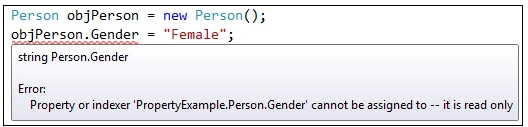
So the Gender property of the Person class always returns a value and we can't assign a value to it.
Create WriteOnly Property
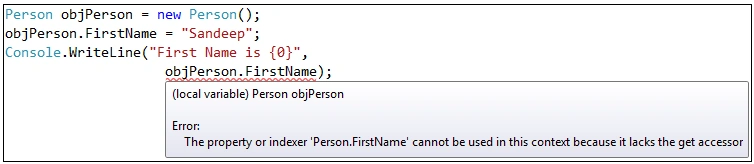
We can also create a write-only property. A write-only property is a property that we can assign a value to but can't get that value because that property doesn't have a get accessor. For example, we have a Person class that has the property FirstName that has a set accessor but doesn't have a get accessor so it is a write-only property.
public class Person
{
    private string mFirstName = string.Empty;
    public string FirstName
    {
        set { mFirstName = value; }
    }
}



Abhay SharmaPosted May 23, 2020, 2:21 PM
Good explanation.
Yogesh KumarPosted Dec 13, 2019, 9:30 PM
Very nice, thanks for article.
Praveen KumarPosted Feb 3, 2019, 12:18 PM
Nice article!
Arvind SinghPosted Dec 25, 2018, 11:58 PM
Nice article......... i have doubt on this line "Read only means that we can access the value of a property but can't assign a value to it." and get { return "Male";} it means assigning the value. also as per my view: the readonly fields can be initialized either at the declaration or in a constructor. / Readonly field, initialized in constructor public class Acls { public readonly string OriginalName; public Acls(string name) { Name = name; // Set readonly field once, in the constructor OriginalName = name; } public string FormalName { get { return string.Format("Sir {0}", Name); } } }
Hitanshi MehtaPosted Sep 28, 2018, 6:13 PM
Nice one!!!
Sandeep Singh ShekhawatPosted Jun 8, 2016, 12:24 AM
Thanks all :)
PnklPosted Apr 7, 2016, 6:04 AM
Good Explanation...
Ravi PatelPosted Nov 10, 2015, 11:11 PM
nice article
Gowtham RajamanickamPosted May 26, 2015, 9:00 AM
Good one..