

Well, you might haven’t heard of the term Google Protobuf or more commonly known as Protocol Buffer and wondering if it’s a buzzword or something. But trust me, you are not the only one to think like that. Even I hadn’t heard about Protobuf up until a friend made me realize what I was missing onto. Spreading the light, let me share what did I learn about Protocol Buffer.
Protocol Buffer is a language-agnostic binary data format developed by Google to serialize the structured data between different services. Now, if you didn’t get all those heavy terms at first it’s fine. Allow me to walk you through it till you’re able to digest it. So, for this article, we’ll be talking about.
- What Protocol Buffer actually is?
- Why Protocol Buffer?
- How do they work?
- General Structure
- Demo
Protocol Buffer
To fully get the concept of Protobuf, we first need to understand what is serialization and what are the problems we had that needed to be solved. As Wikipedia explains serialization,
“Serialization is the process of translating data structures or object state into a format that can be stored (for example, in a file or memory buffer) or transmitted (for example, across a network connection link) and reconstructed later (possibly in a different computer environment)”.
Which in simple words mean that we need to serialize data if we are to store it or transfer. But what should be the format for data serialization? Here are a few fixes for this.
- The raw in-memory data structures can be sent or saved in binary form. But what If I want to retrieve that data over some other memory layout? A straightforward No! That’s not how we play. The code must be compiled with the same memory layout and endianness, etc. Also, it’s really hard to extend this format.
- Serialize the data to XML (Extensible Markup Language) or JSON (JavaScript object notation). This approach is great for the front-end since it is human readable but what about backend server to server communication? These formats are notorious for being space intensive. Also encoding and decoding can impose a great performance penalty on the application.
So what now? Yeah, you can sure go ahead and invent your own serialization technique. This will give you flexibility but not a good idea when you have a tremendous amount of data. You need specified protocols to handle huge traffic. That’s exactly where Protobuf appears in the picture. They are like XML but more flexible, efficient, automated, smaller, faster and simpler. You need to define the structure of data once and then a specially generated source code is used to read and write the structured data to and from a variety of data streams and languages.
Why Protobuf?
I pretty much laid the foundation for why we should be already considering Protocol Buffer but if that’s not convincing enough, let’s discuss some more to make the usage of it reasonable.
There are usually two types of considerations associated with data storage and transmission.
- Size
- Efficiency
XML and JSON are designed to be human readable and self-describing which means they are to be text-based. Now, this comes with a cost as you need to encode data to transport the message and then, decode on another end. Thus, it increases the message size because some schema information needs to be included along with the message for it to make sense.
Protocol Buffers, on the other hand, are not self-describing instead, they work through binary serialization which means that they encode and compress the data to the binary stream which is extremely lightweight and easy to transfer. Reportedly, they take almost 1/3rd of the size of XML and 1/2 size of JSON if compared. Also, a smaller message requires less time for it to be transferred which contribute to efficiency. Protobuf is reportedly 6 times faster than JSON.
In addition to the above-mentioned advantages, here are a few more.
- Validation
- Easily extensible
- Guaranteed type-safety
- Backward compatibility
- Language independence
- Faster serialization/ deserialization
Why now?
Now, you might be wondering why you haven’t heard of it before and if so, why now that we’re talking about them? Here’s an extra sweet for you.
Yep! Although they’ve been around for ten years most people do not know about them is because they were first used by Google ‘internally’. And why now is because of the “Pokemon Go” game.

It is created by Niantic and uses Protobufs for data transfer. It was the success of this game that gave the hype to the use of Protobufs publically.
Any Cons?
Well, I wouldn’t really call these cons but there might be situations when Protobufs might not be that helpful. As we already talked they are not targeting human readability. So if you want your data to be human readable then Protobufs are not a good fit. If your browser is directly consuming the data from service then it might be a better option to choose other serialization techniques. Also, people tend to use XML or JSON more often because they have a good community support whereas Protobufs lags behind there. Don’t expect a very detailed documentation neither do so many blog posts or article targeting development using Protobufs. But, this project is open source so you can sure go ahead and experiment with the things.
How Does Protobuf work?
You need to specify the structure of the data along with the services that you’re serializing by defining the message types in .proto file. Think of this message as a logical record of information in which you specify a message with values. That code then goes to the compiler which compiles it with protocol. A predetermined schema is used to encode and decode the message.
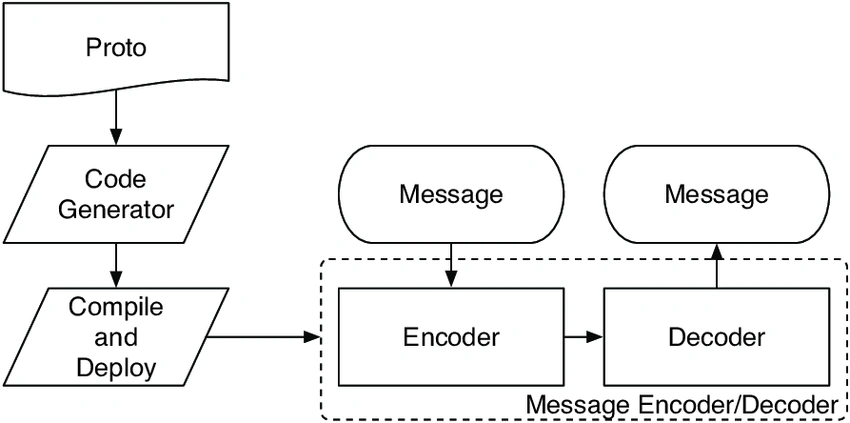
Now, that the working makes sense. Let me give you a very basic .proto message example to elaborate the structure.
- message Movie {
- required string title = 1;
- required string genre = 2;
- }
What we did here is defined the context in the message name Movie which has two fields title and genre with the identifier as 1 and 2. You can specify the fields as optional, required, and repeated. Keep in mind that this is the string representation of what actually would be done in binary.
Demo
So, I’m believing that now you can digest the heavy terms so enough with the talk let’s get our hands dirty.
I'm going to assume your basic familiarity with C++ and how the accessors are used.
Environment Setup
Note
Although Protobuf supports almost all languages and targets all the major platforms, i.e., Linux and Windows, I’ll be covering only the C++ installation for Windows. If you’re interested in working with some other language or platform, then access the Protobufs documentation here.
In order to build Protobuf with MSVC on Windows, you need the following tools.
- CMake
- Visual Studio
- Git (optional)
Go ahead and installed the above tools to follow along.
Once you have everything installed, open Visual Studio command prompt and navigate to your working directory. Once there, execute the following command.
- $ mkdir install
This is just going to create a folder where Protobufs will be installed after the build. Before going ahead, make sure CMake and Git are added to the system path variable. If not, they can be added to the PATH by executing the following commands.
- $ set PATH=%PATH%;C:\Program Files (x86)\CMake\bin
- $ set PATH=%PATH%;C:\Program Files\Git\cmd
Now, you’re good to clone the Protobuf locally.
- $ git clone https://github.com/protocolbuffers/protobuf.git
If you choose not to use git, then you can simply download the package from Git repository that exists at here.
Once you have the repo locally, navigate to the project folder Protobuf, and then to the cmake folder.
- $ cd protobuf
- $ cd cmake
Now, we need to configure the CMake. For that, follow along executing the following commands.
- $ mkdir build & cd build
You need to update any submodules if you are using the Git clone.
- $ git submodule update --init --recursive
Makefile generator can build the project in only one configuration. So, a separate folder is required for each configuration.
For Release configuration:
- $ mkdir release & cd release
- $ cmake -G "NMake Makefiles" ^
- -DCMAKE_BUILD_TYPE=Release ^
- -DCMAKE_INSTALL_PREFIX=../../../../install ^
- ../..
For Debug configuration:
Ano MepaniPosted Sep 20, 2018, 6:52 AM
Very Well explained