

Pre-requisite to understand this
Basic understanding of
client–server architecture, firewall
HTTP/HTTPS requests and responses
Authentication and access control
Introduction
A proxy server acts as an intermediary between clients (users or applications) and backend servers (internet services, APIs, or internal systems). Instead of clients communicating directly with target servers, all requests pass through the proxy, which can inspect, modify, allow, deny, cache, or route traffic. In enterprise environments, proxy servers are critical for security enforcement, traffic control, observability, performance optimization, and compliance.
What problem can we solve with this?
Proxy servers solve several enterprise-grade challenges related to security, governance, performance, and control.
In large organizations, unrestricted direct access to external or internal systems creates security risks, performance bottlenecks, and compliance issues. Proxy servers centralize traffic control, enabling enterprises to enforce policies, monitor usage, protect internal systems, and optimize network behavior without changing individual applications.
Problems solved:
Uncontrolled internet access by employees
Exposure of internal IPs and services
Lack of centralized security enforcement
Repeated requests causing performance degradation
Difficulty auditing and logging user activity
Inability to enforce compliance rules (data leakage, geo restrictions)
How to implement/use this?
Proxy servers are typically deployed as forward proxies, reverse proxies, or transparent proxies, depending on the use case. Enterprises integrate them with identity systems, security tools, and monitoring platforms. Clients are configured (explicitly or implicitly) to route traffic through the proxy, which applies policies before forwarding requests.
Implementation steps:
Deploy proxy server (NGINX, Envoy, HAProxy, etc.)
Define proxy role:
Forward proxy (client to internet)
Reverse proxy (internet to internal services)
Integrate authentication (LDAP, Active Directory, OAuth)
Configure security rules (ACLs, URL filtering, SSL inspection)
Enable caching, logging, and monitoring
Route traffic via proxy (PAC files, DNS, gateway rules)
Sequence diagram
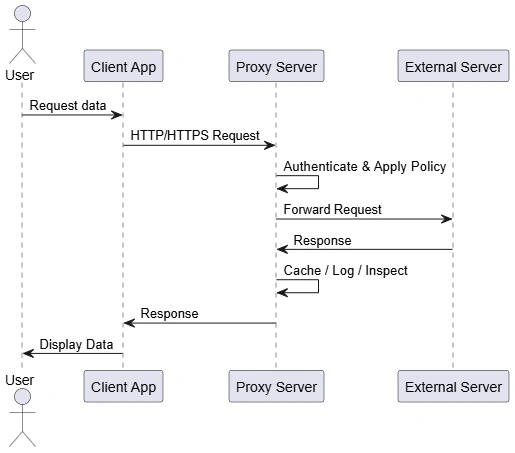
This sequence illustrates how a proxy server sits between a client application and an external server. Every request is intercepted, validated, and controlled by the proxy before reaching the destination. Responses are similarly processed before being returned to the client.
Steps:
Client never directly contacts the external server
Proxy authenticates the user or application
Security and access policies are enforced
Responses can be cached for performance
All traffic is logged for auditing
Component diagram
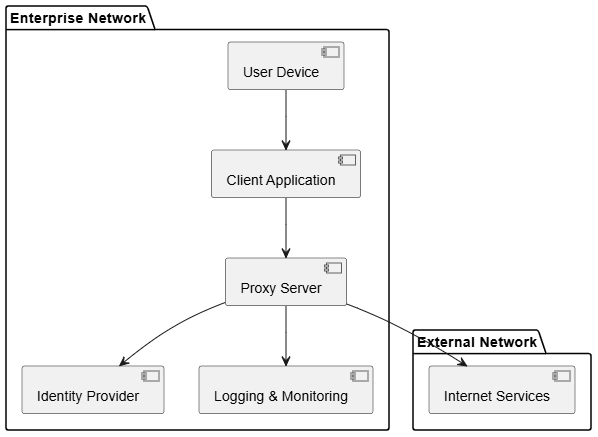
This component diagram shows how a proxy server integrates with enterprise infrastructure. It acts as a central control point between internal users and external services, interacting with identity, logging, and monitoring systems.
Component responsibilities:
Client Application: Sends requests via proxy
Proxy Server: Enforces policies, routes traffic
Identity Provider: Authenticates users/apps
Logging & Monitoring: Captures audit trails
Internet Services: External destinations
Advantages:
Centralized security enforcement
Improved performance through caching
Hides internal network structure
Enables detailed logging and auditing
Simplifies compliance with regulations
Reduces attack surface
Supports scalability and traffic management
Enables content filtering and access control
Summary:
Proxy servers are a foundational enterprise infrastructure component that provide security, control, visibility, and performance optimization. By acting as an intermediary between clients and servers, proxies allow organizations to enforce policies consistently, protect internal systems, and gain operational insight into network traffic. In modern enterprises, proxy servers are indispensable for secure and scalable network architecture.
Join the conversation! Your thoughts help the community grow.