

To load local HTML files in Windows 10 universal app, we need to read and display the data from local XML file sometimes in our apps. Here I will explain how to read local XML files in Windows 10 app.
Let’s see the steps:
Create new Windows 10 app and add the XML file that you want to read, here I add the following xml file to load the student’s details.
Let’s see the steps:
Create new Windows 10 app and add the XML file that you want to read, here I add the following xml file to load the student’s details.
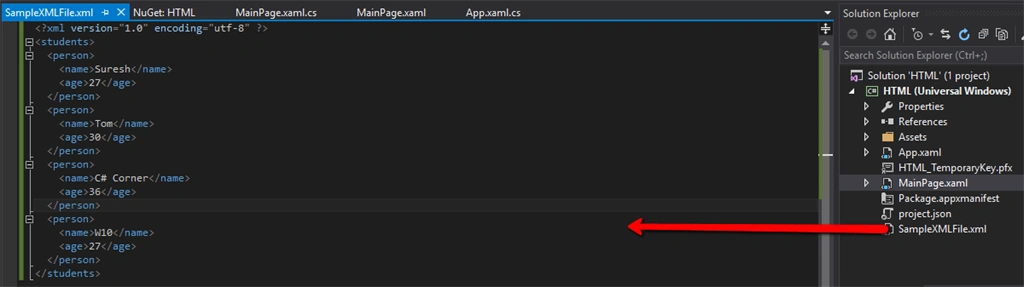
Use encoding="utf-8", otherwise you will probably face an exception.
Next create a sample data class used to store the XML element values like the following code.
- public class Person
- {
- string name;
- int age;
- public string Name
- {
- get { return name; }
- set { name = value; }
- }
- public int Age
- {
- get { return age; }
- set { age = value; }
- }
- }
Add ListBox control to list the student details from xml file.
- <ListBox x:Name="StudentlistBox" HorizontalAlignment="Left" Height="562" Margin="10,10,0,0" VerticalAlignment="Top" Width="340">
- <ListBox.ItemTemplate>
- <DataTemplate>
- <StackPanel Margin="10" >
- <TextBlock Text="{Binding Name}"/>
- <TextBlock Text="{Binding Age}"/>
- </StackPanel>
- </DataTemplate>
- </ListBox.ItemTemplate>
- </ListBox>
Here, I am binding the name and age in the listbox.
Now read the xml file and assign the data to listbox using the following code.
Now read the xml file and assign the data to listbox using the following code.
- string XMLFilePath = Path.Combine(Package.Current.InstalledLocation.Path, "SampleXMLFile.xml");
- XDocument loadedData = XDocument.Load(XMLFilePath);
- var data = from query in loadedData.Descendants("person")
- select new Person
- {
- Name = (string)query.Element("name"),
- Age = (int)query.Element("age")
- };
- StudentlistBox.ItemsSource = data;
To read the date from the XML files you need to use XDocument. To do that we need to include the namespace “using System.Xml.Linq”.
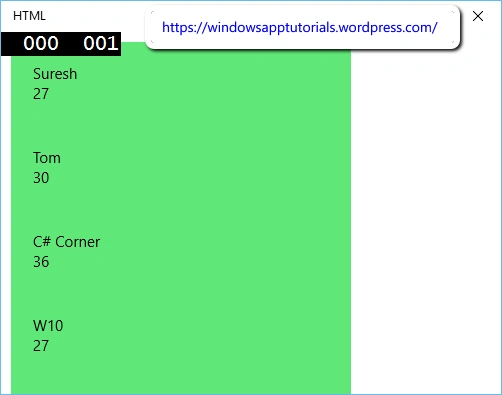
Now run the app and see the excepted output looks like the following screen.
Now run the app and see the excepted output looks like the following screen.
Rahul Kumar SaxenaPosted Apr 11, 2016, 10:50 PM
Good show
Mohammed IbrahimPosted Apr 11, 2016, 1:44 PM
nice
Kuppurasu NagarajPosted Apr 11, 2016, 1:12 PM
Nice Sharing
Saurabh RaiPosted Apr 11, 2016, 12:35 PM
I prefer to use JSON. But I love XML too :) ... Thanks for Sharing
NitinPosted Apr 11, 2016, 11:24 AM
Good one. Thanks for sharing.
Debasis SahaPosted Apr 11, 2016, 10:33 AM
Nice One...
Ibrahim ErsoyPosted Apr 11, 2016, 8:03 AM
Nice article! Keep writing about Universal Apps :) In my opinion about XML is; It's old and not worth "reading" as a file :) I prefer JSON anyday