Introduction
This article shows how to create an application that reads email and its attachment(s) from Microsoft Exchange Server. You can read emails from any folder like Inbox, Outbox, and so on. In this tutorial I will be reading emails from the Inbox folder. You can also set up a filter on what type of emails you what to read. I will be filtering based on Date.
Prerequisites
- Microsoft Exchange WebServices (we can install it from NuGet Package Manager).
- Valid Microsoft Exchange Server User Account.
- Visual Studio 2010+.
I will be creating a Windows Form application in this tutorial.
Step 1. Create a New Project > Windows Forms Application. Open Visual Studio then create a New Project, then go to Templates and select Visual C#, then Windows and select Windows Forms Application.
Type in a decent project name. I named the project "ReadMailFromExchangeServer".
Step 2. Install Microsoft Exchange WebServices. Click on Tools, then NuGet Package Manager > Package Manager Console.
Type: Install-Package Microsoft.Exchange.WebServices. In a while the Microsoft.Exchange.WebServices will be installed in your application.
Step 3. Design the user interface. Add the following controls.
| Control |
Name |
Text |
| Button |
btnRead |
Read Today's Email |
| ListView |
lstMsg |
| Button |
btnLoad |
Load Attachment |
| Label |
lblMsg |
Ready |
| Label |
label1 |
Today's Mail |
| Label |
lblAttach |
No Attachment downloaded |
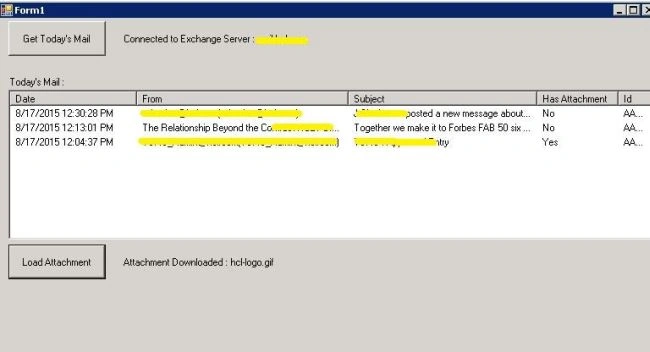
Step 4. The code.
exchange = new ExchangeService(ExchangeVersion.Exchange2007_SP1);
exchange.Credentials = new WebCredentials("USERNAME", "PASSWORD", "DOMAIN");
// exchange.Credentials = new WebCredentials("julian", "mypassword", "mydomain");
exchange.AutodiscoverUrl("EMAILADDRESS");
// exchange.AutodiscoverUrl("[email protected]");
Use ExchangeVersion.Exchange2007_SP1 is your Exchange Server Version is 2007.
The following is the list with compatible versions.
| Exchange2007_SP1 |
Exchange Server 2007 Service Pack 1 (SP1). |
| Exchange2010 |
Exchange Server 2010. |
| Exchange2010_SP1 |
Exchange Server 2010 Service Pack 1 (SP1). |
| Exchange2010_SP2 |
Exchange Server 2010 Service Pack 2 (SP2). |
| Exchange2013 |
Exchange Server 2013. |
| Exchange2013_SP1 |
Exchange Server 2013 Service Pack 1 (SP1). |
If everything is correct you should be connected to the Exchange Server.
TimeSpan ts = new TimeSpan(0, -1, 0, 0);
DateTime date = DateTime.Now.Add(ts);
SearchFilter.IsGreaterThanOrEqualTo filter = new SearchFilter.IsGreaterThanOrEqualTo(ItemSchema.DateTimeReceived, date);

if (exchange != null)
{
    FindItemsResults<Item> findResults = exchange.FindItems(WellKnownFolderName.Inbox, filter, new ItemView(50));

    foreach (Item item in findResults)
    {
        EmailMessage message = EmailMessage.Bind(exchange, item.Id);
        ListViewItem listitem = new ListViewItem(new[]
        {
            message.DateTimeReceived.ToString(),
            message.From.Name.ToString() + " (" + message.From.Address.ToString() + ")",
            message.Subject,
            (message.HasAttachments ? "Yes" : "No"),
            message.Id.ToString()
        });
        lstMsg.Items.Add(listitem);
    }

    if (findResults.Items.Count <= 0)
    {
        lstMsg.Items.Add("No Messages found!!");
    }
}
The preceding code creates a date of 1 hour before. The Exchange SearchFilter creates a filter to retrieve all the emails received 1 hour ago.
The FindItemResults retrieves all emails from the Inbox folder applying the filter. Each email is then read inside a loop. The EmailMessage object is created with each retrieved Item.Id.
The Email Message Details are shown in the ListView.
EmailMessage message = EmailMessage.Bind(exchange, new ItemId(msgid));

if (message.HasAttachments && message.Attachments[0] is FileAttachment)
{
    FileAttachment fileAttachment = message.Attachments[0] as FileAttachment;
    fileAttachment.Load(
        @"C:\Users\Admin\Documents\Visual Studio 2012\Projects\ReadMailFromExchangeServer\ReadMailFromExchangeServer\Attachments\" + fileAttachment.Name
    );
    lblAttach.Text = "Attachment Downloaded: " + fileAttachment.Name;
}
else
{
    MessageBox.Show("No Attachments found!!");
}
Read the EmailMessage using message id.
If the message has an attachment, create the FileAttachment object and then download it.
Here's the complete code.
using Microsoft.Exchange.WebServices.Data;
using System;
using System.Collections.Generic;
using System.ComponentModel;
using System.Data;
using System.Drawing;
using System.Linq;
using System.Net.Sockets;
using System.Text;
using System.Threading.Tasks;
using System.Windows.Forms;

namespace ReadMailFromExchangeServer
{
    public partial class Form1 : Form
    {
        ExchangeService exchange = null;

        public Form1()
        {
            InitializeComponent();
            lstMsg.Clear();
            lstMsg.View = View.Details;
            lstMsg.Columns.Add("Date", 150);
            lstMsg.Columns.Add("From", 250);
            lstMsg.Columns.Add("Subject", 400);
            lstMsg.Columns.Add("Has Attachment", 50);
            lstMsg.Columns.Add("Id", 100);
            lstMsg.FullRowSelect = true;
        }

        private void btnRead_Click(object sender, EventArgs e)
        {
            ConnectToExchangeServer();
            TimeSpan ts = new TimeSpan(0, -1, 0, 0);
            DateTime date = DateTime.Now.Add(ts);
            SearchFilter.IsGreaterThanOrEqualTo filter = new SearchFilter.IsGreaterThanOrEqualTo(ItemSchema.DateTimeReceived, date);

            if (exchange != null)
            {
                FindItemsResults<Item> findResults = exchange.FindItems(WellKnownFolderName.Inbox, filter, new ItemView(50));

                foreach (Item item in findResults)
                {
                    EmailMessage message = EmailMessage.Bind(exchange, item.Id);
                    ListViewItem listitem = new ListViewItem(new[]
                    {
                        message.DateTimeReceived.ToString(),
                        message.From.Name.ToString() + " (" + message.From.Address.ToString() + ")",
                        message.Subject,
                        (message.HasAttachments ? "Yes" : "No"),
                        message.Id.ToString()
                    });
                    lstMsg.Items.Add(listitem);
                }

                if (findResults.Items.Count <= 0)
                {
                    lstMsg.Items.Add("No Messages found!!");
                }
            }
        }

        public void ConnectToExchangeServer()
        {
            lblMsg.Text = "Connecting to Exchange Server..";
            lblMsg.Refresh();
            try
            {
                exchange = new ExchangeService(ExchangeVersion.Exchange2007_SP1);
                exchange.Credentials = new WebCredentials("USERNAME", "PASSWORD", "DOMAIN");
                exchange.AutodiscoverUrl("USERNAME@DOMAIN");

                lblMsg.Text = "Connected to Exchange Server: " + exchange.Url.Host;
                lblMsg.Refresh();
            }
            catch (Exception ex)
            {
                lblMsg.Text = "Error Connecting to Exchange Server!! " + ex.Message;
                lblMsg.Refresh();
            }
        }

        private void btnLoad_Click(object sender, EventArgs e)
        {
            if (exchange != null)
            {
                if (lstMsg.Items.Count > 0)
                {
                    ListViewItem item = lstMsg.SelectedItems[0];

                    if (item != null)
                    {
                        string msgid = item.SubItems[4].Text.ToString();
                        EmailMessage message = EmailMessage.Bind(exchange, new ItemId(msgid));

                        if (message.HasAttachments && message.Attachments[0] is FileAttachment)
                        {
                            FileAttachment fileAttachment = message.Attachments[0] as FileAttachment;
                            // Change the below Path
                            fileAttachment.Load(
                                @"C:\Users\Admin\Documents\Visual Studio 2012\Projects\ReadMailFromExchangeServer\ReadMailFromExchangeServer\Attachments\" + fileAttachment.Name
                            );
                            lblAttach.Text = "Attachment Downloaded: " + fileAttachment.Name;
                        }
                        else
                        {
                            MessageBox.Show("No Attachments found!!");
                        }
                    }
                    else
                    {
                        MessageBox.Show("Please select a Message!!");
                    }
                }
                else
                {
                    MessageBox.Show("Messages not loaded!!");
                }
            }
            else
            {
                MessageBox.Show("Not Connected to Mail Server!!");
            }
        }

        private void Form1_Load(object sender, EventArgs e)
        {
        }
    }
}
- Import the Microsoft Exchange Services.
using Microsoft.Exchange.WebServices.Data;
- Create the instance and pass the credentials.
- Read the emails.
- Read the attachment.


Love ThakkerPosted Jan 28, 2021, 6:22 AM
Hi Julian. Is there a way to use default credential instead passing the credentials hardcode?
Jyotish SinghPosted Oct 9, 2019, 6:54 AM
In case of bounce back mail, any idea how we could read original mails.
Vladan KosticPosted Sep 12, 2019, 11:41 AM
Hi, thanks for this good document for developers.On the net I found .NET Framework / .NET Core which is called MSG .NET I is allows you to easy create/read/parse/convert .msg files and more. Link is http://www.independentsoft.de/msg/tutorial/readmessage.html The API allows you to easy create/read/parse/convert .msg files and more. There are a number of use cases on the site and the API itself is well documented. Link is http://www.independentsoft.de/msg/tutorial/readmessage.html
Darshan GandhiPosted Apr 17, 2019, 12:58 AM
How can you get a notification and then process email from inbox In the previous code I used to have a job but I want to remove it. Now i wanted to process the email as soon as it is received in the inbox
Ram MSBIPosted Nov 28, 2018, 2:46 PM
Hi Julian, In my case I have to download attachment from webmail account and save it into shared drive location. Can you please tell me how to handle this using SSIS. Thanks in advance.
Hadshana KamalanathanPosted Jul 22, 2018, 1:15 AM
Good one...
preeti singhPosted Apr 11, 2018, 1:56 AM
How to ignore the emails with skype invite/meetings while reading all other emails thorugh c sharp console application and print only the emails without the skype/meeting invites??
preeti singhPosted Apr 11, 2018, 1:55 AM
What to do if i want to read all emails in my inbox but only ignore the emails with skype invite or meetings in a c??
Dean ParkerPosted Mar 22, 2018, 10:39 AM
Julian, great article! How would I check all of the folders in the exchange account??
aman deepPosted Mar 3, 2018, 12:18 PM
Getting Exception Please Help
aman deepPosted Mar 3, 2018, 12:18 PM
An unhandled exception of type 'Microsoft.Exchange.WebServices.Data.ServiceLocalException' occurred in Microsoft.Exchange.WebServices.dll
Ramanjjilu NaiduPosted Feb 15, 2018, 3:52 AM
Hi Julian, I have connected to Exchange webservice and trying to add it in the reference(as it is already been installed in other machine) and when i click on "add connected services", i am not able to find it. Please guide me.
Ashvinkumar ThakorPosted Aug 1, 2017, 5:56 AM
Hi, I want to develop web application in C# that can read Mail and display data in dashboard from mail .. If I will deploy such web application in remote server then end user can go to that url and that dashboard will show alerts in dashboard from that user mail..but how can my_web_application deployed on remote server access my mail account ?? is there any way to access mail item by remotely hosted web application ??
papun sahooPosted Jun 27, 2017, 9:54 AM
I am getting this error:Autodiscover blocked a potentially insecure redirection to https://autodiscover-s.outlook.com/autodiscover/autodiscover.xml. To allow Autodiscover to follow the redirection, use the AutodiscoverUrl(string, AutodiscoverRedirectionUrlValidationCallback) overload.
Arundhatee SarangiPosted Jun 15, 2017, 7:40 PM
Hi, Is it possible to write the same code for specific mail subject and without the user interface button ?
Atul FalorPosted Jun 13, 2017, 8:06 PM
I am getting error in the line where the code -> lstMsg.SelectedItems[0] is written as Argument Out of Range. Can you please suggest
Dinesh PeriyasamyPosted Apr 10, 2017, 12:57 AM
The Autodiscover service couldn't be located.
Anil KumarPosted Apr 3, 2017, 9:30 AM
Define exchange = new ExchangeService(ExchangeVersion.Exchange2013_SP1);
Anil KumarPosted Apr 3, 2017, 9:30 AM
Hi sir,If i have two user of diffrent mail sever like 2007_SP1 and 2013_SP1 , then how we can define exchange = new ExchangeService(ExchangeVersion.Exchange2007_SP1);
Ravi KumarPosted Mar 10, 2017, 12:17 PM
Hello sir, I am able to read the mail from exchange server, but trying to read unique subject line. ex, New mail subject line : Hello, againg someone replied on that mail : RE: Hello . I want to print only latest subject line of that mail thread avoiding duplicate. Please help
linda engelenPosted Jan 15, 2017, 11:17 AM
Exchange = new ExchangeService(ExchangeVersion.Exchange2013_SP1); exchange.Credentials = new WebCredentials("itembrabantzorg", "password!", "gmail"); exchange.AutodiscoverUrl("[email protected]");I have this, but it still says:The Autodiscover service couldn't be located.
Varsha VenugopalPosted Nov 23, 2016, 11:49 PM
How can i read from subfolder in Inbox eg. Inbox/Abc, Here without interrupting inbox i need to read mails directly from Abc folder and based on number of days like last 10 days mails.
SubashPosted Oct 26, 2016, 3:49 AM
Excellent sir can we use this from 2010 itself because u mention 2010+ ?
Michael ZdenekPosted Oct 4, 2016, 5:37 AM
I have the same problem. Does anyone know, where is my mistake?Mike
Vidhi PatelPosted Sep 13, 2016, 2:07 AM
The Autodiscover service couldn't be located.this is error are compning
Vidhi PatelPosted Sep 13, 2016, 2:06 AM
I have error in my code can please sloved it
Santhakumar MunuswamyPosted Aug 18, 2015, 2:30 PM
Good one
Pankaj Kumar ChoudharyPosted Aug 17, 2015, 9:39 AM
Nice explain
Gopi ChandPosted Aug 17, 2015, 9:13 AM
Nice work :)
Nilesh JadavPosted Aug 17, 2015, 8:54 AM
Great Post :)
Sibeesh VenuPosted Aug 17, 2015, 8:48 AM
Nice Share
Mohammed IbrahimPosted Aug 17, 2015, 6:53 AM
nice
Humayun Kabir MamunPosted Aug 17, 2015, 6:29 AM
Nice...
Rajeesh MenothPosted Aug 17, 2015, 6:02 AM
Nice Share
Karthikeyan KPosted Aug 17, 2015, 5:57 AM
Thanks for sharing sir...
Vaikesh K PPosted Aug 17, 2015, 5:44 AM
Nice one