

Introduction
In this article, I will explain how to create a registration form in ASP.NET C#. This article also explains how we use Stored Procedures instead of explicit SQL statements to add data from a form to a database.
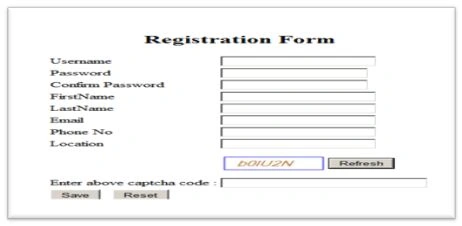
Use the following procedure to create a sample.
Step 1: Create a database and add a table for storing the data as in the following:
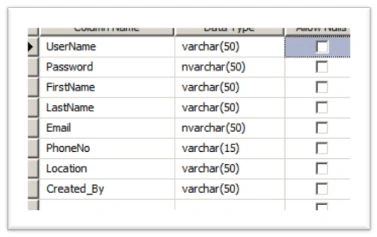
Step 2: Create a Stored Procedure to store the records in the database as in the following:
- Create PROCEDURE [dbo].[sp_EmpInformation]
- @UserName varchar(50),
- @Password varchar(50),
- @FirstName varchar(50),
- @LastName varchar(50),
- @Email varchar(50),
- @PhoneNo varchar(50),
- @Location varchar(50),
- @Created_By varchar(50),
- @ERROR VARCHAR(100) OUT
- AS
- BEGIN-- SET NOCOUNT ON added to prevent extra result sets from-- interfering with SELECT statements.
- SET NOCOUNT ON;
- ---Checking Condition if User exists or not if user not exists returns different message if exists returns different message
- IF NOT EXISTS(SELECT * FROM Employee_Information WHERE UserName=@UserName)
- BEGIN INSERT INTO Employee_Information
- (
- UserName,
- [Password],
- FirstName,
- LastName,
- Email,
- PhoneNo,
- Location,
- Created_By
- )VALUES(@UserName,
- @Password,
- @FirstName,
- @LastName,
- @Email,
- @PhoneNo,
- @Location,
- @Created_By
- )
- SET @ERROR=@UserName+' has registered successfully.'
- END
- ELSE
- BEGIN
- SET @ERROR=@UserName + ' has already exists.'
- END
- End
Step 3: Open Visual Studio and select create Web application.
Step 4: Add a new Web page Emp_Registration.aspx and design it as below:
- <div>
- <asp:ScriptManager ID="SM1" runat="server">
- </asp:ScriptManager>
- <table align="center">
- <tr>
- <td align="center" colspan="2">
- <h2>
- Registration Form</h2>
- </td>
- </tr>
- <tr>
- <td>
- <asp:Label ID="lbluser" runat="server" Text="Username"></asp:Label>
- </td>
- <td>
- <asp:TextBox ID="txtuser" runat="server"></asp:TextBox>
- </td>
- </tr>
- <tr>
- <td>
- <asp:Label ID="lblpwd" runat="server" Text="Password"></asp:Label>
- </td>
- <td>
- <asp:TextBox ID="txtpwd" runat="server" TextMode="Password"></asp:TextBox>
- </td>
- </tr>
- <tr>
- <td>
- <asp:Label ID="lblcnfmpwd" runat="server" Text="Confirm Password"></asp:Label>
- </td>
- <td>
- <asp:TextBox ID="txtcnmpwd" runat="server" TextMode="Password"></asp:TextBox>
- </td>
- </tr>
- <tr>
- <td>
- <asp:Label ID="lblfname" runat="server" Text="FirstName"></asp:Label>
- </td>
- <td>
- <asp:TextBox ID="txtfname" runat="server"></asp:TextBox>
- </td>
- </tr>
- <tr>
- <td>
- <asp:Label ID="lbllname" runat="server" Text="LastName"></asp:Label>
- </td>
- <td>
- <asp:TextBox ID="txtlname" runat="server"></asp:TextBox>
- </td>
- </tr>
- <tr>
- <td>
- <asp:Label ID="lblemail" runat="server" Text="Email"></asp:Label>
- </td>
- <td>
- <asp:TextBox ID="txtEmail" runat="server"></asp:TextBox>
- </td>
- </tr>
- <tr>
- <td>
- <asp:Label ID="lblCnt" runat="server" Text="Phone No"></asp:Label>
- </td>
- <td>
- <asp:TextBox ID="txtphone" runat="server"></asp:TextBox>
- </td>
- </tr>
- <tr>
- <td>
- <asp:Label ID="lbladd" runat="server" Text="Location"></asp:Label>
- </td>
- <td align="left">
- <asp:TextBox ID="txtlocation" runat="server"></asp:TextBox>
- </td>
- </tr>
- <tr>
- <td>
- </td>
- <td valign="middle">
- <asp:UpdatePanel ID="UP1" runat="server">
- <ContentTemplate>
- <table>
- <tr>
- <td style="height: 50px; width: 100px;">
- <asp:Image ID="imgCaptcha" runat="server" />
- </td>
- <td valign="middle">
- <asp:Button ID="btnRefresh" runat="server" Text="Refresh" OnClick="btnRefresh_Click" />
- </td>
- </tr>
- </table>
- </ContentTemplate>
- </asp:UpdatePanel>
- </td>
- </tr>
- <tr>
- <td>
- Enter above captcha code :
- </td>
- <td>
- <asp:TextBox ID="txtCaptcha" runat="server" Width="200px"></asp:TextBox>
- </td>
- </tr>
- <tr>
- <td align="left" colspan="2">
- <asp:Button ID="btnsubmit" runat="server" Text="Save" OnClick="btnsubmit_Click" />
- <asp:Button ID="btnReset" Text="Reset" runat="server" />
- </td>
- </tr>
- <tr>
- <td colspan="2">
- <span style="color: Red; font-weight: bold">
- <asp:Label ID="lblErrorMsg" runat="server"></asp:Label></span>
- </td>
- </tr>
- </table>
- </div>
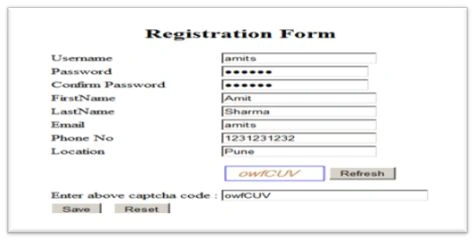
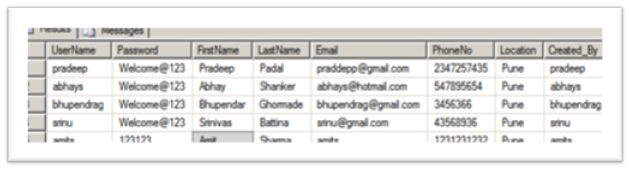
Amperayani RamakrishnaPosted Jul 9, 2021, 9:33 AM
Thank you.. Nice coding..
Dharmendra Kumar PanditPosted Sep 11, 2018, 12:29 PM
Thank you sir . NIce one code working fine.
prerna acharyaPosted Nov 26, 2015, 4:53 AM
Thanks for posting your article but could you plz tell me that where you used the MESSAGE and CLEAR CONTROL...i have an error in this point..
prerna acharyaPosted Nov 24, 2015, 2:50 PM
could you plz tell me that how to create stored procedure and where??? i am just learning asp.net
Abhay ShankerPosted May 1, 2014, 11:35 PM
Thanks..
Lakshmanan Sethu SankaranarayanPosted May 1, 2014, 4:01 AM
Good one