

Introduction
Kendo Spreadsheet control is used to display the data in the spreadsheet view. In this article, we are going to see how to do remote binding in Kendo SpreadSheets.
WEB API Services
I'm going to use the following WEB API Services which are developed using ASP.NET CORE to construct the data source for Kendo SpreadSheet control. If you are new to ASP.NET CORE WEB API please go through my previous article which will give you a basic idea about how to create an API service using ASP.NET CORE WEB API project.
- public class Product
- {
- public int ProductID { get; set; }
- public string ProductName { get; set; }
- public double Price { get; set; }
- public double Tax { get; set; }
- public Product(int ProductID,string ProductName, double Price, double Tax )
- {
- this.ProductID = ProductID;
- this.ProductName = ProductName;
- this.Price = Price;
- this.Tax = Tax;
- }
- }
ProductsController.cs
- namespace MyCoreAPI.Controllers
- {
- [Produces("application/json")]
- [Route("api/Products")]
- public class ProductsController : Controller
- {
- [HttpGet]
- [Route("ProductDetails")]
- public List<Product> GetProduct()
- {
- try
- {
- List<Product> products = new List<Product>();
- products.Add(new Product(1, "Tea pack", 100, 10));
- products.Add(new Product(2, "Coffee pack", 120, 12));
- return products;
- }
- catch (Exception ex)
- {
- List<Product> products = null;
- return products;
- }
- }
- }
- }
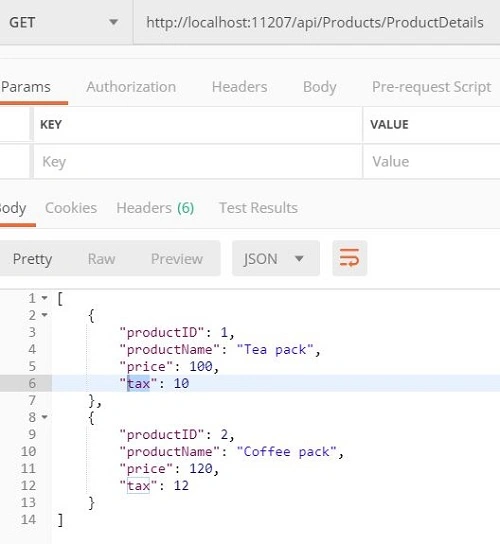
Testing the API in Postman
KendoSpreadSheet.html
- <!DOCTYPE html>
- <html>
- <head>
- <style>
- html {
- font-size: 14px;
- font-family: Arial, Helvetica, sans-serif;
- }
- </style>
- <title></title>
- <link rel="stylesheet" href="https://kendo.cdn.telerik.com/2018.3.1017/styles/kendo.common-material.min.css" />
- <link rel="stylesheet" href="https://kendo.cdn.telerik.com/2018.3.1017/styles/kendo.material.min.css" />
- <link rel="stylesheet" href="https://kendo.cdn.telerik.com/2018.3.1017/styles/kendo.material.mobile.min.css" />
- <script src="https://kendo.cdn.telerik.com/2018.3.1017/js/jquery.min.js"></script>
- <script src="https://kendo.cdn.telerik.com/2018.3.1017/js/jszip.min.js"></script>
- <script src="https://kendo.cdn.telerik.com/2018.3.1017/js/kendo.all.min.js"></script>
- </head>
- <body>
- <div id="example">
- <div class="box wide">
- <div class="box-col">
- <h4>Save data changes</h4>
- <ul class="options">
- <li>
- <button class="k-button" id="save">Save changes</button>
- <button class="k-button" id="cancel">Cancel changes</button>
- </li>
- </ul>
- </div>
- </div>
- <div id="spreadsheet" style="width: 100%"></div>
- <script>
- $(function () {
- var dataSource = new kendo.data.DataSource({
- transport: {
- read: onRead,
- },
- schema: {
- model: {
- id: "ProductID",
- fields: {
- productID: { type: "number" },
- productName: { type: "string" },
- price: { type: "number" },
- tax: { type: "number" }
- }
- }
- }
- });
- $("#spreadsheet").kendoSpreadsheet({
- columns: 20,
- rows: 100,
- toolbar: false,
- sheetsbar: false,
- sheets: [{
- name: "Products",
- dataSource: dataSource,
- rows: [{
- height: 40,
- cells: [
- {
- bold: "true",
- background: "#9c27b0",
- textAlign: "center",
- color: "white",
- title: "ID"
- }, {
- bold: "true",
- background: "#9c27b0",
- textAlign: "center",
- color: "white",
- title:"Product Name"
- }, {
- bold: "true",
- background: "#9c27b0",
- textAlign: "center",
- color: "white",
- title:"Price"
- }, {
- bold: "true",
- background: "#9c27b0",
- textAlign: "center",
- color: "white"
- }, ]
- }],
- columns: [
- { width: 100 },
- { width: 415 },
- { width: 145 },
- { width: 145 },
- { width: 145 }
- ]
- }]
- });
- function onRead(options) {
- $.ajax({
- url: "http://localhost:11207/api/Products/ProductDetails",
- dataType: "json",
- success: function (result) {
- options.success(result);
- },
- error: function (result) {
- options.error(result);
- }
- });
- }
- </script>
- </div>
- </body>
- </html>
The onRead method is used to make the AJAX call to get the product details.
Result in the browser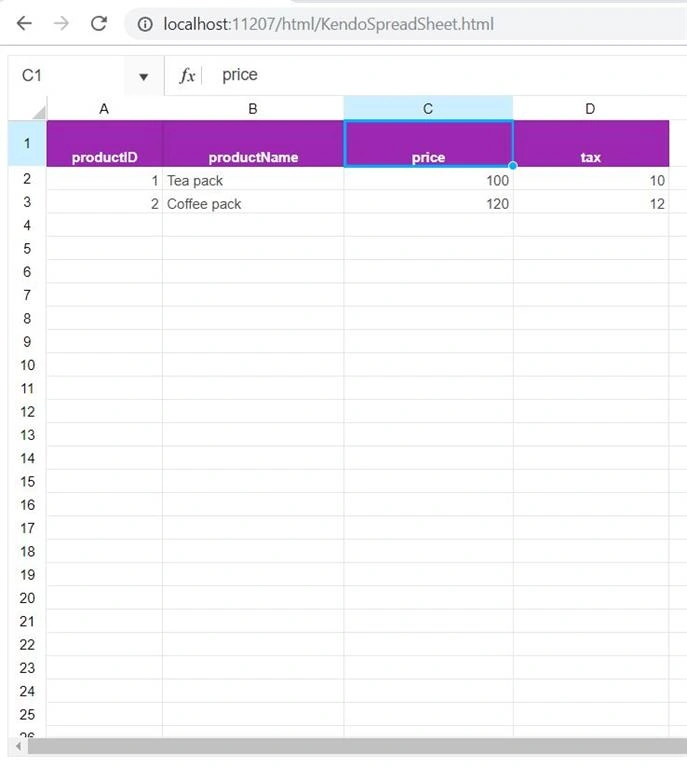
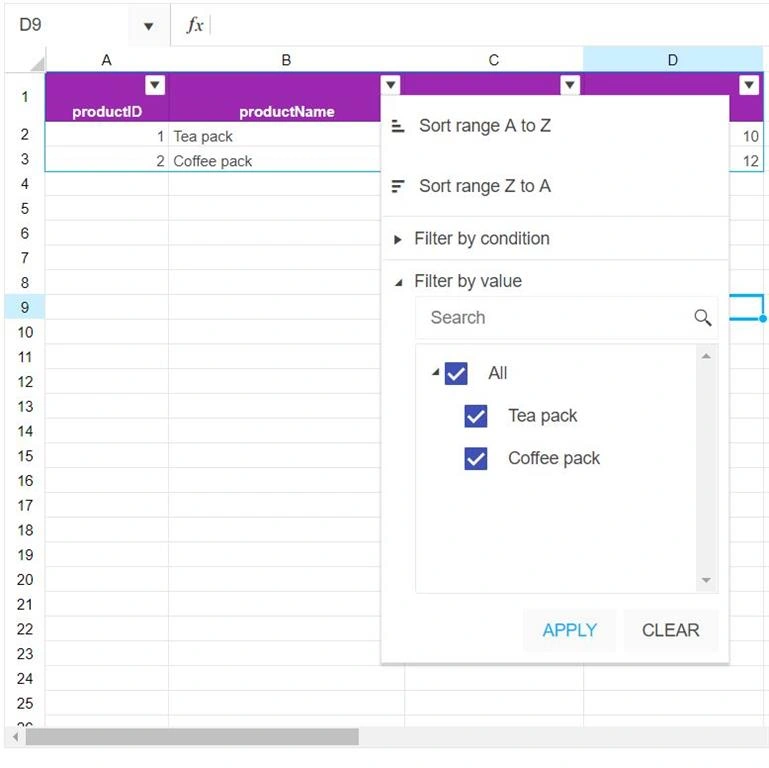
Sorting and filtering of Kendo spreadsheets can be enabled using the filter object, as given below.
- filter: {
- ref: "A1:D3",
- columns: []
- },
- <!DOCTYPE html>
- <html>
- <head>
- <style>
- html {
- font-size: 14px;
- font-family: Arial, Helvetica, sans-serif;
- }
- </style>
- <title></title>
- <link rel="stylesheet" href="https://kendo.cdn.telerik.com/2018.3.1017/styles/kendo.common-material.min.css" />
- <link rel="stylesheet" href="https://kendo.cdn.telerik.com/2018.3.1017/styles/kendo.material.min.css" />
- <link rel="stylesheet" href="https://kendo.cdn.telerik.com/2018.3.1017/styles/kendo.material.mobile.min.css" />
- <script src="https://kendo.cdn.telerik.com/2018.3.1017/js/jquery.min.js"></script>
- <script src="https://kendo.cdn.telerik.com/2018.3.1017/js/jszip.min.js"></script>
- <script src="https://kendo.cdn.telerik.com/2018.3.1017/js/kendo.all.min.js"></script>
- </head>
- <body>
- <div id="example">
- <div id="spreadsheet" style="width: 100%"></div>
- <script>
- $(function () {
- var dataSource = new kendo.data.DataSource({
- transport: {
- read: onRead,
- },
- schema: {
- model: {
- id: "ProductID",
- fields: {
- productID: { type: "number" },
- productName: { type: "string" },
- price: { type: "number" },
- tax: { type: "number" }
- }
- }
- }
- });
- $("#spreadsheet").kendoSpreadsheet({
- columns: 20,
- rows: 100,
- toolbar: false,
- sheetsbar: false,
- sheets: [{
- name: "Products",
- dataSource: dataSource,
- filter: {
- ref: "A1:D3",
- columns: []
- },
- rows: [{
- height: 40,
- cells: [
- {
- bold: "true",
- background: "#9c27b0",
- textAlign: "center",
- color: "white",
- title: "ID"
- }, {
- bold: "true",
- background: "#9c27b0",
- textAlign: "center",
- color: "white",
- title:"Product Name"
- }, {
- bold: "true",
- background: "#9c27b0",
- textAlign: "center",
- color: "white",
- title:"Price"
- }, {
- bold: "true",
- background: "#9c27b0",
- textAlign: "center",
- color: "white"
- }, ]
- }],
- columns: [
- { width: 100 },
- { width: 415 },
- { width: 145 },
- { width: 145 },
- { width: 145 }
- ]
- }]
- });
- function onRead(options) {
- $.ajax({
- url: "http://localhost:11207/api/Products/ProductDetails",
- dataType: "json",
- success: function (result) {
- options.success(result);
- },
- error: function (result) {
- options.error(result);
- }
- });
- }
- });
- </script>
- </div>
- </body>
- </html>
Conclusion
We saw how to implement a remote data binding in the kendo spreadsheet, which is basic functionality. Also, we saw the process of enabling the client-side sorting and filtering in the spreadsheet. We will see more advanced functionality in Kendo spreadsheets in my future articles.
Sarathlal SaseendranPosted Dec 31, 2018, 1:16 PM
Really cool article Gautham.