

Remote validation is a process where we make server calls to validate data without posting an entire form to the server. Now I will explain you step-by-step using a MVC4 application that I have used in the current project.
Let's see step-by-step.
Step 1
First we will create a database table tbl_customer.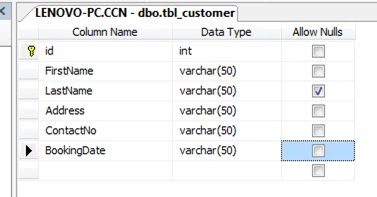
Step 2
Create a Visual Studio new project.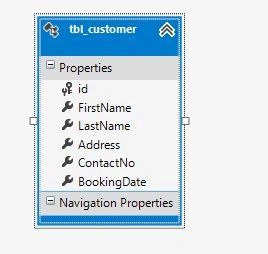
Go to File, then New and select Project ASP.NET MVC4 Application and name it “RemoteValidation”. Then select a template, here I am selecting an internet template.
Step 3
We map the database table using Entity Framework.
Step 4
Create a model class CustomerModel.cs.
- public class CustomerModel
- {
- public int id { get; set; }
- [Required(ErrorMessage = "First Name is required")]
- public string FirstName { get; set; }
- public string LastName { get; set; }
- [Required(ErrorMessage = "Address is required")]
- public string Address { get; set; }
- [Required(ErrorMessage = "Contact Number is required")]
- public string ContactNo { get; set; }
- [Remote("ValidationForWeekEnds", "Customer")]
- public string BookingDate { get; set; }
- }
Remote validation uses System.Web.Mvc or System.Web.Mvc.Remote.
Step 5
Create a Controller. I created a CustomerController.
The Customer controller contains two action methods.
The first Action method is “Index”.
- [HttpGet]
- public ActionResult Index()
- {
- return View();
- }
Step 6
We will create a view for index method.
- @model RemoteValidation.Models.CustomerModel
- @{
- ViewBag.Title = "Index";
- Layout = "~/Views/Shared/_Layout.cshtml";
- }
- <link rel="stylesheet" href="http://code.jquery.com/ui/1.10.4/themes/smoothness/jquery-ui.css">
- <script src="http://code.jquery.com/jquery-1.10.2.js"></script>
- <script src="http://code.jquery.com/ui/1.10.4/jquery-ui.js"></script>
- <script>
- $(function () {
- $("#BookingDate").datepicker();
- });
- </script>
- <h2>Index</h2>
- @using (Html.BeginForm())
- {
- @Html.AntiForgeryToken()
- @Html.ValidationSummary(true)
- <fieldset>
- <legend>CustomerModel</legend>
- <div class="editor-label">
- @Html.LabelFor(x => x.FirstName)
- </div>
- <div class="editor-field">
- @Html.TextBoxFor(x => x.FirstName,new { @maxlength="50"})
- @Html.ValidationMessageFor(x => x.FirstName)
- </div>
- <div class="editor-label">
- @Html.LabelFor(x => x.LastName)
- </div>
- <div class="editor-field">
- @Html.TextBoxFor(x => x.LastName,new { @maxlength="50"})
- </div>
- <div class="editor-label">
- @Html.LabelFor(x => x.Address)
- </div>
- <div class="editor-field">
- @Html.TextBoxFor(x => x.Address,new { @maxlength="50"})
- @Html.ValidationMessageFor(x=> x.Address)
- </div>
- <div class="editor-label">
- @Html.LabelFor(x=> x.ContactNo)
- </div>
- <div class="editor-field">
- @Html.TextBoxFor(x => x.ContactNo,new { @maxlength="50"})
- @Html.ValidationMessageFor(x=> x.ContactNo)
- </div>
- <div class="editor-label">
- @Html.LabelFor(x => x.BookingDate)
- </div>
- <div class="editor-field">
- @Html.TextBoxFor(x => x.BookingDate,new { @maxlength="50"})
- @Html.ValidationMessageFor(x => x.BookingDate)
- </div>
- <p>
- <input type="submit" value="Create" />
- </p>
- </fieldset>
- }
- @section Scripts {
- @Scripts.Render("~/bundles/jqueryval")
- }
We create a post method index and write code to insert customer information.
- [HttpPost]
- public ActionResult Index(CustomerModel custModel)
- {
- using (CCNEntities db=new CCNEntities())
- {
- tbl_customer tblCustomer = (custModel.id == 0) ? new tbl_customer() : db.tbl_customer.Where(x => x.id == custModel.id).FirstOrDefault();
- tblCustomer.FirstName = custModel.FirstName;
- tblCustomer.LastName = custModel.LastName;
- tblCustomer.Address = custModel.Address;
- tblCustomer.ContactNo = custModel.ContactNo;
- tblCustomer.BookingDate = custModel.BookingDate.ToString();
- if (custModel.id== 0)
- {
- db.tbl_customer.Add(tblCustomer);
- }
- db.SaveChanges();
- }
- return RedirectToAction("Index");
- }
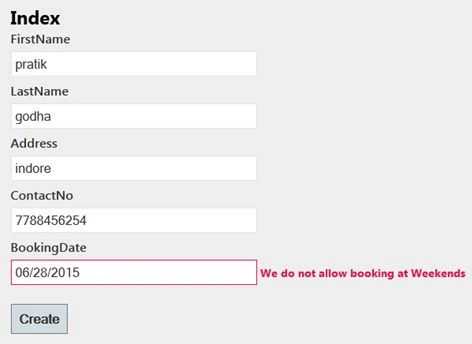
Create a method that contains the logic for remote validation. Here I am validating Booking (for example, any service provided by company) is not allowed at weekends.
- public JsonResult ValidationForWeekEnds(CustomerModel custModel)
- {
- DateTime dt =Convert.ToDateTime(custModel.BookingDate);
- custModel.BookingDate=dt.DayOfWeek.ToString();
- if (custModel.BookingDate.Contains("Saturday") || custModel.BookingDate.Contains("Sunday"))
- {
- return Json("We do not allow booking at Weekends", JsonRequestBehavior.AllowGet);
- }
- return Json(true, JsonRequestBehavior.AllowGet);
- }
Finally run the application and see if we select a BookingDate from the date picker. If the day is Sunday or Saturday, then it will validate without posting an entire form to the server.
I hope you will like it.
Tony YangPosted Nov 24, 2015, 10:21 PM
reghtrhg
Santhakumar MunuswamyPosted Jun 29, 2015, 2:40 PM
Thanks for good one
Debasis SahaPosted Jun 29, 2015, 8:09 AM
Nice Article
Rajeesh MenothPosted Jun 29, 2015, 7:32 AM
Good One Virendra Gaur..
Sibeesh VenuPosted Jun 29, 2015, 6:10 AM
Good one.
Gopi ChandPosted Jun 29, 2015, 4:18 AM
Nice