
Introduction
In my previous article I have described how to separate duplicate and non-duplicate element of array and here I describe how to remove duplicate elements of an array. When an array contains more than one of the same element then that element is called a duplicate element and I want to store each element only once.
Use the following procedure to create it.
Step 1
First of all you must create a new Windows Store Application.
Open Visual Studio 2012
"File" -> "New" -> "Project..."
Choose "Template" -> "Visual C#" -> "Window Store app"
Choose "Blank App (XAML)" then rename the application
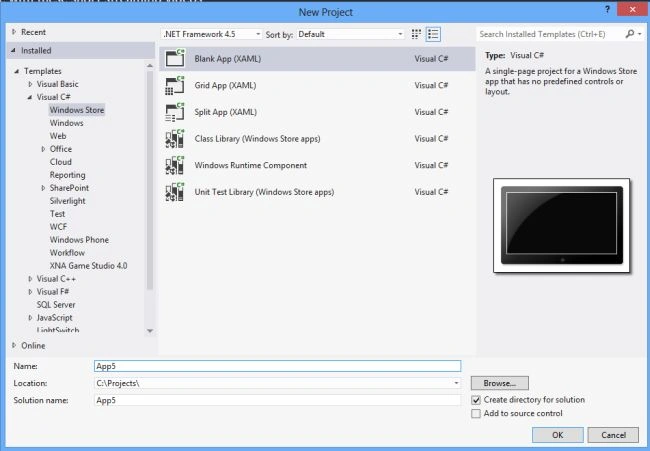
Step 2
Write the following XAML code in "Mainpage.Xaml" (that is available in Solution Explorer):
<Page
x:Class="remove_duplicate_element_of_an_array.MainPage"
xmlns="http://schemas.microsoft.com/winfx/2006/xaml/presentation"
xmlns:x="http://schemas.microsoft.com/winfx/2006/xaml"
xmlns:local="using:remove_duplicate_element_of_an_array"
xmlns:d="http://schemas.microsoft.com/expression/blend/2008"
xmlns:mc="http://schemas.openxmlformats.org/markup-compatibility/2006"
mc:Ignorable="d">
<Grid Background="Red">
<Grid.RowDefinitions>
<RowDefinition Height="110*"/>
<RowDefinition Height="59*"/>
<RowDefinition Height="40*"/>
<RowDefinition Height="45*"/>
<RowDefinition Height="514*"/>
</Grid.RowDefinitions>
<Grid.ColumnDefinitions>
<ColumnDefinition Width="167*"/>
<ColumnDefinition Width="230*"/>
<ColumnDefinition Width="286*"/>
</Grid.ColumnDefinitions>
<TextBlock Text="Array content is :" FontSize="20" FontFamily="Arial" FontWeight="ExtraBold" Foreground="White" Grid.Column="1" Grid.Row="1" TextAlignment="Left" Margin="0,0,375,12" Grid.ColumnSpan="2"/>

Deepak KumarPosted Mar 17, 2015, 6:04 AM
please replay
Deepak KumarPosted Mar 17, 2015, 6:04 AM
i want use random file store in array without duplicate value in window store app