

Introduction
In
Part 1 article of this series, we have discussed how to Display Data with
Repeater Control but now in this part we will discuss how to use Templates with
Repeater Control.
Templates with Repeater Control
As we know Repeater control supports five different types of templates mostly:
- ItemTemplate: Formats each item from the data source.
- AlternatingItemTemplate: Formats every other item from the data source.
- SeparatorTemplate: Formats between each item from the data source.
- HeaderTemplate: Formats before all items from the data source.
- FooterTemplate: Formats after all items from the data source.
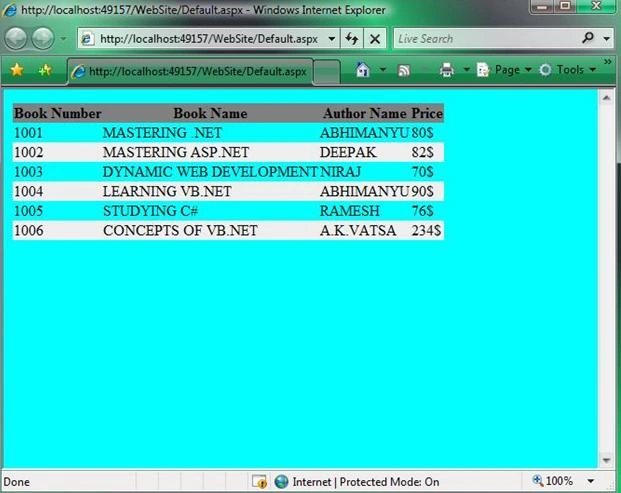
The order in which we declare the templates in the Repeater control does not matter. We can use the AlternatingItemTemplate to display alternating rows with a different background color. Here is the example given below.
<%@
Page Language="VB"
%>
<!DOCTYPE html PUBLIC "-//W3C//DTD XHTML 1.0 Transitional//EN" "http://www.w3.org/TR/xhtml1/DTD/xhtml1-transitional.dtd">
<script runat="server">
</script>
<html
xmlns="http://www.w3.org/1999/xhtml">
<head
id="Head1"
runat="server">
<style
type="text/css">
html
{
background-color:aqua;
}
.content
{
width:600px;
border:solid
1px black;
background-color:white;
}
.books
{
border-collapse:collapse;
}
.movies th,.movies
td
{
padding:10px;
border-bottom:1px
solid black;
}
.alternating
{
background-color:#eeeeee;
}
.heading
{
background-color:Gray;
}
</style>
<title></title>
</head>
<body>
<form
id="form1"
runat="server">
<div id="content">
<asp:Repeater
id="rptBooks"
DataSourceID="SqlDataSource1"
Runat="server">
<HeaderTemplate>
<table
class="books">
<tr
class="heading">
<th>Book
Number</th>
<th>Book
Name</th>
<th>Author
Name</th>
<th>Price</th>
</tr>
</HeaderTemplate>
<ItemTemplate>
<tr>
<td><%#
Eval("ID")%></td>
<td><%#Eval("TITLE")
%></td>
<td><%#Eval("AUTHOR")
%></td>
<td><%#Eval("PRICE")
%></td>
</tr>
</ItemTemplate>
<AlternatingItemTemplate>
<tr
class="alternating">
<td><%#
Eval("ID")%></td>
<td><%#
Eval("TITLE")%></td>
<td><%#
Eval("AUTHOR")%></td>
<td><%#Eval("PRICE")
%></td>
</tr>
</AlternatingItemTemplate>
<FooterTemplate>
</table>
</FooterTemplate>
</asp:Repeater>
MeenaPosted Oct 16, 2017, 6:31 AM
How to pass more than one value in the navigate url