

In this article, I will tell you how to resize an image to a desired size.
To resize an image in ASP.Net/C#, we will use the following procedure:
1. Get an image that you want to resize:
// Replace this with the actual path to your image
string path = "~Images";
System.Drawing.Image img = System.Drawing.Image.FromFile(string.Concat(path, "\3904.jpeg"));
In the attached sample, I stored the image in the image folder.
2. The Bitmap object is declared to get the image in pixel data.
Bitmap b = new Bitmap(img);
3. To resize the image to the desired format, I used the method given below:
private static System.Drawing.Image ResizeImage(System.Drawing.Image imgToResize, Size size)
{
    // Get the image current width
    int sourceWidth = imgToResize.Width;
    // Get the image current height
    int sourceHeight = imgToResize.Height;
    float nPercent = 0;
    float nPercentW = 0;
    float nPercentH = 0;
    // Calculate width and height with new desired size
    nPercentW = ((float)size.Width / (float)sourceWidth);
    nPercentH = ((float)size.Height / (float)sourceHeight);
    nPercent = Math.Min(nPercentW, nPercentH);
    // New Width and Height
    int destWidth = (int)(sourceWidth * nPercent);
    int destHeight = (int)(sourceHeight * nPercent);
    Bitmap b = new Bitmap(destWidth, destHeight);
    Graphics g = Graphics.FromImage((System.Drawing.Image)b);
    g.InterpolationMode = InterpolationMode.HighQualityBicubic;
    // Draw image with new width and height
    g.DrawImage(imgToResize, 0, 0, destWidth, destHeight);
    g.Dispose();
    return (System.Drawing.Image)b;
}
In the method above we get the bitmap image and draw the new image with new width and height. (The image will be drawn in the specified aspect ratio.)
4. Pass the bitmap image in the method above with the desired width and height:
System.Drawing.Image i = ResizeImage(b, new Size(500, 500));
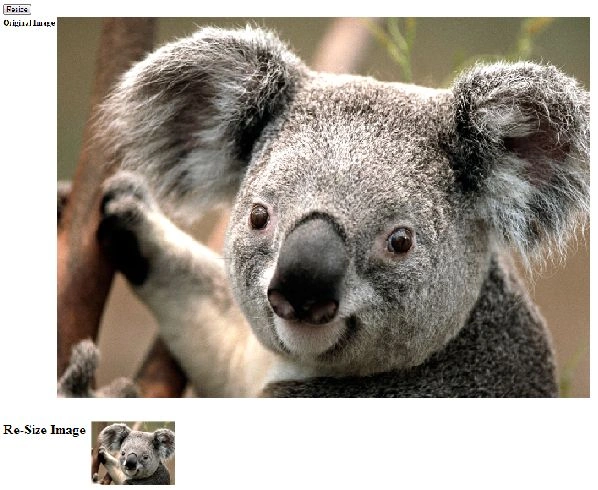
The method given above will return the image with the new width and height.
Result
Nathan WoodruffPosted Nov 1, 2024, 4:43 AM
In your section Bitmap b = new Bitmap(destWidth, destHeight); Graphics g = Graphics.FromImage((System.Drawing.Image)b); g.InterpolationMode = InterpolationMode.HighQualityBicubic; // Draw image with new width and height g.DrawImage(imgToResize, 0, 0, destWidth, destHeight); g.Dispose(); if you have a very large image to resize g.drawImage(imgToResize.... returns an overflow error. to fix this I've substituted this code Graphics g = Graphics.FromImage((System.Drawing.Image)b); // Draw image with new width and height try { g.InterpolationMode = InterpolationMode.HighQualityBicubic; g.DrawImage(imgToResize, 0, 0, destWidth, destHeight); } catch { g.InterpolationMode = InterpolationMode.Bilinear; g.DrawImage(imgToResize, 0, 0, destWidth, destHeight); } g.Dispose(); the HighQualityBiCubic setting is what is causing the memory overflow and the lowest quality setting will get around the problem
AlexPosted Feb 29, 2024, 2:58 PM
Great example, would be even better if it worked. First of all I'm a proper newbie beginner into c#, no idea what is happening. So for people like me: 1) for some reason private static is shouting error message "The modifier 'private' is not valid for this item", which goes away if you remove private static. No idea why, but it is replaced with 11 warning messages about windows 6.1 and later. One day i will find out what is happening and why. 2) the author forgot to save the output file like so: i.Save("S:/WOW/template1.jpg"); Otherwise I have no idea where he is returning his result image..
prabha karanPosted Mar 30, 2022, 1:12 PM
Image has been rotated after re-sized.
Angel MoralesPosted Apr 9, 2021, 4:22 PM
Thanks for sharing ... works great...
balaji badriPosted Oct 19, 2015, 6:41 AM
Can i take a new Website or New Project Please tel me
James HendrixPosted Aug 27, 2015, 5:16 PM
Thanks for sharing your code. Works great in my project
Bhavesh PatelPosted Jun 2, 2015, 12:01 AM
Thank You..
milad naeemPosted Mar 15, 2014, 5:34 AM
the source image w:325, h:200
milad naeemPosted Mar 15, 2014, 5:34 AM
can any when help me
milad naeemPosted Mar 15, 2014, 5:34 AM
why not resize to the specific height and width ex:460,418 give me 460,283