

Before reading this article, please look into the previous article to learn how to create a list in site and create a SharePoint hosted app in Visual Studio.
In this article, we will discuss from the third point onward, as we have already discussed the first two points in Part One.
- Create a List in Office 365 SharePoint Site
- Creation of Project using SharePoint Hosted App
- HTML code for User Interface
- Write Business logic for Insert, Update, Delete, Get data functionalities under App.js file.
- Deploy the Project
- Test the application.
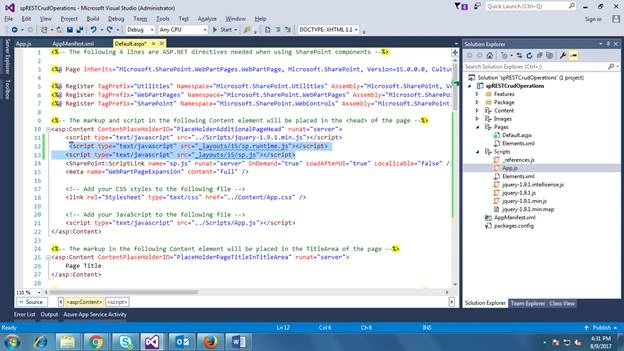
In default.aspx page, we will do some changes as mentioned below.
- Add the below script tags after jQuery script tag.
- <script type="text/javascript" src="_layouts/15/sp.runtime.js"></script>
- <script type="text/javascript" src="_layouts/15/sp.js"></script>
- Write the below HTML code for User Interface under ContentPlaceHolderID.
- <table class="centerTable">
- <tr>
- <td>
- <table>
- <tr>
- <td><span style="color: red; font: bold;"></span>ID </td>
- <td>
- <input type="text" id="empID" class="csValue" size="40" />
- </td>
- </tr>
- <tr>
- <td><span style="color: red; font: bold;"></span>EmployeeName </td>
- <td>
- <input type="text" id="empName" class="csValue" size="40" />
- </td>
- </tr>
- <tr>
- <td><span style="color: red; font: bold;"></span>Salary </td>
- <td>
- <input type="text" id="empSalary" class="csValue" size="40" />
- </td>
- </tr>
- <tr>
- <td><span style="color: red; font: bold;"></span>Address </td>
- <td>
- <textarea name="Text1" cols="40" rows="5" id="empAddress" class="csValue"></textarea>
- </td>
- </tr>
- </table>
- </td>
- </tr>
- </table>
- <table>
- <tr>
- <td>
- <input type="button" value="Clear" id="btnClear" style="background-color: #4CAF50; border: none; color: white; padding: 7px 15px; text-align: center; text-decoration: none; display: inline-block; font-size: 14px; margin: 4px 2px; cursor: pointer;" />
- </td>
- <td>
- <input type="button" value="Submit" id="btnCreate" style="background-color: #4CAF50; border: none; color: white; padding: 7px 15px; text-align: center; text-decoration: none; display: inline-block; font-size: 14px; margin: 4px 2px; cursor: pointer;" />
- </td>
- <td>
- <input type="button" value="Update" id="btnUpdate" style="background-color: #4CAF50; border: none; color: white; padding: 7px 15px; text-align: center; text-decoration: none; display: inline-block; font-size: 14px; margin: 4px 2px; cursor: pointer;" />
- </td>
- <td>
- <input type="button" value="GetData" id="btnGet" style="background-color: #4CAF50; border: none; color: white; padding: 7px 15px; text-align: center; text-decoration: none; display: inline-block; font-size: 14px; margin: 4px 2px; cursor: pointer;" />
- </td>
- <td>
- <input type="button" value="Delete" id="btnDelete" style="background-color: #4CAF50; border: none; color: white; padding: 7px 15px; text-align: center; text-decoration: none; display: inline-block; font-size: 14px; margin: 4px 2px; cursor: pointer;" />
- </td>
- </tr>
- </table>
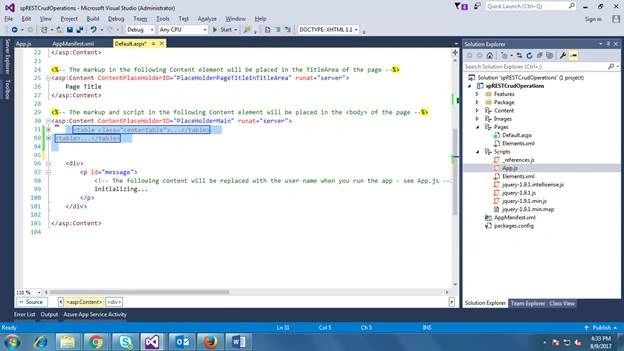
We are writing some methods for insert, update, delete, and get data and clear data operations.
- createEmployee();
- UpdateEmployee();
- GetEmployeeDetails();
- ClearData();
- GetEmployeeDetailsByID();
- createEmployee() method looks like this.
- function createEmployee() {
- $.ajax({
- url: _spPageContextInfo.siteAbsoluteUrl + "/_api/web/lists/getbytitle('" + listName + "')/items",
- type: "POST",
- contentType: "application/json;odata=verbose",
- data: JSON.stringify
- ({
- __metadata:
- {
- type: "SP.Data.EmployeeListItem"
- },
- Title: $("#empName").val(),
- Salary: $("#empSalary").val(),
- Address: $("#empAddress").val()
- }),
- headers: {
- "Accept": "application/json;odata=verbose", // return data format
- "X-RequestDigest": $("#__REQUESTDIGEST").val()
- },
- success: function (data, status, xhr) {
- $("#tblEmployees").empty();
- GetEmployeeDetails();
- alert("Successfully Submitted");
- },
- error: function (xhr, status, error) {
- alert(JSON.stringify(error));
- }
- });
- }
- UpdateEmployee() method looks like below.
- function UpdateEmployee() {
- var id = $("#empID").val();
- $.ajax({
- url: _spPageContextInfo.siteAbsoluteUrl + "/_api/web/lists/getbytitle('" + listName + "')/items('" + id + "')", // list item ID
- type: "POST",
- data: JSON.stringify
- ({
- __metadata:
- {
- type: "SP.Data.EmployeeListItem"
- },
- Title: $("#empName").val(),
- Salary: $("#empSalary").val(),
- Address: $("#empAddress").val()
- }),
- headers:
- {
- "Accept": "application/json;odata=verbose",
- "Content-Type": "application/json;odata=verbose",
- "X-RequestDigest": $("#__REQUESTDIGEST").val(),
- "IF-MATCH": "*",
- "X-HTTP-Method": "MERGE"
- },
- success: function (data, status, xhr) {
- $("#tblEmployees").empty();
- GetEmployeeDetails();
- alert("Date Updated Successfully");
- },
- error: function (xhr, status, error) {
- alert(JSON.stringify(error));
- }
- });
- }
- GetEmployeeDetails() Method looks like below.
- function GetEmployeeDetails() {
- $.ajax({
- url: _spPageContextInfo.siteAbsoluteUrl + "/_api/web/lists/getbytitle('" + listName + "')/items?$select=Title,Salary,Address",
- type: "GET",
- headers: { "Accept": "application/json;odata=verbose" }, // return data format
- success: function (data) {
- //console.log(data.d.results);
- for (var i = 0; i < data.d.results.length; i++) {
- var item = data.d.results[i];
- $("#tblEmployees").append(item.Title + "\t" + item.Salary + "\t" + item.Address + "<br/>");
- }
- },
- error: function (error) {
- alert(JSON.stringify(error));
- }
- });
- }
- GetEmployeeDetailsByID() method looks like this.
- function GetEmployeeDetailsByID() {
- var idValue = $("#empID").val();
- $.ajax({
- url: _spPageContextInfo.siteAbsoluteUrl + "/_api/web/lists/getbytitle('" + listName + "')/items('" + idValue + "')",
- type: "GET",
- headers: { "Accept": "application/json;odata=verbose" }, // return data format
- success: function (data) {
- $("#empName").val(data.d.Title);
- $("#empSalary").val(data.d.Salary);
- $("#empAddress").val(data.d.Address);
- $("#tblEmployees").empty();
- GetEmployeeDetails();
- },
- error: function (error) {
- alert(JSON.stringify(error));
- }
- });
- }
Finally, the App.js code looks like below.
- 'use strict';
- var hostWebUrl;
- var appWebUrl;
- var listName = "Employee";
- ExecuteOrDelayUntilScriptLoaded(initializePage, "sp.js");
- function initializePage() {
- var context = SP.ClientContext.get_current();
- var user = context.get_web().get_currentUser();
- // This code runs when the DOM is ready and creates a context object which is needed to use the SharePoint object model
- $(document).ready(function () {
- GetEmployeeDetails();
- $("#btnCreate").on('click', function () {
- createEmployee();
- ClearData();
- });
- $("#btnUpdate").on('click', function () {
- UpdateEmployee();
- ClearData();
- });
- $("#btnClear").on('click', function () {
- ClearData();
- });
- $("#btnGet").on('click', function () {
- $('#empName').val("");
- $("#empSalary").val("");
- $("#tblAddress").val("");
- $("#tblEmployees").empty();
- GetEmployeeDetailsByID();
- });
- $("#btnDelete").on('click', function () {
- deleteEmployee();
- ClearData();
- });
- });
- function deleteEmployee() {
- var id = $("#empID").val();
- $.ajax
- ({
- url: _spPageContextInfo.siteAbsoluteUrl + "/_api/web/lists/getbytitle('" + listName + "')/items('" + id + "')",
- type: "POST",
- headers:
- {
- "Accept": "application/json;odata=verbose",
- "Content-Type": "application/json;odata=verbose",
- "X-RequestDigest": $("#__REQUESTDIGEST").val(),
- "IF-MATCH": "*",
- "X-HTTP-Method": "DELETE"
- },
- success: function (data, status, xhr) {
- $("#tblEmployees").empty();
- GetEmployeeDetails();
- alert("Successfully record deleted");
- },
- error: function (xhr, status, error) {
- alert(JSON.stringify(error));
- }
- });
- }
- function ClearData() {
- $("#empID").val("");
- $('#empName').val("");
- $("#empSalary").val("");
- $("#empAddress").val("");
- }
- function GetEmployeeDetailsByID() {
- var idValue = $("#empID").val();
- $.ajax({
- url: _spPageContextInfo.siteAbsoluteUrl + "/_api/web/lists/getbytitle('" + listName + "')/items('" + idValue + "')",
- type: "GET",
- headers: { "Accept": "application/json;odata=verbose" }, // return data format
- success: function (data) {
- $("#empName").val(data.d.Title);
- $("#empSalary").val(data.d.Salary);
- $("#empAddress").val(data.d.Address);
- $("#tblEmployees").empty();
- GetEmployeeDetails();
- },
- error: function (error) {
- alert(JSON.stringify(error));
- }
- });
- }
- function UpdateEmployee() {
- var id = $("#empID").val();
- $.ajax({
- url: _spPageContextInfo.siteAbsoluteUrl + "/_api/web/lists/getbytitle('" + listName + "')/items('" + id + "')", // list item ID
- type: "POST",
- data: JSON.stringify
- ({
- __metadata:
- {
- type: "SP.Data.EmployeeListItem"
- },
- Title: $("#empName").val(),
- Salary: $("#empSalary").val(),
- Address: $("#empAddress").val()
- }),
- headers:
- {
- "Accept": "application/json;odata=verbose",
- "Content-Type": "application/json;odata=verbose",
- "X-RequestDigest": $("#__REQUESTDIGEST").val(),
- "IF-MATCH": "*",
- "X-HTTP-Method": "MERGE"
- },
- success: function (data, status, xhr) {
- $("#tblEmployees").empty();
- GetEmployeeDetails();
- alert("Date Updated Successfully");
- },
- error: function (xhr, status, error) {
- alert(JSON.stringify(error));
- }
- });
- }
- function createEmployee() {
- $.ajax({
- url: _spPageContextInfo.siteAbsoluteUrl + "/_api/web/lists/getbytitle('" + listName + "')/items",
- type: "POST",
- contentType: "application/json;odata=verbose",
- data: JSON.stringify
- ({
- __metadata:
- {
- type: "SP.Data.EmployeeListItem"
- },
- Title: $("#empName").val(),
- Salary: $("#empSalary").val(),
- Address: $("#empAddress").val()
- }),
- headers: {
- "Accept": "application/json;odata=verbose", // return data format
- "X-RequestDigest": $("#__REQUESTDIGEST").val()
- },
- success: function (data, status, xhr) {
- $("#tblEmployees").empty();
- GetEmployeeDetails();
- alert("Successfully Submitted");
- },
- error: function (xhr, status, error) {
- alert(JSON.stringify(error));
- }
- });
- }
- function GetEmployeeDetails() {
- $.ajax({
- url: _spPageContextInfo.siteAbsoluteUrl + "/_api/web/lists/getbytitle('" + listName + "')/items?$select=ID,Title,Salary,Address",
- type: "GET",
- headers: { "Accept": "application/json;odata=verbose" }, // return data format
- success: function (data) {
- //console.log(data.d.results);
- var table = $("#tblEmployees");
- var html = "<thead><tr><th>ID</<th><th>Name</th><th>Salary</th><th>Address</th></tr></thead>";
- for (var i = 0; i < data.d.results.length; i++) {
- var item = data.d.results[i];
- //$("#tblEmployees").append(item.Title + "\t" + item.Salary + "\t" + item.Address + "<br/>");
- html += "<tr><td>" + item.ID + "</td><td>" + item.Title + "</td><td>" + item.Salary + "</td><td>" + item.Address + "</td></tr>";
- }
- table.html(html);
- },
- error: function (error) {
- alert(JSON.stringify(error));
- }
- });
- }
- function manageQueryStringParameter(paramToRetrieve) {
- var params =
- document.URL.split("?")[1].split("&");
- var strParams = "";
- for (var i = 0; i < params.length; i = i + 1) {
- var singleParam = params[i].split("=");
- if (singleParam[0] == paramToRetrieve) {
- return singleParam[1];
- }
- }
- }
- // This function prepares, loads, and then executes a SharePoint query to get the current users information
- function getUserName() {
- context.load(user);
- context.executeQueryAsync(onGetUserNameSuccess, onGetUserNameFail);
- }
- // This function is executed if the above call is successful
- // It replaces the contents of the 'message' element with the user name
- function onGetUserNameSuccess() {
- $('#message').text('Hello ' + user.get_title());
- }
- // This function is executed if the above call fails
- function onGetUserNameFail(sender, args) {
- alert('Failed to get user name. Error:' + args.get_message());
- }
- }
Right click on the solution and select the "Deploy" option.

- Once you deploy it, the system will ask for Ofice 365 credentials. Enter the credentials.
- Trust the app like in the below screen.

- You can see the User Interface page like below.

Here, we will test for "Submit" button.
- Enter Employee Name, Salary, and Address values and click on the "Submit" button. Leave the ID text box empty for it is auto-generated.
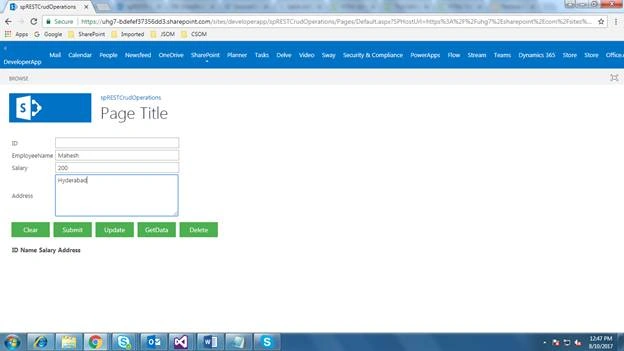
- Once you click on Submit button, the data will be displayed in the below table.

- To test Get Data, enter the ID value in text box. Example - I entered 15 in ID text box and clicked on "Get Data" button. The list Item data will be displayed in the respective text boxes.

- To test Clear functionality, click on "Clear" button; the data will be cleared for textboxes.

- To test "Delete" functionality, enter the ID value and click on Delete button. Example- I have entered ID 15 in text box and clicked on Delete button. List Item ID 15 record will be removed from the list.

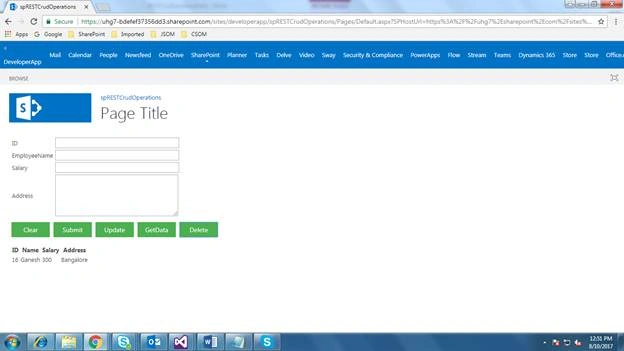
Here, we have seen CRUD operations for REST API in SharePoint 2013. I am attaching the code here. Please test and let me know if you have any queries. We will see more on REST APIs in my upcoming article.
Jayprakash BirlaPosted Feb 13, 2020, 2:53 AM
Thanks this code is helpfull for me
Tarun DPosted Aug 28, 2017, 1:43 AM
Thank you Mahesh for the nice Article