Introduction

There are three ways to pass a value or data from a view to an action.
- Parameterized Query.
- Form Data.
- Model Binding.
The data that is passed
A Form Collection is the data that is passed in a form submission when we use the HTTP POST Method.
- What we will do in this application.
- We will learn retrieving the data by using Form Collection.
- For all this operation we will use the EntityFramework.
The following database script is available in the attached file.
- create table tbl_FormCollectionUse
- (
- ID int identity primary key,
- Name varchar(50),
- Mobile bigint,
- EmailID varchar(100),
- Address varchar(100)
- )
Start Visual Studio 2010 then Start a New MVC 3 (With Razor View Engine).
Add a New Controller to the project named “FormCollection”.
Steps

Steps
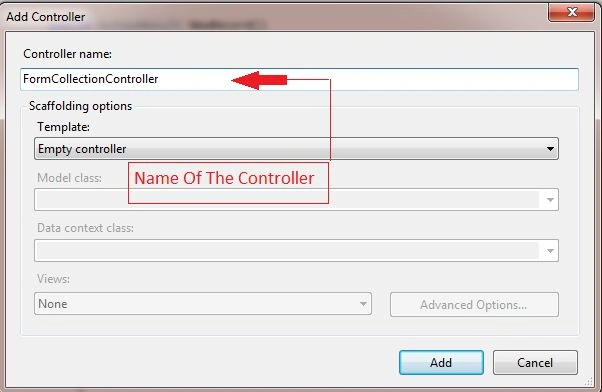
FormCollectionController.cs
- using System;
- using System.Collections.Generic;
- using System.Linq;
- using System.Web;
- using System.Web.Mvc;
-
- namespace MvcApplication3.Controllers
- {
- public class FormCollectionController : Controller
- {
- string _Name, _EmailID, _Address;
- long _MobileN0;
-
-
-
-
- public ActionResult Index()
- {
- return View();
- }
-
- }
- }
Add a View to the Index() Action method.
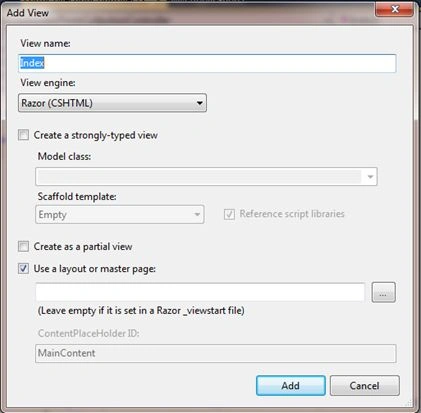
Index.cshtml
- @{
- ViewBag.Title = "Index";
- }
-
- <h2>Index</h2>
- <h6></h6>
- <h6> I will Retrieve data through the Form Collection and Insert it to the database.</h6>
- <h6>@Html.ActionLink("New Record", "NewRecord", "FormCollection")</h6>
Add a new Action Method as in the following:
- using System;
- using System.Collections.Generic;
- using System.Linq;
- using System.Web;
- using System.Web.Mvc;
-
- namespace MvcApplication3.Controllers
- {
- public class FormCollectionController : Controller
- {
- string _Name, _EmailID, _Address;
- long _MobileN0;
-
-
-
- public ActionResult Index()
- {
- return View();
- }
- public ActionResult NewRecord()
- {
- return View();
- }
- }
- }
Add a View to the Action method as in the following:
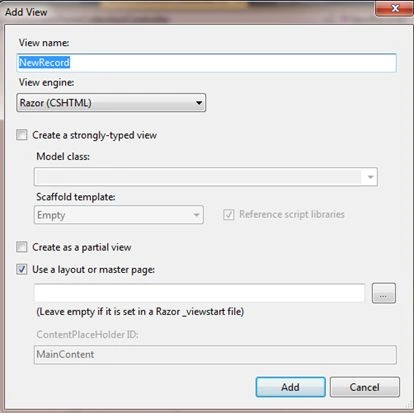
Design The View Depending on our requirements
NewRecord.cshtml
- @{
- ViewBag.Title = "NewRecord";
- }
-
- <h2>NewRecord</h2>
- <h6>@Html.ActionLink("Go Back", "Index", "FormCollection")</h6>
- @using (@Html.BeginForm("Insert", "FormCollection", FormMethod.Post))
- {
- <table>
- <tr>
- <td>@Html.Label("Name")</td><td>:</td><td>@Html.TextBox("TxtName")</td>
- </tr>
- <tr>
- <td>@Html.Label("Mobile No")</td><td>:</td><td>@Html.TextBox("Mobile")</td>
- </tr>
- <tr>
- <td>@Html.Label("EmailID")</td><td>:</td><td>@Html.TextBox("TxtEmailID")</td>
- </tr>
- <tr>
- <td>@Html.Label("Address")</td><td>:</td><td>@Html.TextBox("TxtAddress")</td>
- </tr>
- <tr>
- <td>@Html.Label("Save Your Details")</td><td>:</td><td><input type="submit" value="Submit" /></td>
- </tr>
- <tr>
- <td>@Html.Label("Reset Your Details")</td><td>:</td><td><input type="reset" value="Reset" /></td>
- </tr>
- </table>
- }

Then add a new Action Method to the Controller as in the following:
- using System;
- using System.Collections.Generic;
- using System.Linq;
- using System.Web;
- using System.Web.Mvc;
-
- namespace MvcApplication3.Controllers
- {
- public class FormCollectionController : Controller
- {
- string _Name, _EmailID, _Address;
- long _MobileN0;
-
-
-
-
- public ActionResult Index()
- {
- return View();
- }
-
- public ActionResult NewRecord()
- {
- return View();
- }
-
- public ActionResult Insert(FormCollection Fc)
- {
- return View();
- }
-
- }
- }
Notice: The new Action Method is declared with a FormCollection Parameter.
Then add a View for the Insert Action as in the following method

Insert.cshtml
- @{
- ViewBag.Title = "Insert";
-
- }
-
- <h2>Insert</h2>
- <h6>@Html.ActionLink("Go Back", "Index", "FormCollection")</h6>
- <h6>@ViewBag.Msg</h6>
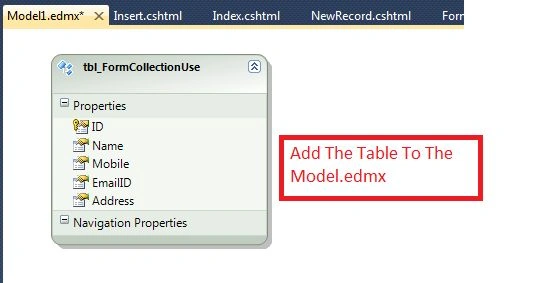
Create the table if not created and add it to the Entity Framework Model Designer as in the following:
- create table tbl_FormCollectionUse
- (
- ID int identity primary key,
- Name varchar(50),
- Mobile bigint,
- EmailID varchar(100),
- Address varchar(100)
- )
The following shows how to add a table to the (EntityFramework Designer) Model.edmx file.
At the Model.edmx select Update Model from Database -> Update Wizard then select the Table Name then click Finish.
Modify the code at Insert the Action method and retrieve and save that data to the database.
- using System;
- using System.Collections.Generic;
- using System.Linq;
- using System.Web;
- using System.Web.Mvc;
-
- namespace MvcApplication3.Controllers
- {
- public class FormCollectionController : Controller
- {
- string _Name, _EmailID, _Address;
- long _MobileN0;
-
-
-
-
- public ActionResult Index()
- {
- return View();
- }
-
- public ActionResult NewRecord()
- {
- return View();
- }
-
- public ActionResult Insert(FormCollection Fc)
- {
- using (MVC_PracticeEntities objContext = new MVC_PracticeEntities())
- {
- tbl_FormCollectionUse Tbl = new tbl_FormCollectionUse();
-
- Tbl.Name = Fc["TxtName"].ToString();
- Tbl.Mobile = Convert.ToInt64(Fc["Mobile"]);
- Tbl.EmailID = Fc["TxtEmailID"].ToString();
- Tbl.Address = Fc["TxtAddress"].ToString();
-
- objContext.AddTotbl_FormCollectionUse(Tbl);
-
- int i = objContext.SaveChanges();
- if (i > 0)
- {
- ViewBag.Msg = "Data Saved Suuceessfully.";
- }
- }
-
-
- return View();
- }
-
- }
- }
Run the application and test it.
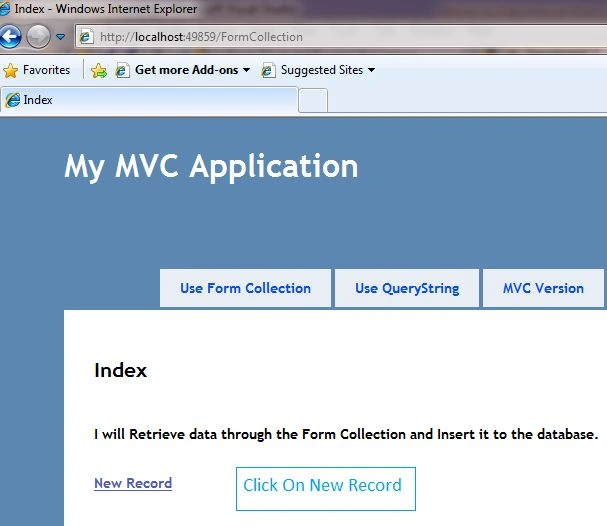
Click on New Record.
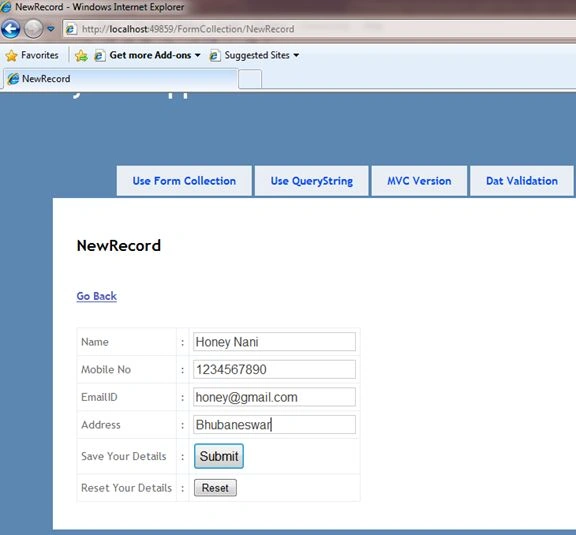
Click on Submit.

Ad some more data and watch the DB Table.
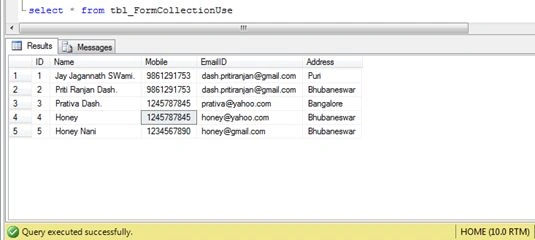
I am providing all the code and the scripts again.
Index.cshtml
- @{
- ViewBag.Title = "Index";
- }
-
- <h2>Index</h2>
- <h6></h6>
- <h6> I will Retrieve data through the Form Collection and Insert it to the database.</h6>
- <h6>@Html.ActionLink("New Record", "NewRecord", "FormCollection")</h6>
NewRecord.cshtml
- @{
- ViewBag.Title = "NewRecord";
- }
-
- <h2>NewRecord</h2>
- <h6>@Html.ActionLink("Go Back", "Index", "FormCollection")</h6>
- @using (@Html.BeginForm("Insert", "FormCollection", FormMethod.Post))
- {
- <table>
- <tr>
- <td>@Html.Label("Name")</td><td>:</td><td>@Html.TextBox("TxtName")</td>
- </tr>
- <tr>
- <td>@Html.Label("Mobile No")</td><td>:</td><td>@Html.TextBox("Mobile")</td>
- </tr>
- <tr>
- <td>@Html.Label("EmailID")</td><td>:</td><td>@Html.TextBox("TxtEmailID")</td>
- </tr>
- <tr>
- <td>@Html.Label("Address")</td><td>:</td><td>@Html.TextBox("TxtAddress")</td>
- </tr>
- <tr>
- <td>@Html.Label("Save Your Details")</td><td>:</td><td><input type="submit" value="Submit" /></td>
- </tr>
- <tr>
- <td>@Html.Label("Reset Your Details")</td><td>:</td><td><input type="reset" value="Reset" /></td>
- </tr>
- </table>
- }
Insert.cshtml
- @{
- ViewBag.Title = "Insert";
-
- }
-
- <h2>Insert</h2>
- <h6>@Html.ActionLink("Go Back", "Index", "FormCollection")</h6>
- <h6>@ViewBag.Msg</h6>
- using System;
- using System.Collections.Generic;
- using System.Linq;
- using System.Web;
- using System.Web.Mvc;
-
- namespace MvcApplication3.Controllers
- {
- public class FormCollectionController : Controller
- {
- string _Name, _EmailID, _Address;
- long _MobileN0;
-
-
-
-
- public ActionResult Index()
- {
- return View();
- }
-
- public ActionResult NewRecord()
- {
- return View();
- }
-
- public ActionResult Insert(FormCollection Fc)
- {
- using (MVC_PracticeEntities objContext = new MVC_PracticeEntities())
- {
- tbl_FormCollectionUse Tbl = new tbl_FormCollectionUse();
-
- Tbl.Name = Fc["TxtName"].ToString();
- Tbl.Mobile = Convert.ToInt64(Fc["Mobile"]);
- Tbl.EmailID = Fc["TxtEmailID"].ToString();
- Tbl.Address = Fc["TxtAddress"].ToString();
-
- objContext.AddTotbl_FormCollectionUse(Tbl);
-
- int i = objContext.SaveChanges();
- if (i > 0)
- {
- ViewBag.Msg = "Data Saved Suuceessfully.";
- }
- }
-
-
- return View();
- }
-
- }
- }


Ravi SPosted May 20, 2019, 10:31 PM
How to insert data into database using without entity framework insert method in formcollection.
Manav PandyaPosted Dec 24, 2016, 3:38 AM
What is objContext.AddTotbl_FormCollectionUse(Tbl); ????
Manav PandyaPosted Dec 24, 2016, 2:34 AM
Great post on form collection in mvc
Osadhis NandaPosted Apr 13, 2016, 2:11 AM
I want to know when data inserted into table depending on the status of the table pop up message shown in to the UI on every insertion in each table.
Saineshwar BageriPosted Mar 10, 2015, 9:04 AM
nice article
Tom MohanPosted Mar 10, 2015, 1:07 AM
good show
Rajeev RanjanPosted Mar 9, 2015, 11:34 PM
such a nice article .