

In this article we will discuss about the basics of Routing in WCF services. This concept aims at hiding the actual services from a client applications and making them sending the requests to a single common service. Based on the request being sent to the common service, it is routed to the appropriate, one or more services, which were actually intended to receive the request from the client application. So such a scenario looks like the following:
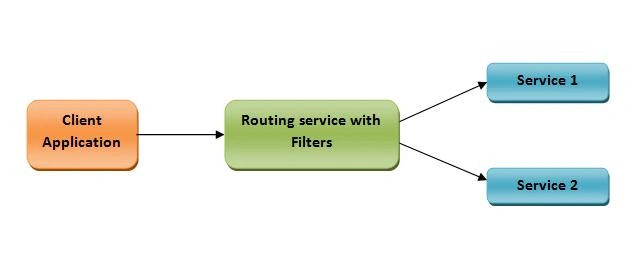
Some of the major advantages of this concept include:
- Service versioning:
This means, create multiple versions of a service, one after another. Old clients will keep using the older version and new clients can be routed to the new service, using the router service. Once the old clients are ready to use the new service, pass appropriate version request in the request message. - Protocol bridging:
This includes the scenario, where the client supports different protocols and the services support different protocols. In such a case, create a service which can communicate with the client application as per their protocol type support and route the request to the appropriate service, based on the request where it is intended to be. - Error handling:
This allows creation of back-up list for the service that should receive the requests, in case there is any failure in processing the request by a service.
Refer to the following msdn link, for some more features that this routing service can provide: https://msdn.microsoft.com/en-us/library/ee517423%28v=vs.110%29.aspx?f=255&MSPPError=-2147217396
How the router service works ?
Now the question arises, how we can create a router service, which can perform these tasks. For this, the major task is to define the configuration for the routing service, based on which the request will be routed to the appropriate service. This configuration include following major steps:
1. Configure the router service with it's end point and behavior configuration: This includes defining the endpoint where it can be accessed and protocol that can be used for this service and it's contract type. So it would look like the following:
- <services>
- <service name="System.ServiceModel.Routing.RoutingService"
- behaviorConfiguration="RoutingSvcBehavior">
- <host><baseAddresses><add baseAddress="http://localhost:5643/RoutingSvc"/></baseAddresses></host>
- <endpoint
- address=""
- binding="wsHttpBinding"
- name="RoutingEndpoint"
- contract="System.ServiceModel.Routing.IRequestReplyRouter"/>
- </service>
- </services>
- <behaviors>
- <serviceBehaviors>
- <behavior name="RoutingSvcBehavior">
- <serviceMetadata httpGetEnabled="true" httpsGetEnabled="true"/>
- <serviceDebug includeExceptionDetailInFaults="false"/>
- <routing filterTableName="SvcRouterTable"/>
- </behavior>
- </serviceBehaviors>
- </behaviors>
- IDuplexSessionRouter
- IRequestReplyRouter
- ISimplexDatagramRouter
- ISimplexSessionRouter
In our case, we are going to use the request-reply mode, so we are using the IRequestReplyRouter. Further there is the a tag named routing, which acts as the core logic of this routing concept. We will discuss about these further.
Next we add list of endpoints in the client tag, which is nothing but the endpoints of the services, which are intended to receive the request from the client application. It will look like the following:
- <client>
- <endpoint
- name="Service_1" binding="wsHttpBinding"
- address="http://localhost:12354/Service1.svc"
- contract="*">
- </endpoint>
- <endpoint
- name="Service_2" binding="wsHttpBinding"
- address="http://localhost:34343/Service_2.svc"
- contract="*">
- </endpoint>
- </client>
So in the above code, we have defined endpoints of two services Service_1 and Service_2, for which the router service will work.
Next, we will define the routing table, with filters, based on which a request is redirected to an appropriate service, for which it is actually intended to be. This section will look like the following:
- <routing>
- <filters>
- <filter name="MyFilter_1" filterType="Action" filterData="http://localhost:64832/IMyService/GetData"/>
- <filter name="MyFilter_2" filterType="Action" filterData="http://localhost:64832/IMyService/GetData2"/>
- </filters>
- <filterTables>
- <filterTable name="ServiceRouterTable">
- <add filterName="MyFilter_1" endpointName="Service_1"/>
- <add filterName="MyFilter_2" endpointName="Service_2"/>
- </filterTable>
- </filterTables>
- </routing>
- Action
- EndpointAddress
- EndpointAddressPrefix
- And
- Custom
- EndpointName
- MatchAll
- XPath
So this was the basic configuration for the routing service. Next we simply define the client services and the client application. Client application will be configured to make the requests to the router service. In next article, we will practically implement the concept of routing service. Hope you enjoyed reading it. Happy coding...!!!
Read more articles on WCF:
Amit DavePosted May 3, 2016, 10:36 AM
Keep up the Good work!
Sonu ChaudharyPosted May 2, 2016, 6:04 AM
Thanks for sharing
Kuppurasu NagarajPosted Apr 30, 2016, 2:29 PM
Nice Sharing..
Prasanth RadhakrishnanPosted Apr 30, 2016, 12:08 AM
nice work...
Vivek KumarPosted Apr 29, 2016, 4:05 PM
Good one
Mohammed IbrahimPosted Apr 29, 2016, 12:47 PM
nice
Debasis SahaPosted Apr 29, 2016, 9:06 AM
Good One..
Vignesh ManiPosted Apr 29, 2016, 8:37 AM
Nice
Gowtham RajamanickamPosted Apr 29, 2016, 7:50 AM
good work..
Hari ShankerPosted Apr 29, 2016, 7:33 AM
Good Work
Bhuvanesh MohankumarPosted Apr 29, 2016, 7:15 AM
Hearing for first time, good
Rahul Kumar SaxenaPosted Apr 29, 2016, 6:42 AM
Good Show