

Introduction
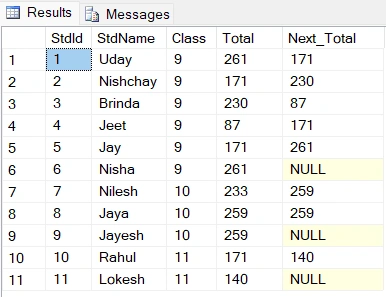
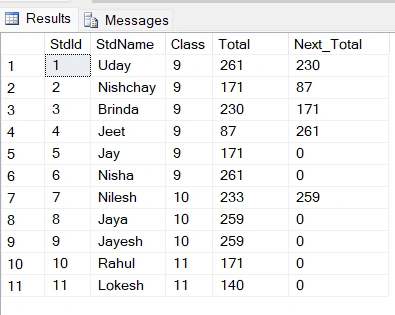
In this article, we will learn about SQL functions, Row_Number(), Rank(), Dense_Rank(), Lead() and Leg() with their examples. If you are new to SQL, please read and download a free SQL book here: What is SQL. Everything You Need to Know About SQL.
Creating a table in SQL Server
To get this starrted, let's create a new table, StudentData in SQL Server using the following SQL statement. You can run this query in SSMS or console, however you like to work with SQL Server. The StudentData tabe has seven columns - StdId, StdName, Class, Sub1, Sub2, Sub3, and Total that represent ID, student name, class, subject1, subject2, subject3, and total marks of a student respectively. The query also ads few records to the table.
Create Table StudentData
(
	StdId Int,
	StdName Varchar(20),
	Class Int,
	Sub1 Int,
	Sub2 Int,
	Sub3 Int,
	Total Int
)

Insert Into StudentData Values(1,'Uday',9,85,86,90,0)
Insert Into StudentData Values(2,'Nishchay',9,56,65,50,0)
Insert Into StudentData Values(3,'Brinda',9,70,75,85,0)
Insert Into StudentData Values(4,'Jeet',9,30,29,28,0)
Insert Into StudentData Values(5,'Jay',9,50,56,65,0)
Insert Into StudentData Values(6,'Nisha',9,85,86,90,0)
Insert Into StudentData Values(7,'Nilesh',10,50,98,85,0)
Insert Into StudentData Values(8,'Jaya',10,76,98,85,0)
Insert Into StudentData Values(9,'Jayesh',10,85,76,98,0)
Insert Into StudentData Values(10,'Rahul',11,56,65,50,0)
Insert Into StudentData Values(11,'Lokesh',11,35,50,55,0)
Let's check our data. Execute the following query.
Select * From StudentData
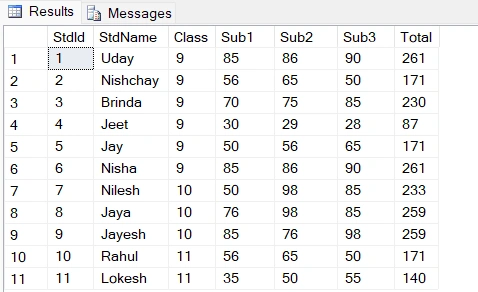
The following is the sample data for the StudentData Table that we just added using the above query.
ROW_NUMBER() Function without Partition By clause
The Row_Number() Function is a very important part of SQL. Using row_number(), we will give a unique numbers to each row. Here is the syntax of Row_Number() in SQL.
Syntax
ROW_NUMBER () OVER ([PARTITION BY value_exp, ... [ n ]] ORDER BY_clause)
Example
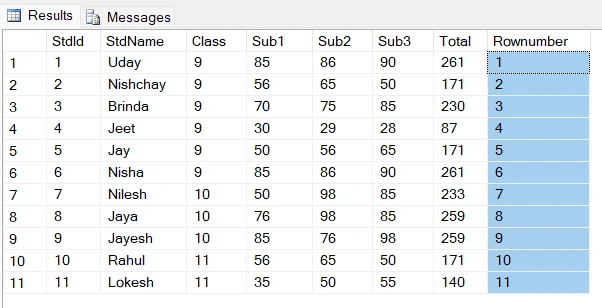
select *, ROW_NUMBER() over(Order By StdId) as Rownumber from StudentData
The following is the output of the above query.
ROW_NUMBER() Function with Partition By clause
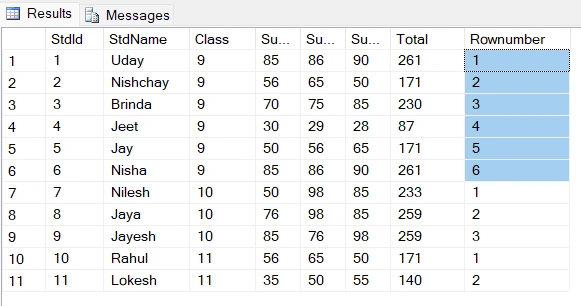
If we want to add row_number() for each group, this will start from the beginning for every group. Let's understand this further by following an example.
Example
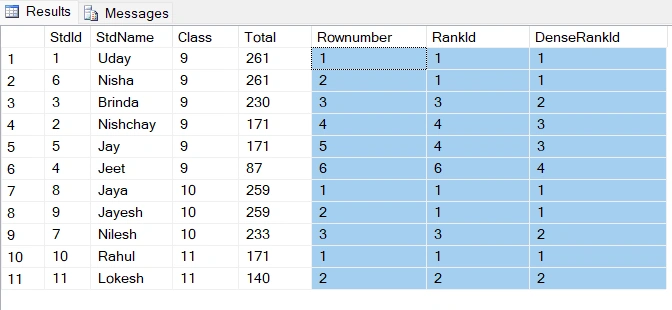
select *, ROW_NUMBER() over(Partition By Class Order By StdId) as Rownumber from StudentData
The following is the output of the above query.
RANK() Function in SQL
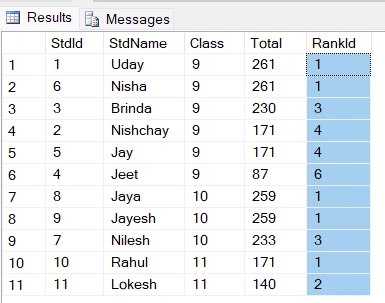
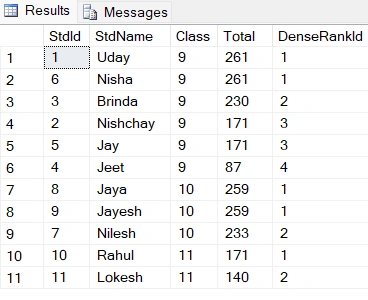
The RANK() function in SQL gives a unique value to each different row. Skip the value for the same records and give the next value. For example, if two records have the same rank, e.g., 1, so it gives 3 to the third row, skip the 2.
Example
Bhavesh RavalPosted Nov 18, 2022, 11:00 AM
Very use full all function in sql with example
Mukesh SagarPosted Aug 22, 2022, 11:28 AM
Nice explanation.
Rasik SharmaPosted Aug 8, 2022, 2:11 PM
Since this is a learning forum, I suggest it would have been better if you could also attach or keep the script as well as sample data together with your solutions!