

Introduction
This article describes how to create a RSS feed in ASP.Net.
Procedure
To create a RSS feed use the following procedure:
-
Add the following line in to the RSS page under the page directive line as in the following:
- <%@OutputCacheDuration="120"VaryByParam="*"%>
-
Create a table with the fields Id, title, description and URL and enter some dummy data like:
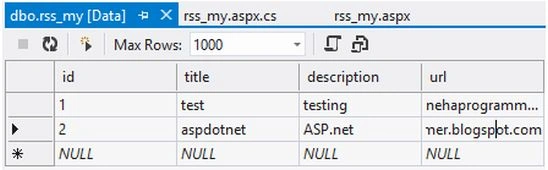
-
Add the following code on the page load:
- string connectionString = "Data Source=name;Initial Catalog=db name;Integrated Security=True";
- DataTable d_t = newDataTable();
- SqlConnection conn = newSqlConnection(connectionString);
- using (conn)
- {
- SqlDataAdapter adp = newSqlDataAdapter("SELECT * from tablename", conn);
- adp.Fill(d_t);
- }
- Response.Clear();
- Response.ContentType = "text/xml";
- XmlTextWriter Text_Writer = newXmlTextWriter(Response.OutputStream,Encoding.UTF8);
- Text_Writer.WriteStartDocument();
- //Below tags are mandatory rss
- Text_Writer.WriteStartElement("rss");
- Text_Writer.WriteAttributeString("version","2.0");
- // Channel tag will contain RSS feed details
- Text_Writer.WriteStartElement("channel");
- Text_Writer.WriteElementString("title"," ASP.NET ");
- Text_Writer.WriteElementString("link","http://nehaprogrammer.blogspot.com");
- Text_Writer.WriteElementString("description"," C#.NET,ASP.NET ");
- Text_Writer.WriteElementString("copyright","Copyright 2013 - 2014 nehaprogrammer.blogspot.com. All rights reserved.");
- foreach (DataRow oFeedItem in d_t.Rows)
- {
- Text_Writer.WriteStartElement("item");
- Text_Writer.WriteElementString("title", oFeedItem["Title"].ToString());
- Text_Writer.WriteElementString("description", oFeedItem["Description"].ToString());
- Text_Writer.WriteElementString("link", oFeedItem["URL"].ToString());
- Text_Writer.WriteEndElement();
- }
- Text_Writer.WriteEndElement();
- Text_Writer.WriteEndElement();
- Text_Writer.WriteEndDocument();
- Text_Writer.Flush();
- Text_Writer.Close();
- Response.End();
Save all and view the page in the browser. It will work perfectly.
Neha SharmaPosted Apr 9, 2013, 9:32 AM
Thx Ruchit but here it's working
Rachit PateleditedPosted Apr 9, 2013, 3:40 AMEdited Apr 9, 2013, 4:38 AM
Nice article but OutputCache not work. May be OutputCache not support when we set Response.ContentType = "text/xml";
Neha SharmaPosted Apr 9, 2013, 1:35 AM
Thx..!!
Former memberPosted Apr 8, 2013, 8:10 PM
Nice artice Neha /DJ