

Initial chamber
Step 1: Open Visual Studio 2010 and create an empty website. Give it a suitable name: FileUpload_demo.
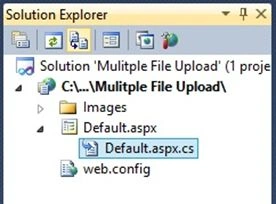
Step 2: In Solution Explorer you will get your empty website. Add a web form by following these steps:
For Web Form:
Step 3: FileUpload_demo (Your Empty Website) - Right Click, Add New Item, then Web Form. Name it Fileupload_demo.aspx.
Again get back to your website in Solution Explorer and Add New Folder and give a name [New Folder, then Images].
Design chamber
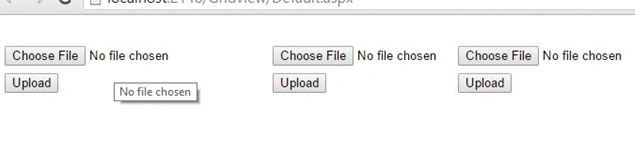
Step 4: Open Fileupload_demo.aspx file to create our design, we will drag an HTML table, three FileUpload controls, three buttons and three labels.
Fileupload_demo.aspx.
- <%@ Page Language="C#" AutoEventWireup="true" CodeFile="Default.aspx.cs" Inherits="_Default" %>
- <!DOCTYPE html PUBLIC "-//W3C//DTD XHTML 1.0 Transitional//EN" "http://www.w3.org/TR/xhtml1/DTD/xhtml1-transitional.dtd">
- <html xmlns="http://www.w3.org/1999/xhtml">
- <head runat="server">
- <title></title>
- <style type="text/css">
- .style1
- {
- width: 281px;
- }
- </style>
- </head>
- <body>
- <form id="form1" runat="server">
- <div>
- <table style="width:100%;">
- <tr>
- <td class="style1">
- </td>
- <td>
- </td>
- <td>
- </td>
- </tr>
- <tr>
- <td class="style1">
- <asp:FileUpload ID="FileUpload1" runat="server" Width="211px" />
- </td>
- <td>
- <asp:FileUpload ID="FileUpload2" runat="server" />
- </td>
- <td>
- <asp:FileUpload ID="FileUpload3" runat="server" />
- </td>
- </tr>
- <tr>
- <td class="style1">
- <asp:Label ID="Label1" runat="server"></asp:Label>
- </td>
- <td>
- <asp:Label ID="Label2" runat="server"></asp:Label>
- </td>
- <td>
- <asp:Label ID="Label3" runat="server"></asp:Label>
- </td>
- </tr>
- <tr>
- <td class="style1">
- <asp:Button ID="Button1" runat="server" onclick="Button1_Click" Text="Upload" />
- </td>
- <td>
- <asp:Button ID="Button2" runat="server" onclick="Button2_Click" Text="Upload" />
- </td>
- <td>
- <asp:Button ID="Button3" runat="server" onclick="Button3_Click" Text="Upload" />
- </td>
- </tr>
- </table>
- </div>
- </form>
- </body>
- </html>


Dharmendra Kumar PanditPosted Nov 13, 2019, 5:24 AM
Nice article .........
Aktham MahmoudPosted Sep 17, 2019, 2:00 AM
Hi' am trying to use this method implemented by Details View control, but no way find solution to resolve a big problems
Arul RPosted Oct 28, 2015, 5:29 AM
Good one !!!
AbedElHamid AlWahidyPosted Oct 20, 2015, 5:12 AM
if i store pdf or doc file how can i retrieve it in data grid to downloaded
Santhakumar MunuswamyPosted Oct 18, 2015, 3:18 AM
Good one
Gowtham KPosted Oct 13, 2015, 11:51 AM
Nice Share
Gopi ChandPosted Oct 13, 2015, 11:04 AM
Well done Nilesh
RakeshPosted Oct 13, 2015, 10:30 AM
Good share
Debendra DashPosted Oct 13, 2015, 6:19 AM
good one nilesh....
Sujeet SumanPosted Oct 13, 2015, 5:10 AM
Nice Article.....................
Mukesh KumarPosted Oct 13, 2015, 2:50 AM
Nice Article Sir.. Thanks for sharing