

Saving data from Gridview Footer in ASP
GridView control is the most important data control provided by ASP.NET. The GridView control enables you to connect to a datasource and display data in tabular format. How ever we can customize GridView, we can insert different controls in it and show to the user. It is a very user friendly controls. I think till now whatever project i have worked, I used this control. Now various jQuery grids are available which are used in different projects, but the flexibility and coding standard of Gridview in ASP project has no comparison with other controls.
Here, I am explaining one example which i used in various projects. I have also explained how to save data from GridView footer using TextBoxes.
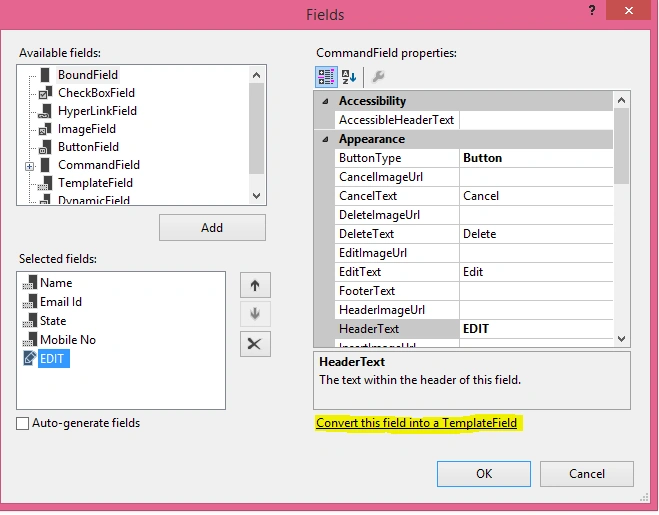
I have added a GridView in my project and in command field added EDIT button like the following .
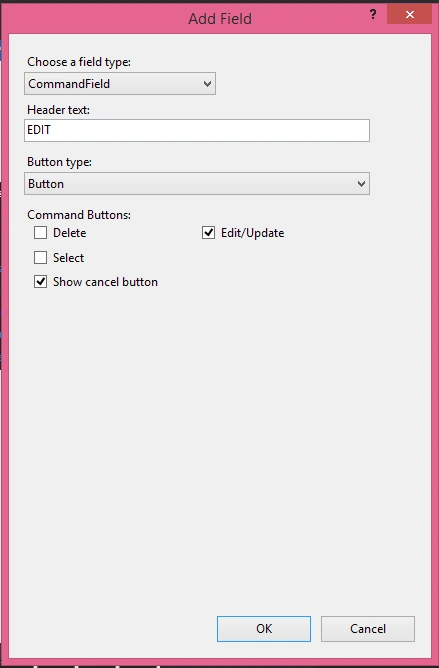
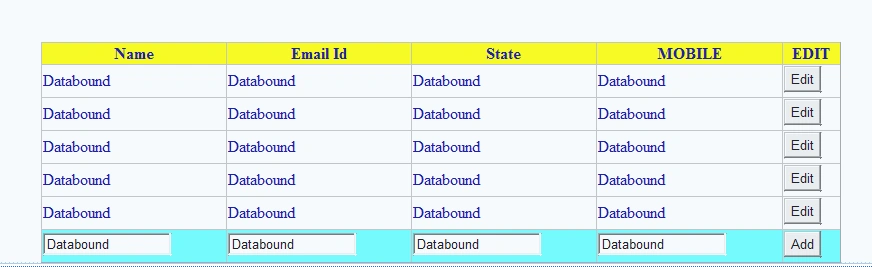
Now after adding it will look like the following in the design view.

Now to add textboxes in footer go to edit template in the smart tag.
After that go to each property's Footer field and from tool box drag and drop a textbox like the following:
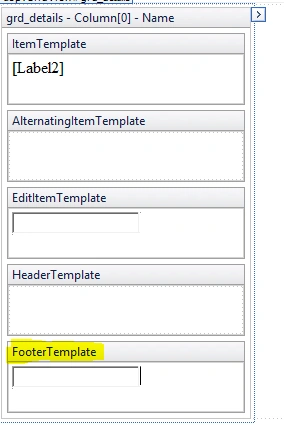
Here i have added for the "Name" property. Similarly for every property I can start adding textbox in footer.
If it need other controls such as, dropdownlist I can add it also.
After adding all the textboxes add a BUTTON to add the records.
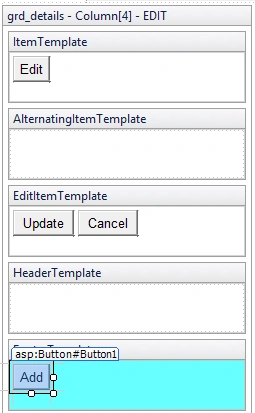
If it need other controls such as, dropdownlist I can add it also.
After adding all the textboxes add a BUTTON to add the records.
Go to there property and change there id. Here i have shown how i changed the id of mobile textbox.
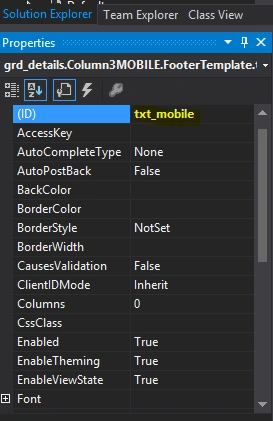
Now go to the "Edit columns" and convert all fields to template fields.
After that the source code will look like the following:
- <div style="margin-left:15%">
- <asp:GridView ID="grd_details" runat="server" AutoGenerateColumns="False" ForeColor="#000099" OnRowEditing="grd_details_RowEditing" ShowFooter="True" Width="800px">
- <Columns>
- <asp:TemplateField HeaderText="Name" SortExpression="Name">
- <EditItemTemplate>
- <asp:TextBox ID="TextBox2" runat="server" Text='<%# Bind("Name") %>'></asp:TextBox>
- </EditItemTemplate>
- <FooterTemplate>
- <asp:TextBox ID="txt_name" runat="server" Text='<%# Bind("Name") %>'></asp:TextBox>
- </FooterTemplate>
- <ItemTemplate>
- <asp:Label ID="Label2" runat="server" Text='<%# Bind("Name") %>'></asp:Label>
- </ItemTemplate>
- </asp:TemplateField>
- <asp:TemplateField HeaderText="Email Id" SortExpression="Email">
- <EditItemTemplate>
- <asp:TextBox ID="TextBox3" runat="server" Text='<%# Bind("Email") %>'></asp:TextBox>
- </EditItemTemplate>
- <FooterTemplate>
- <asp:TextBox ID="txt_email" runat="server" Text='<%# Bind("Email") %>'></asp:TextBox>
- </FooterTemplate>
- <ItemTemplate>
- <asp:Label ID="Label3" runat="server" Text='<%# Bind("Email") %>'></asp:Label>
- </ItemTemplate>
- </asp:TemplateField>
- <asp:TemplateField HeaderText="State" SortExpression="State">
- <EditItemTemplate>
- <asp:TextBox ID="TextBox4" runat="server" Text='<%# Bind("State") %>'></asp:TextBox>
- </EditItemTemplate>
- <FooterTemplate>
- <asp:TextBox ID="txt_state" runat="server" Text='<%# Bind("State") %>'></asp:TextBox>
- </FooterTemplate>
- <ItemTemplate>
- <asp:Label ID="Label4" runat="server" Text='<%# Bind("State") %>'></asp:Label>
- </ItemTemplate>
- </asp:TemplateField>
- <asp:TemplateField HeaderText="MOBILE" SortExpression="mobile">
- <ItemTemplate>
- <asp:Label ID="Label1" runat="server" Text='<%# Bind("mobileNo") %>'></asp:Label>
- </ItemTemplate>
- <EditItemTemplate>
- <asp:TextBox ID="TextBox1" runat="server" Text='<%# Bind("mobile") %>'></asp:TextBox>
- </EditItemTemplate>
- <FooterTemplate>
- <asp:TextBox ID="txt_mobile" runat="server" Text='<%# Bind("mobile") %>'></asp:TextBox>
- </FooterTemplate>
- </asp:TemplateField>
- <asp:TemplateField HeaderText="EDIT">
- <EditItemTemplate>
- <asp:Button ID="Button1" runat="server" CausesValidation="True" CommandName="Update" Text="Update" />
- <asp:Button ID="Button2" runat="server" CausesValidation="False" CommandName="Cancel" Text="Cancel" /> </EditItemTemplate>
- <FooterTemplate>
- <asp:Button ID="Button1" runat="server" CausesValidation="True" CommandName="Update" OnClick="Button1_Click" Text="Add" /> </FooterTemplate>
- <ItemTemplate>
- <asp:Button ID="Button1" runat="server" CausesValidation="False" CommandName="Edit" Text="Edit" /> </ItemTemplate>
- </asp:TemplateField>
- </Columns>
- <FooterStyle BackColor="#66FFFF" />
- <HeaderStyle BackColor="Yellow" /> </asp:GridView>
- </div>


Anish AnsariPosted Nov 16, 2015, 12:41 AM
nice
Santhakumar MunuswamyPosted Nov 9, 2015, 1:05 AM
Good one
Debasis SahaPosted Nov 8, 2015, 11:52 PM
Nice Once..
Harshad PansuriyaPosted Nov 8, 2015, 11:05 PM
Nice one
Debendra DashPosted Nov 8, 2015, 12:58 PM
Thanks mukesh....
Mukesh KumarPosted Nov 8, 2015, 12:30 PM
Good One Sir