

This article is a continuation of my previous article on Populating a Dropdown list in ASP.NET MVC 2 using Entity Framework 4 @ http://www.c-sharpcorner.com/UploadFile/2124ae/5628/
Here I will demonstrate how to get a drop down list with the selected value across the Post back.
We will see how to keep the selected item as selected once we submit the page.
I will be referring to database, Models, Views and Controllers used in my previous article @ (http://www.c-sharpcorner.com/UploadFile/2124ae/5628/) and even the code discussed below will be an addition to the existing sample of the previous article.
1. Update Controllers
- Open the HomeController.cs file from Controllers folder
- Include the Action Result method for Submit where we get the selected value of State drop down and repopulate our dropdownlist.
[HttpPost]
public ActionResult Index(IndexViewModel postmodel)
{
string ddlState_SelectedStateValue = Request.Form["ddlStateId"];
IList<SelectListItem> iselectList_States = objRepository.GetStateName();
postmodel.StateValue = new SelectList(iselectList_States, "Value", "Text", ddlState_SelectedStateValue).ToList();
return View(postmodel);
}
2. Update Views
-
Open Index.aspx from Views -> Home -> Views folder.
->Include a Submit Button
3. Compile and Run the Project.
Select a State Value and Click Submit 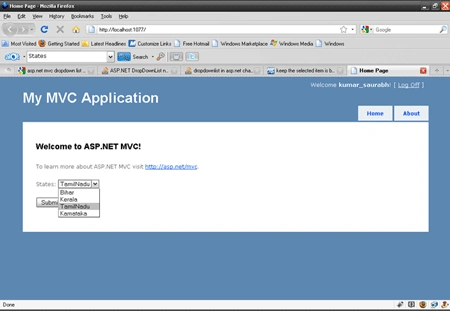
-
We can see across Post back – our drop drop down list gets repopulated with the last selected value.
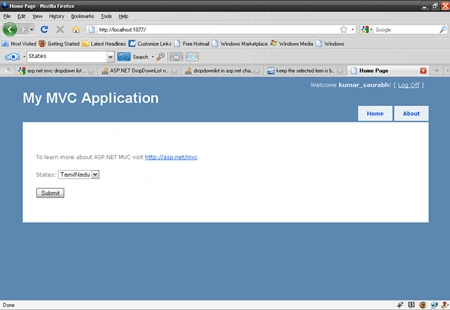
I have attached the Code for this Sample application.
Happy Learning!
Siyamcela MadokwePosted Aug 23, 2017, 10:07 AM
Thank you this was very useful
Sonu ChaudharyPosted Jun 10, 2016, 1:02 PM
good one
miram miramPosted Oct 19, 2011, 11:16 AM
Thanks for the article, however there much that needs to be explained! How does the code for the cshtml look like? What about the code for the methods used, e.g. GetStateName.