

If you don't have MS Outlook, you may want to give this a try for simple scheduling. You can use it to write one line activities at any hour throughout your lifetime. It also includes an alarm feature for notifying you of special events. Since it includes the source code, you can modify it to customize your scheduling needs.
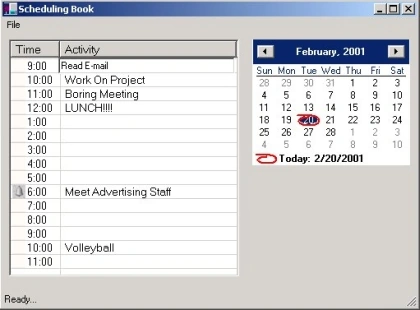
The Scheduling program consists of three main classes. The Form (shown above), the DatabaseController used to read and write scheduled events into the database and RowData which corresponds to data extracted from a row in the database. UML Design is shown below:
The Above Design was Reverse Engineered using WithClass 2000 UML Design Tool
There are many aspects of the C# .NET framework we could talk about in this code such as the use of the timer, listview manipulation, key capturing, calendar control, and edit box positioning. In this article, we will concentrate primarily on how to use ADO.NET to read and write the scheduling information. Below is a database snapshot of our calendar database:
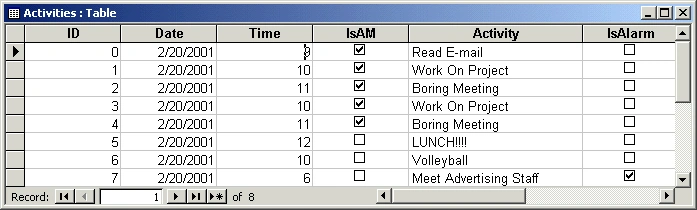
The ADO.NET Library Framework provides a fairly simple means of reading and writing data to an access JET database. Reading from the database is performed in a few steps. First, you set up what's called an ADODataSetCommand Object. This object allows you to assign SQL commands to it in order to manipulate the database. The code for assigning a command to this object is shown below:
- private ADODataSetCommand AdoCmd = new ADODataSetCommand("SELECT * FROM Activities", "Provider=Microsoft.JET.OLEDB.4.0;data source=calendar.mdb"); // create a new DataSet Command and connect to
- // the Access database calendar.mdb
- ...........
- // set up a SQL Select command that filters on the date
- AdoCmd.SelectCommand.CommandText = "SELECT * FROM Activities WHERE Date = #" + strDate + "#";
Here we have a DataSet Command Object in which we change the command to filter only Activity rows that are performed on a specific date. These are the rows we will display in our listview located on the left side of the form. Once we have the DataSet Command Object setup, we can create a dataset and fill it:
- DataSet dtSet = new DataSet(); // create a new data set
- AdoCmd.FillDataSet(dtSet, "Activities"); // Fill the DataSet using the DataSet Command Object
The DataSet can now be used to extract information from the table. The table reference is gotten from the collection of tables in the dataset. Our database only has one table "Activities", so we can just get the first table, indexed at 0. Once we have the reference to the DataTable, we can go through the Rows collection and extract each row of information from the table. A Column of information in a row is extracted by dereferencing using the column name of the table (e.g. dtRow["Activity"] ). You could also use the column index (e.g. dtRow[4]):
- DataTable dTable = dtSet.Tables[0]; // extract the first (and only) table from the dataset
- // go through each row of the dataset and populate the listview
- foreach(DataRow dtRow in dTable.Rows) {
- nCount = CalcRow(dtRow); // determine listview row to populate using the date and time information
- // populate the listview row from the "Activity" column in the database
- listView1.ListItems[nCount].SetSubItem(0, dtRow["Activity"].ToString());
- // Determine the Image to use in the listview based on whether the "IsAlarm" Column is set or not
- if (dtRow["IsAlarm"].ToString().ToBoolean() == true) {
- listView1.ListItems[nCount].ImageIndex = 1;
- } else {
- listView1.ListItems[nCount].ImageIndex = 0;
- }
- }
ay gafPosted Aug 9, 2014, 3:18 PM
any other updated solution please it doesn't work for me
fitore fitorePosted Feb 26, 2012, 4:09 PM
i have problem with this code. cannot debug cause of form1.resx isnt here. may you help me please?
Phillip SeamanPosted Apr 15, 2010, 12:16 PM
I just tried to DL this project and when opened it does not work in VS2008 .NET 3.5/2.0. Do you have an updated version as the Resource file is rejected.
marcin drobnicccaPosted Dec 7, 2009, 4:42 PM
how i can run it? please help me
dinesh babuPosted Oct 30, 2009, 6:56 AM
yes!