

Part 14.1: Building the ReviewMyCode MCP Server
First, let’s address the obvious question.
Why am I calling this 14.1 instead of just Part 14?
Well, teaching how to build a production-grade MCP server definitely isn’t going to fit into a single article, is it?
So instead of cramming everything into one massive post, we’re turning this into a 4-part mini-series.
Yes, I know how that sounds.
A series… inside another series?
Umm. Yeah.
Anyway, here’s how this is going to work:
14.1 ReviewMyCode MCP Server: Foundation and Architecture
14.4 ReviewMyCode MCP Server: Deployment, Docker, and Testing
Schrödinger's AI is your invitation to look inside. Right now, AI feels like a mystery , wired like a brain, yet running on pure math.
Each article is a new layer of the box. We start with the first spark of an idea and move all the way to the models reshaping everything we thought we knew .
Explore the entire series Schrodingers-AI
I’d suggest cloning the code from my repository: review-my-code-mcp
It’ll make it easier to follow along with the project as we build it. That said, it’s not strictly required since we’ll be building everything step by step throughout the series.

In Part 13, we built an MCP server with .NET and understood how tools become callable by AI clients.
Part 13 reference: MCP Server in .NET
A Quick Tour
The server will expose three MCP tools to any connected AI client:
Tool 1: review_csharp_code
When an AI client calls this tool, it passes raw C# code and optionally a maxIssues parameter.
The server responds with a JSON report:
{
  "summary": "Code review found critical issues in async patterns and security.",
  "score": 5,
  "issues": [
    {
      "severity": "critical",
      "category": "async correctness",
      "line": 42,
      "description": "Avoid async void methods; exceptions can be unobserved.",
      "fix": "Return Task instead. Example: public async Task MyMethodAsync() { ... }"
    }
  ],
  "totalRulesChecked": 127,
  "totalRulesMatched": 8,
  "checkedCategories": [
    "async correctness",
    "security",
    "performance",
    "maintainability"
  ],
  "categoryScores": [
    {
      "category": "async correctness",
      "score": 3,
      "issueCount": 2
    }
  ],
  "suggestedChanges": [...],
  "invocationId": "a1b2c3d4e5f6g7h8"
}summary: Human-readable overview
score: 0-10 quality score
issues: Array of findings with severity, category, line, description, and fix
totalRulesChecked: How many rules were evaluated
totalRulesMatched: How many triggered
categoryScores: Score per category with issue count
suggestedChanges: Normalized fixes
invocationId: Unique ID for this review (useful for logging)
Tool 2: health_check
Simple verification that the server is alive and responsive.
{
  "status": "healthy",
  "timestamp": "2026-05-09T14:32:05.123Z"
}
Tool 3: get_rule_backlog
Reads markdown files in documentation/rule-catalog/ and returns pending rule proposals. This lets teams propose new checks without writing code.
{
  "async-rules.md": [
    "Rule name: Detect Task.Run in async context; Category: async correctness; Severity: warning; Detection: Regex pattern; Fix: Prefer async/await"
  ],
  "security-rules.md": [...]
}
The MCP Flow in This Project
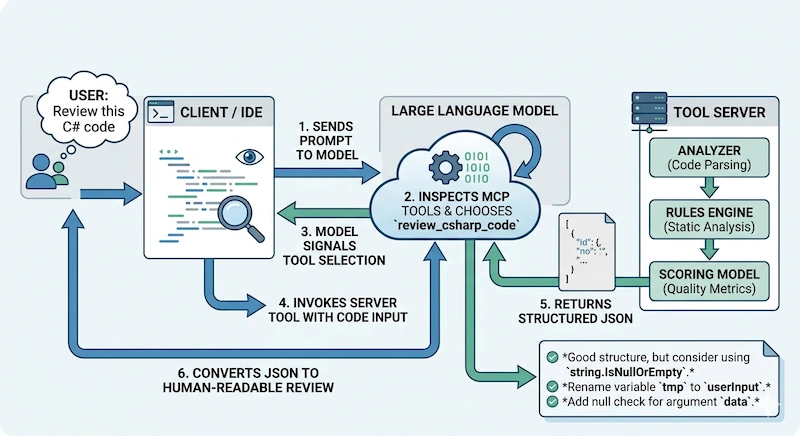
User prompt: "Review this C# code", and let's say you have following code in your project somewhere.
public async void BadAsync()
{
    var result = await SomeTaskAsync().Result;
}
AI client inspection: The model sees available MCP tools and recognizes
review_csharp_codeis relevantTool invocation: Client sends the code to your server via MCP stdio transport
Server processing:
ReviewAnalyzer runs ~127 rules against the code
Rules check for: async violations, security issues, performance problems, maintainability concerns, etc.
Each rule that matches produces a
ReviewIssueReviewScorer calculates a 0-10 quality score
Results are grouped by category
Response: Server returns structured JSON
Model rendering: AI model converts JSON into human-readable feedback for the user
This is the MCP pattern: Tool definition → Input → Processing → Structured JSON → Client handling
The Architecture Overview
Here's how the project is organized:
review-my-code-mcp/
│
├── Program.cs
│   └─ Bootstraps the MCP server and DI
│
├── Tools/
│   └─ CodeReviewTool.cs (MCP tool endpoints)
│
├── Services/
│   ├─ ReviewAnalyzer.cs (runs rules, collects findings)
│   ├─ ReviewScorer.cs (calculates scores)
│   ├─ MarkdownRuleBacklogService.cs (reads markdown backlog)
│   ├─ ServiceCollectionExtensions.cs (DI registration)
│   └─ IReviewAnalyzer, IReviewScorer, IRuleBacklogService (interfaces)
│
├── Rules/
│   ├─ Abstractions/
│   │  ├─ ICodeRule.cs (base rule interface)
│   │  ├─ IRuleGroupProvider.cs (base provider interface)
│   │  ├─ RuleContext.cs (data passed to rules)
│   │  ├─ ContainsTokenRule.cs (token detection rule)
│   │  ├─ RegexRule.cs (regex-based rule)
│   │  └─ DelegateRule.cs (custom logic rule)
│   │
│   ├─ Async/ (async correctness rules)
│   ├─ Security/ (security rules)
│   ├─ Performance/ (performance rules)
│   ├─ Maintainability/ (maintainability rules)
│   ├─ Method/ (method design rules)
│   ├─ TypeDesign/ (class/interface/record rules)
│   ├─ FileAndFolder/ (file organization rules)
│   └─ CSharpModernization/ (C# 10+ adoption rules)
│
├── Models/
│   ├─ ReviewIssue.cs
│   ├─ ReviewResult.cs
│   ├─ CategoryReviewScore.cs
│   └─ ...other response models
│
└── documentation/
    └─ rule-catalog/
       ├─ async-rules.md
       ├─ security-rules.md
       ├─ performance-rules.md
       └─ ...other category docs
Key principle: Separation of concerns.
Tools = MCP protocol contract (what clients call)
Services = Application logic (analysis, scoring, backlog reading)
Rules = Reusable domain logic (specific checks and violations)
Models = Response contracts (JSON serialization)
Documentation = Rule specs and backlog
This makes it easy to:
Add new rules (just add to a provider)
Add new categories (create a new provider)
Change scoring logic (update ReviewScorer)
Propose new checks without coding (add to markdown)
Step 1: Create Your Project
Open your terminal and run:
dotnet new console -n review-my-code-mcp
cd review-my-code-mcp
dotnet new sln -n code-review
dotnet sln add review-my-code-mcp.csproj
This creates:
A new console app (best for MCP stdio servers)
A solution file to organize multiple projects later
Rename the auto-generated .csproj if needed:
mv review-my-code-mcp.csproj McpCodeReviewServer.csproj
dotnet sln add McpCodeReviewServer.csproj --force
Add Required NuGet Packages
The server needs two key packages:
dotnet add package ModelContextProtocol
dotnet add package Microsoft.Extensions.HostingModelContextProtocol: Provides
[McpServerToolType],[McpServerTool]attributes, MCP transport plumbing, and stdlib server helpersMicrosoft.Extensions.Hosting: Provides the Generic Host pattern (clean startup, DI, logging, shutdown)
Check your .csproj:
<ItemGroup>
    <PackageReference Include="ModelContextProtocol" Version="1.2.0" />
    <PackageReference Include="Microsoft.Extensions.Hosting" Version="10.0.5" />
</ItemGroup>
Step 2: Create the Folder Structure
Create these directories at the project root:
mkdir Tools Services Rules/Abstractions Rules/Async Rules/Security Rules/Performance Rules/Maintainability Rules/Method Rules/TypeDesign Rules/FileAndFolder Rules/CSharpModernization Models documentation/rule-catalogThis matches the architecture diagram above.
Step 3: Understand Program.cs — The Entry Point
When the MCP server starts, Program.cs is executed. This is where we:
Build the host
Register all services and rules via dependency injection
Configure MCP transport (stdio)
Start listening for tool invocations
Here's what it looks like:
using McpCodeReviewServer.Tools;
using McpCodeReviewServer.Services;
using Microsoft.Extensions.DependencyInjection;
using Microsoft.Extensions.Hosting;

var builder = Host.CreateApplicationBuilder(args);

// Register the code review engine (all services, rules, scorers)
builder.Services.AddCodeReviewEngine();

// Configure MCP
builder.Services
    .AddMcpServer()                           // Enable MCP protocol
    .WithStdioServerTransport()               // Use stdin/stdout for communication
    .WithTools<CodeReviewTool>();            // Expose methods from CodeReviewTool as MCP tools

await builder.Build().RunAsync();
Line 5-6: Create the host builder
var builder = Host.CreateApplicationBuilder(args);CreateApplicationBuilder is a Microsoft.Extensions.Hosting helper that:
Sets up configuration
Enables logging
Prepares dependency injection
Is ready for service registration
Think of it as a factory for building the entire application.
Line 8: Register the code review engine
builder.Services.AddCodeReviewEngine();This is a custom extension method (we'll create it in ServiceCollectionExtensions.cs).
It registers:
IReviewAnalyzer→ implementationReviewAnalyzerIReviewScorer→ implementationReviewScorerIRuleBacklogService→ implementationMarkdownRuleBacklogServiceAll eight rule providers:
AsyncRulesProvider,SecurityRulesProvider, etc.
In one line, we wire up the entire review pipeline.
Lines 10-13: Configure MCP transport
builder.Services
    .AddMcpServer()                           // Enable MCP protocol handling
    .WithStdioServerTransport()               // Use stdin/stdout
    .WithTools<CodeReviewTool>();            // Register CodeReviewTool's methods as tools
This is fluent API chaining. Each method returns the builder so you can chain calls.
What each does:
.AddMcpServer(): Adds MCP protocol support to the host.WithStdioServerTransport(): Configures the transport to use stdio (standard input/output)When the AI client starts your server, it launches it as a process
Communication happens through stdin/stdout
This is how Cursor, Claude Desktop, etc. talk to MCP servers
.WithTools<CodeReviewTool>(): ScansCodeReviewToolclass for public methods marked with[McpServerTool]and exposes them as callable toolsThe client can see and call these tools
Arguments are type-safe and validated
Line 15: Run the host
await builder.Build().RunAsync();.Build(): Creates the host with all registered services.RunAsync(): Starts the host and runs indefinitely
Once this runs, your MCP server is live and listening on stdin for tool invocations.
Step 4: What Happens When a Tool is Called
When an AI client calls your review_csharp_code tool, here's the flow:
Client sends JSON over stdin:
{
  "tool": "review_csharp_code",
  "parameters": {
    "code": "public async void BadAsync() { ... }",
    "maxIssues": 50
  }
}
MCP server receives on stdin
Framework locates the tool: Finds
CodeReviewTool.ReviewCSharpCodemethod (because it's marked[McpServerTool(Name = "review_csharp_code")])Framework invokes the method with the provided parameters
Method executes:
Calls
_reviewAnalyzer.Analyze(code, maxIssues)to run rulesCalls
_reviewScorer.CalculateScore(issues)to get a scoreBuilds a
ReviewResultresponse objectSerializes to JSON
Server sends JSON response back on stdout:
{
  "summary": "...",
  "score": 5,
  "issues": [...],
  ...
}
Client receives, parses, and uses the response
This is the MCP request/response cycle.
Step 5: Create ServiceCollectionExtensions.cs
Now let's create the DI registration extension method that Program.cs calls.
Create Services/ServiceCollectionExtensions.cs:
using McpCodeReviewServer.Rules.Abstractions;
using McpCodeReviewServer.Rules.Async;
using McpCodeReviewServer.Rules.Security;
using McpCodeReviewServer.Rules.Performance;
using McpCodeReviewServer.Rules.Maintainability;
using McpCodeReviewServer.Rules.Method;
using McpCodeReviewServer.Rules.TypeDesign;
using McpCodeReviewServer.Rules.FileAndFolder;
using McpCodeReviewServer.Rules.CSharpModernization;
using Microsoft.Extensions.DependencyInjection;

namespace McpCodeReviewServer.Services;

/// <summary>
/// Extension method to register all code review services and rule providers.
/// </summary>
public static class ServiceCollectionExtensions
{
    /// <summary>
    /// Adds the code review engine to the service collection.
    /// This registers the analyzer, scorer, backlog service, and all rule providers.
    /// </summary>
    public static IServiceCollection AddCodeReviewEngine(this IServiceCollection services)
    {
        // Register the core services (singletons because they're stateless)
        services.AddSingleton<IReviewAnalyzer, ReviewAnalyzer>();
        services.AddSingleton<IReviewScorer, ReviewScorer>();
        services.AddSingleton<IRuleBacklogService, MarkdownRuleBacklogService>();

        // Register all rule category providers
        // ReviewAnalyzer will receive IEnumerable<IRuleGroupProvider> via DI
        // and use them to build the full rule set
        services.AddSingleton<IRuleGroupProvider, AsyncRulesProvider>();
        services.AddSingleton<IRuleGroupProvider, SecurityRulesProvider>();
        services.AddSingleton<IRuleGroupProvider, PerformanceRulesProvider>();
        services.AddSingleton<IRuleGroupProvider, MaintainabilityRulesProvider>();
        services.AddSingleton<IRuleGroupProvider, MethodRulesProvider>();
        services.AddSingleton<IRuleGroupProvider, TypeDesignRulesProvider>();
        services.AddSingleton<IRuleGroupProvider, FileAndFolderRulesProvider>();
        services.AddSingleton<IRuleGroupProvider, CSharpModernizationRulesProvider>();

        return services;
    }
}
Key insight: We register multiple implementations of IRuleGroupProvider. When ReviewAnalyzer requests IEnumerable<IRuleGroupProvider>, it gets all eight providers. This is how we achieve scalable rule management, to add a new category, just create a new provider and register it here.
Step 6: Create Basic Data Models
Create Models/ReviewIssue.cs:
namespace McpCodeReviewServer.Models;

public sealed record ReviewIssue(
    string Severity,
    string Category,
    int? Line,
    string Description,
    string Fix);
Create Models/ReviewResult.cs:
namespace McpCodeReviewServer.Models;

public sealed record ReviewResult(
    string Summary,
    int Score,
    IReadOnlyCollection<ReviewIssue> Issues,
    string InvocationId,
    int TotalRulesChecked,
    int TotalRulesMatched,
    IReadOnlyCollection<string> CheckedCategories,
    IReadOnlyCollection<CategoryReviewScore> CategoryScores,
    IReadOnlyCollection<SuggestedChange> SuggestedChanges);

public sealed record CategoryReviewScore(
    string Category,
    int Score,
    int IssueCount);

public sealed record SuggestedChange(
    string Severity,
    string Category,
    int? Line,
    string Description,
    string Fix);
We'll add more models as we build Services and Rules in Article 14.2.
Summary: Foundation Laid
What this project builds: A production MCP server for C# code review
The MCP flow: Client → Tool call → Server processing → Structured JSON response
The architecture: Tools, Services, Rules, Models, and Documentation
Program.cs: How dependency injection, MCP transport, and tool registration work
The DI pattern: How rule providers are registered and discovered
The cat is neither alive nor dead and honestly, that's the most exciting place to be. There are a lot more layers to uncover.
Explore the entire series Schrodingers-AI
I’d suggest cloning the code from my repository: review-my-code-mcp
It’ll make it easier to follow along with the project as we build it. That said, it’s not strictly required since we’ll be building everything step by step throughout the series.
Previous: Part 13: Let’s Build an MCP Server with .NET
Next: Part 14.2: ReviewMyCode MCP Server: Core Implementation
Join the conversation! Your thoughts help the community grow.