

First, let’s address the obvious question.
Why am I calling this 14.2 instead of just Part 15?
Well, teaching how to build a production-grade MCP server definitely isn’t going to fit into a single article, is it?
So instead of cramming everything into one massive post, we’re turning this into a 4-part mini-series.
Yes, I know how that sounds.
A series… inside another series?
Umm. Yeah.
Anyway, here’s how this is going to work:
14.4 ReviewMyCode MCP Server: Deployment, Docker, and Testing
Schrödinger's AI is your invitation to look inside. Right now, AI feels like a mystery , wired like a brain, yet running on pure math.
Each article is a new layer of the box. We start with the first spark of an idea and move all the way to the models reshaping everything we thought we knew .
Explore the entire series Schrodingers-AI
I’d suggest cloning the code from my repository: review-my-code-mcp
It’ll make it easier to follow along with the project as we build it. That said, it’s not strictly required since we’ll be building everything step by step throughout the series.

Part 14.4: ReviewMyCode MCP Server: Deployment, Docker, and Testing
Welcome to the final part of this mini-series "ReviewMyCode".
By now, you have:
A complete MCP server with loads of rules across 8 categories
A full analysis and scoring pipeline that returns structured JSON
A rule system that is easy to extend without modifying existing rule providers
Now we package and ship it cleanly.
In this article, we will:
Add Docker support with a production-style multi-stage build
Build and smoke test the image locally
Connect the server to Cursor and Claude Desktop through Docker
Verify end-to-end behavior
Cover common issues and practical production tips
Why Docker?
Without Docker, every machine needs:
The right .NET SDK version
Matching NuGet/package behavior
Correct local project paths in client config
With Docker, you get:
Same runtime everywhere
No local dependency drift
Easier onboarding
For MCP stdio servers, this is a natural fit. Instead of launching dotnet directly on host paths, the client launches a Docker process with docker run ... and communicates through stdin/stdout exactly the same way.
Step 1: Add .dockerignore
Create .dockerignore at project root:
bin/
 obj/
.git/
.vs/
.vscode/
**/.DS_Store
.gitignore
.dockerignore
README.md
article/
app/screenshots/
*.md
!documentation/
Smaller build context
Faster image builds
Cleaner and more deterministic image contents
Step 2: Add Dockerfile
Create Dockerfile at project root:
# syntax=docker/dockerfile:1

# Stage 1: Build
FROM mcr.microsoft.com/dotnet/sdk:8.0 AS build
WORKDIR /src

# Copy project file first to maximize Docker layer cache reuse
COPY McpCodeReviewServer.csproj ./
RUN dotnet restore McpCodeReviewServer.csproj

# Copy source and publish
COPY . .
RUN dotnet publish McpCodeReviewServer.csproj \
    -c Release \
    -o /app/publish \
    /p:UseAppHost=false

# Stage 2: Runtime
FROM mcr.microsoft.com/dotnet/runtime:8.0 AS runtime
WORKDIR /app

# Copy only published output
COPY --from=build /app/publish .

# Required by get_rule_backlog tool
COPY --from=build /src/documentation ./documentation

ENTRYPOINT ["dotnet", "McpCodeReviewServer.dll"]
Multi-stage build: what actually runs?
A common point of confusion is project vs DLL execution.
1. Two stages, two purposes
Build stage: compiles your project from the csproj.
Runtime stage: only runs the published DLL.
2. What each stage contains in this project
Host project (your machine)
McpCodeReviewServer.csproj
Program.cs
Rules/
Services/
Models/
Tools/
documentation/
Build stage inside Docker (temporary)
/src/McpCodeReviewServer.csproj
/src/all source code copied from project
/app/publish/McpCodeReviewServer.dll
/app/publish/other published files
.NET SDK is present here
Runtime stage inside Docker (final image)
/app/McpCodeReviewServer.dll
/app/McpCodeReviewServer.deps.json
/app/McpCodeReviewServer.runtimeconfig.json
/app/other published dependencies
/app/documentation/rule-catalog/... (copied for get_rule_backlog)
.NET Runtime only (no SDK, no source build workspace)
3. What actually runs
Container starts with: dotnet McpCodeReviewServer.dll, so runtime executes DLL, not csproj.
Image vs container
Image: packaged template (files + metadata + startup command).
Container: live running process created from image.
Lifecycle in one line
docker build: creates image, runs nothing.
docker run: starts container and runs the DLL process.
MCP-specific behavior
You usually do not run container manually all day. Cursor/Claude starts and stops container when needed. Only Docker engine must stay running in background.
Step 3: Build the image
From project root:
docker build -t review-my-code-mcp:latest .Optional version tags:
docker build -t review-my-code-mcp:1.0.0 .
docker tag review-my-code-mcp:1.0.0 review-my-code-mcp:latest
Verify image exists:
docker images | grep review-my-code-mcpStep 4: Local smoke test
Run container in stdio-compatible mode:
docker run --rm -i review-my-code-mcp:latestWhy flags matter:
--rm: remove container after exit-i: keep stdin open for MCP protocol
Stop with Ctrl+C.
Step 5: Configure Cursor
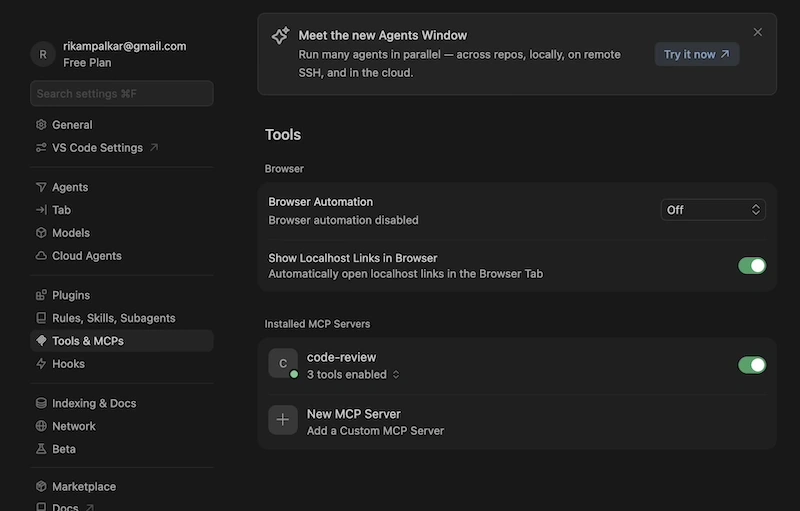
In Cursor MCP settings, add:
{
  "mcpServers": {
    "csharp-code-review": {
      "type": "stdio",
      "command": "docker",
      "args": [
        "run",
        "--rm",
        "-i",
        "review-my-code-mcp:latest"
      ],
      "env": {}
    }
  }
}
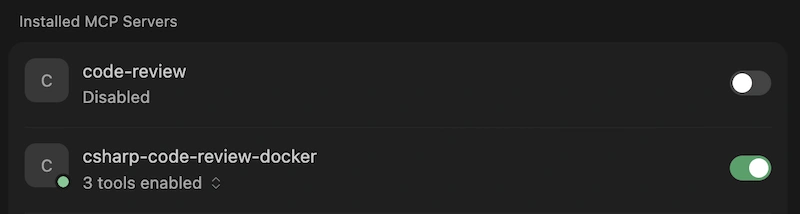
Then restart/reload Cursor MCP servers. Then you should be able to see this:
Step 6: Configure Claude Desktop
Edit config file:
macOS:
~/Library/Application Support/Claude/claude_desktop_config.jsonWindows:
%APPDATA%\\Claude\\claude_desktop_config.jsonLinux:
~/.config/Claude/claude_desktop_config.json
Add:
{
  "mcpServers": {
    "csharp-code-review": {
      "type": "stdio",
      "command": "docker",
      "args": [
        "run",
        "--rm",
        "-i",
        "review-my-code-mcp:latest"
      ],
      "env": {}
    }
  }
}
Restart Claude Desktop.
Step 7: End-to-end verification checklist
docker build -t review-my-code-mcp:latest .succeedsdocker run --rm -i review-my-code-mcp:lateststarts and exits cleanlyCursor detects server in MCP panel
Claude Desktop detects server in MCP settings
health_checktool is availablereview_csharp_codetool is availableget_rule_backlogtool is available and reads documentation files
Few notes:
Once you configure your client app successfully, you should be able to see the list of tools displayed, as shown in the Cursor example below.
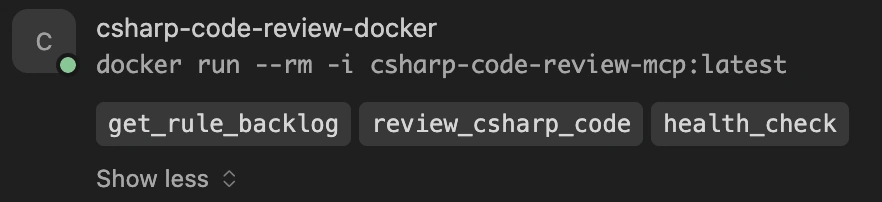
Now, what happens if you stop the Docker server? Do you think the tools will still be available? No, right? You’ll see a “Connection closed” message instead.

Production tips
Version pinning
Use explicit tags instead of only latest:
"args": ["run", "--rm", "-i", "review-my-code-mcp:1.0.0"]Registry publishing (optional)
docker login
docker tag review-my-code-mcp:1.0.0 yourusername/review-my-code-mcp:1.0.0
docker push yourusername/review-my-code-mcp:1.0.0
Resource limits (optional)
docker run --rm -i --memory 512m --cpus 1 review-my-code-mcp:latestEnvironment-specific client configs
{
  "mcpServers": {
    "csharp-code-review-dev": {
      "command": "dotnet",
      "args": ["run", "--project", "/path/to/review-my-code-mcp"]
    },
    "csharp-code-review-prod": {
      "command": "docker",
      "args": ["run", "--rm", "-i", "review-my-code-mcp:1.0.0"]
    }
  }
}
End-to-end flow recap
Develop rules and services locally
Package with Docker image
Configure AI client to launch Dockerized MCP server
User asks for review
Client invokes MCP tool
Containerized server analyzes code and returns structured results
Ready for next Article? Let's ship it.
The cat is neither alive nor dead and honestly, that's the most exciting place to be. There are a lot more layers to uncover.
Explore the entire series Schrodingers-AI
I’d suggest cloning the code from my repository: review-my-code-mcp
It’ll make it easier to follow along with the project as we build it. That said, it’s not strictly required since we’ll be building everything step by step throughout the series.
Previous: Part 14.3: ReviewMyCode MCP Server: Rules & Extensibility
Final summary
These 4 articles take you from designing a clean C# MCP code-review server to shipping it in production with Docker.
You end up with a practical system that runs bunch of rules, returns structured review + score output, and is easy to extend.
Final result: it works consistently in real clients like Cursor and Claude Desktop, so your team can use the same setup everywhere.
Join the conversation! Your thoughts help the community grow.