

Schrödinger's AI is your invitation to look inside. Right now, AI feels like a mystery , wired like a brain, yet running on pure math.
Each article is a new layer of the box. We start with the first spark of an idea and move all the way to the models reshaping everything we thought we knew .
Explore the entire series Schrodingers-AI
I’d suggest cloning the code from my repository: review-my-code-mcp
It’ll make it easier to follow along with the project as we build it. That said, it’s not strictly required since we’ll be building everything step by step throughout the series.

Part 15: Stop Babysitting Your AI Editor. Make It Follow Rules
Most of developers using Cursor is leaving productivity on the table. I was one of them till I started doing this
THE PROBLEM
You're Prompting the Same Things Over and Over
You ask Cursor to generate a class. It writes business logic inside the class. You correct it. Next class, same mistake. You explain async patterns. It uses .Result anyway. You specify naming conventions. It ignores them the next day.
This isn't Cursor being dumb. This is you not giving it memory. Cursor has no idea what you decided yesterday, what patterns your team agreed on, or what stack you're running.
This article walks you through the complete system, what Cursor Rules are, how they work under the hood, best practices, and the order to do everything before a single line of code gets written.
FOUNDATIONS
What Are Cursor Rules?
Cursor Rules are instruction files that live inside your project and tell the AI how to behave, specifically, in the context of your codebase. There are two formats:
The Old Way .cursorrules
A single file in your project root. Still works, but limited. One file means one context, no scoping, no granularity.
The New Way .cursor/rules/*.mdc
Multiple files, each scoped to specific contexts. A rule for controllers fires only when you're working in a controller. A rule for DTOs fires only for DTO files. This is what you should use. A rule for component when you're working with React or Angular.
The core idea: instead of repeating "use async/await, follow clean architecture, name your DTOs like this" in every prompt — you write it once, scope it correctly, and Cursor injects it automatically every time it's relevant.
We're gonna stick to new way, because if anything I learned form software engineering is be scoped.
I simply asked Cursor to generate some Cursor rules. You usually need to be very specific about the rules you want, but this was just for a demo. I opened an empty project and asked Cursor to generate some rules, and it went ahead and created four rule files.
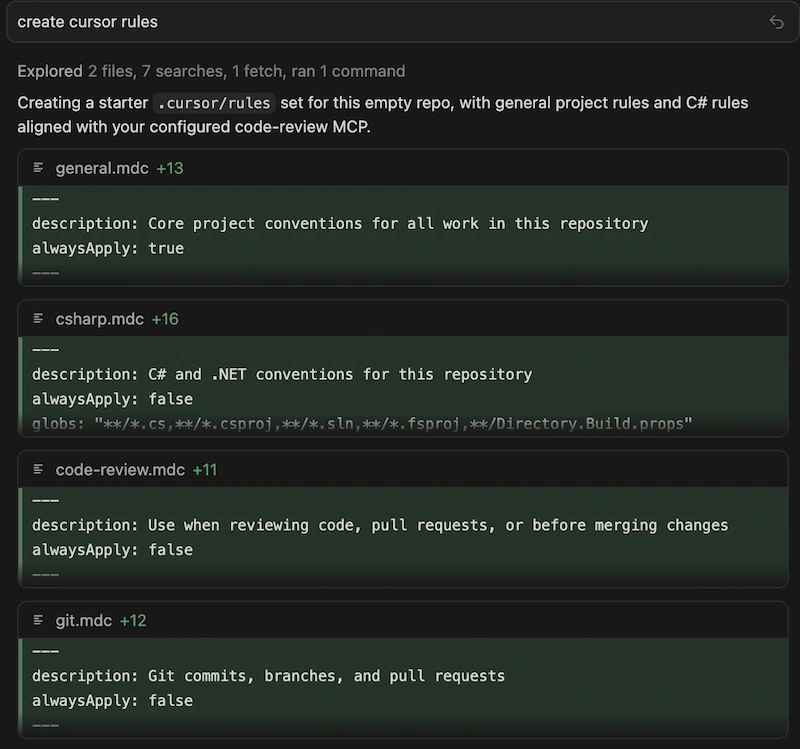
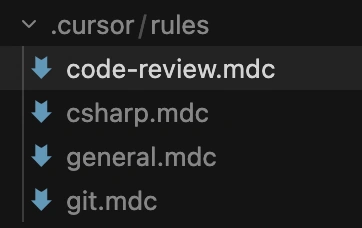
You can find those files in the .cursor/rules folder.
First question that comes to my mind is what is .mdc files?
An .mdc file is Cursor's format for project rules: a Markdown file with a small YAML frontmatter block at the top that tells Cursor when to include the rule.
Let's open code-review.mdc
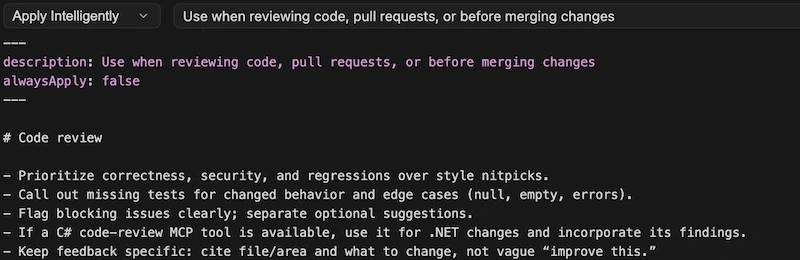
Content looks just like md file so we are good.
There is dropdown with 4 items, these are Activation Modes
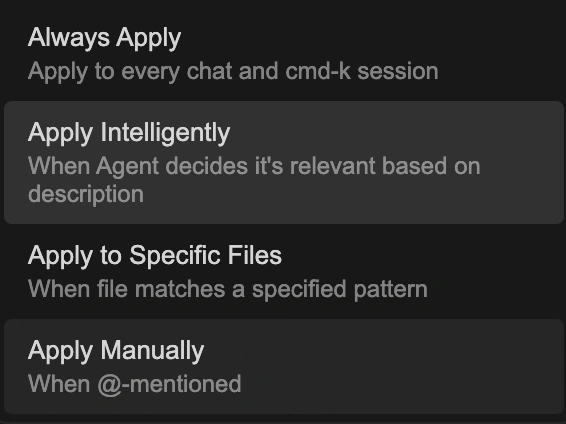
This is the most important thing to understand. Each rule has an activation mode that controls when it fires.
Always Apply: Injected into every chat session without condition. Use sparingly, it costs tokens on every single request regardless of relevance.
Apply Intelligently: Cursor's Agent reads your
descriptionfield and decides if the rule is relevant to the current task. No file matching, purely semantic. Write a sharp description or this mode misfires.

Apply to Specific Files: Auto-attached when the active file matches your glob pattern.
**/*Controller.csfires only when you're working in a controller. Most token-efficient option for scoped rules.
Apply Manually: Only fires when you explicitly
@mentionthe rule in chat. Fully on-demand. Good for rules that apply to rare, specific tasks.
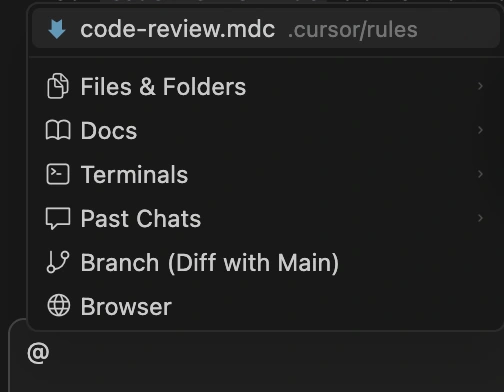
The Four Rule Types
Cursor actually has four distinct rule types, each serving a different scope.
Project Rules: Lives in
.cursor/rules/. Version-controlled. Scoped to your codebase. This is the main system later covered in this article.
User Rules: Global to your Cursor environment. Set in Cursor Settings → Rules. Applies across every project you open. Use for personal preferences — communication style, language preference, your own coding habits.

Team Rules: Team and Enterprise plans only. Managed from the Cursor dashboard by admins. Applied across the entire organization. Admins can enforce rules so team members can't disable them.
AGENTS.md: A plain markdown file in your project root. No frontmatter, no metadata, no globs. Just instructions. Simple alternative to
.cursor/rulesfor small projects.
How Cursor Actually Uses These Rules
Cursor doesn't "read" your rules like a human reads documentation. It injects them into the system prompt of every AI call it makes. Before the model sees your request, it sees your rules. This matters because it changes how you write them, precise, example-driven instructions outperform vague prose every time.
The actual flow when you type a prompt:
You type your prompt
"Create an order controller with a POST endpoint"
Cursor checks activation conditions
Which file is active? What's the task context? Which rules match?
Cursor assembles the context
Pulls in alwaysApply rules + rules which are selected based of the description + rules that are manually included
Sends to the LLM
Your rules prepended to your request, the model generates with full context
RESOURCES
Where to Find Existing Rules
Don't write everything from scratch. The community has done a lot of the work already.
cursor.directory: The official registry. Find rules by framework and language. Best starting point for any stack.
GitHub Repos Worth Bookmarking
PatrickJS/awesome-cursorrules: The most popular collection. Modern .mdc format. Covers most major stacks.
sanjeed5/awesome-cursor-rules-mdc: AI-generated .mdc files for specific libraries using semantic search.
continuedev/awesome-rules: Standard markdown format, compatible with Cursor, Continue.dev, and others.
hao-ji-xing/awesome-cursor: Curated hub of Cursor tools, extensions, and rule repos in one place.
Import Rules Directly from GitHub
Cursor has a built-in import mechanism. You don't have to manually copy files from repos. Go to:
how to import
Cursor Settings → Rules → + Add Rule → Remote Rule (GitHub)
Paste the repo URL → Cursor scans for all .mdc files → imports them
Rules land in .cursor/rules/imported/<repoName>/ preserving the original folder structure. Works with public and private repos. One click instead of manual copy-paste across files.
For C# specifically, start with awesome-cursorrules, grab the closest .NET rule, and customize from there. Never use a community rule as-is; always adapt it to your project's specifics.
Two Ways to Create Rules Without Leaving Cursor
You don't have to create .mdc files manually either. Two faster options:
/create-rule
Type /create-rule in the Agent chat. Describe what you want. Cursor generates the .mdc file with correct frontmatter and saves it to .cursor/rules/ automatically.
Settings UI
Cursor Settings → Rules → + Add Rule. Creates a new rule file in .cursor/rules/. From settings you can also see all rules and their current activation status.
How to Start a New Project the Right Way
Don't open cursor and start coding. That's the wrong order. Here's the right sequence.
Rules before code. Requirements before rules. The order is everything.
Gather requirements first
What's the app doing? What's the stack, .NET 8, EF Core, which DB, external APIs? Clean architecture or vertical slice? Minimal API or MVC? Get this locked before touching Cursor.
Let Cursor generate your starter rules
Type
/create-rulein the Agent chat and describe your stack. "C# 12 .NET 8 REST API, Clean Architecture, EF Core with PostgreSQL, FluentValidation, Serilog, generate rules for naming, architecture, async patterns, error handling, and logging." Cursor writes the.mdcfiles with correct frontmatter automatically. Review and adjust, don't accept blindly.Pull from existing repos
Check cursor.directory and awesome-cursorrules for .NET rules. Merge the best parts into what Cursor generated.
Create meta.mdc first
This one rule captures all future rules automatically. It tells Cursor to suggest a new rule file whenever you establish a new pattern. Your ruleset grows with the project.
Scaffold the project structure
Now ask Cursor to generate the folder structure. Your rules are already in place — the scaffold will follow your conventions from line one.
Let rules grow as you build
Hit a pattern mid-development? Stop, add a rule, continue. The meta rule keeps Cursor suggesting this automatically.
BEST PRACTICES
1. Keep rules focused and scoped
One rule file per concern. Don't dump everything into one file. A rule for naming conventions, a separate one for architecture patterns, another for testing. Each tight and specific.
2. Be explicit: not vague
— VAGUE
"Write clean code.", "Follow best practices.", "Use proper naming."
+ EXPLICIT
"Use PascalCase for all classes.", "Never use .Result or .Wait().", "Suffix async methods with Async."
3. Include examples directly in the rule
A before/after code snippet inside the rule file is worth ten lines of prose. The LLM pattern-matches against examples, give it something concrete to match against.
4. Save tokens, prefer "Apply to Specific Files" over "Always Apply"
This is the most underused optimization. Always Apply burns tokens on every single request, even when the rule has zero relevance. Swap it for a broad glob like **/*.cs using Apply to Specific Files, you get near-identical coverage at a fraction of the cost. Reserve Always Apply only for rules that are genuinely cross-cutting and short.
5. Hard limit: 500 lines per rule file
Keep every rule file under 500 lines. If you're hitting that ceiling, the rule is doing too much. Split it into two focused files. A bloated rule is harder for the model to apply consistently and wastes context on irrelevant guidance.
6. Let Cursor update its own rules
When Cursor makes a mistake, you don't have to edit the rule file manually. Tag @cursor on a GitHub issue or PR describing the problem — Cursor can update the rule for you. Treat your ruleset like a living document, not a one-time setup.
Summary
Rules are instructions baked into your project that tell Cursor how to behave, permanently.
Without them, every prompt starts from zero. Cursor repeats the same mistakes because it has no memory between sessions.
With them, your naming conventions, architecture decisions, async patterns, and error handling are injected automatically before every AI call. You write it once, Cursor follows it forever.
The right order: requirements → rules → code. Use /create-rule to generate them, scope them with "Apply to Specific Files" to save tokens, keep each file under 500 lines, and let the ruleset grow as the project grows.
Stop correcting. Start ruling.
Ready for next Article? Let's ship it.
The cat is neither alive nor dead and honestly, that's the most exciting place to be. There are a lot more layers to uncover.
Explore the entire series Schrodingers-AI
I’d suggest cloning the code from my repository: review-my-code-mcp
It’ll make it easier to follow along with the project as we build it. That said, it’s not strictly required since we’ll be building everything step by step throughout the series.
Previous mini series: Learn to build MCP server:
Join the conversation! Your thoughts help the community grow.