

Introduction
$scope in AngularJS is object which refers as an application model. It is object that bind view (DOM element) with the controller. In controller, model data is accessed via $scope object. As we know, AngularJS supports MV* pattern, $scope object becomes the model of MV*.
The $scope is a special JavaScript object. Both View and controller have access to the scope object. It can be used to communication between view and controller. Scope object contains both data and functions. Every AngularJS application have a $rootScope that is the top most scope created on DOM element which contains the ng-app directive. It can watch expressions and propagate events.
Characteristics of scope object
- It provide the APIs to observe model (example $watch).
- It can be nested, so that it limits access to the properties. Nested scopes are either child scope or isolated scope.
- It provide the APIs to propagate any model changes from the outside of "Angular realm" (example $apply).
- It provide context against expression to be evaluated.
Scope Inheritance
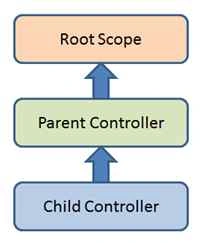
Scope is controller specific. Every Angular application has only one root scope but may have many child scopes. Some directives create new scope, so that the application may have multiple scopes. Whenever any new scope is created, they are added as child of parent scope. It creates a tree structure.
When Angular evaluates any expression, it first looks at the scope that is associated with current element. If no such property is found it looks into parent scope. This process is recursive until the root scope. This is known as "prototypical inheritance" in JavaScript.
Example
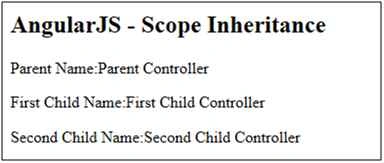
In the following example, I have created three controllers: parentController, firstChildControllerand secondChildController and defined one property in each controller parentName, level1name and level2name respectively. Here controllers are attached with DOM element in a nested way.
As described above, AngularJS evaluates expression with current associated scope and then it search in parent scope and so on until the root scope is reached.
TestAngularJs.html
- <!DOCTYPE html>
- <html>
- <head>
- <title>AngularJS Test Application</title>
- <script src="angular.js"></script>
- </head>
- <body ng-app="myapp">
- <h2>AngularJS - Scope Inheritance</h2>
- <div ng-controller="ParentController">
- <div ng-controller="firstChildController">
- <div ng-controller="secondChildController">
- <p>Parent Name:{{parentName}}</p>
- <p>First Child Name:{{level1name}}</p>
- <p>Second Child Name:{{level2name}}</p>
- </div>
- </div>
- </div>
- <script>
- var app = angular.module("myapp", []);
- app.controller("ParentController", function ($scope) {
- $scope.parentName = "Parent Controller";
- });
- app.controller("firstChildController", function ($scope) {
- $scope.level1name = "First Child Controller";
- });
- app.controller("secondChildController", function ($scope) {
- $scope.level2name = "Second Child Controller";
- });
- </script>
- </body>
- </html>
Former memberPosted Jun 14, 2016, 9:38 AM
nice one
Former memberPosted Feb 6, 2016, 4:29 AM
Variables set at the root-scope are available to the controller scope via prototypical inheritance. is this correct?
Santhakumar MunuswamyPosted Nov 11, 2015, 10:46 AM
Good one
Pradeep SahooPosted Nov 5, 2015, 10:40 PM
good information
Mukesh KumarPosted Nov 4, 2015, 2:56 AM
Good One
Sibeesh VenuPosted Nov 4, 2015, 12:23 AM
Nice Share
Humayun Kabir MamunPosted Nov 4, 2015, 12:21 AM
Nice...
Harshad PansuriyaPosted Nov 3, 2015, 11:04 PM
Nice one