

Introduction
In this article, we will see how to create a simple screen-sharing app using signalR streaming. SignalR supports both server-to-client and client-to-server streaming. In my previous article, I have done server to client streaming with ChannelReader and ChannelWriter for streaming support. This may look very complex to implement asynchronous streaming just like writing the asynchronous method without async and await keyword. IAsyncEnumerable is the latest addition to .Net Core 3.0 and C# 8 feature for asynchronous streaming. It is now super easy to implement asynchronous streaming with a few lines of clean code. In this example, we will use the client to server streaming to stream the desktop content to all the connected remote client viewers using signalR stream with the support of IAsyncEnumerable API.
Disclaimer
The sample code for this article is just an experimental project for testing signalR streaming with IAsyncEnumerable. In Real-world scenarios, You may consider using peer to peer connection using WebRTC or other socket libraries for building effective screen sharing tool.
Architecture
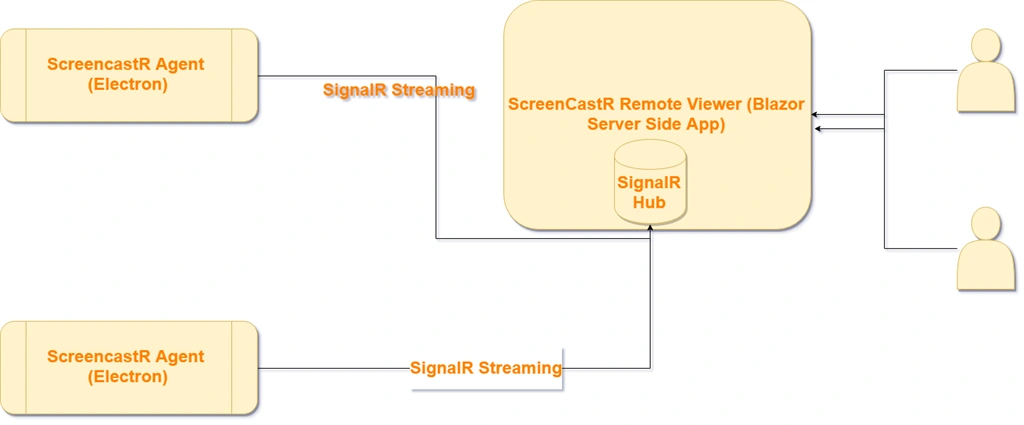
How it works
ScreencastR Agent
Steps
ScreencastR agent is an Electron-based desktop application. Electron is a framework for creating native applications with web technologies like JavaScript, HTML, and CSS. It allows you to create desktop applications with pure JavaScript by providing a runtime with rich native (operating system) APIs. In our example, I have used desktopCapturer API to capture the desktop content. If you are new to electron, you can follow this official doc to create your first electron application.
A simple electron application will have the following files which are similar to the node.js application.
- your-app/
- ├── package.json
- ├── main.js
- └── index.html
The starting point is the package.json which will have entry point javascript (main.js) and main.js will create a basic electron shell with default menu option and load the main HTML page. (index.html). In this package.json, I have added the dependency of latest SignalR client.
package.json
- {
- "name": "ScreencastRAgent",
- "version": "1.0.0",
- "description": "ScreencastR Agent",
- "main": "main.js",
- "scripts": {
- "start": "electron ."
- },
- "repository": "https://github.com/electron/electron-quick-start",
- "keywords": [
- "Electron",
- "quick",
- "start",
- "tutorial",
- "demo"
- ],
- "author": "Jeeva Subburaj",
- "license": "CC0-1.0",
- "devDependencies": {
- "electron": "^6.0.0"
- },
- "dependencies": {
- "@microsoft/signalr": "^3.0.0-preview8.19405.7"
- }
- }
When we run the
npm build, it will bring all the dependencies under node_modules folder including signalR client. Copy the signalr.js file from node_modules\@microsoft\signalr\dist\browserfolder into the root folder.index.html
- <!DOCTYPE html>
- <html>
- <head>
- <meta charset="UTF-8">
- <title>ScreencastR Agent</title>
- </head>
- <body>
- <h1>ScreencastR Agent</h1>
- <div>
- <h4>Agent Name</h1>
- <input type="text" id="agentName"/>
- </div>
- <input id="startCast" type="button" value="Start Casting">
- <input id="stopCast" type="button" value="Stop Casting">
- <canvas id='screenCanvas'></canvas>
- </body>
- <script>
- require('./renderer.js')
- require('./signalr.js')
- </script>
- </html>
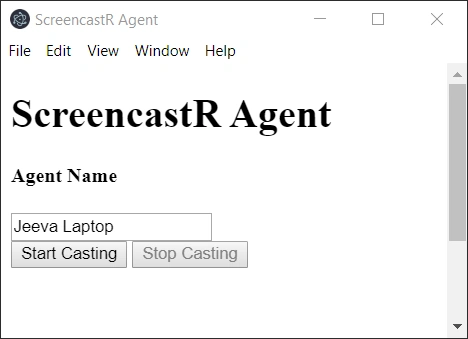
In the index.html page, we have simple layout to get the name of agent and start and stop casting button.
Renderer.js
- const { desktopCapturer } = require('electron')
- const signalR = require('@microsoft/signalr')
- let connection;
- let subject;
- let screenCastTimer;
- let isStreaming = false;
- const framepersecond = 10;
- const screenWidth = 1280;
- const screenHeight = 800;
- async function initializeSignalR() {
- connection = new signalR.HubConnectionBuilder()
- .withUrl("https://localhost:5001/ScreenCastHub")
- .configureLogging(signalR.LogLevel.Information)
- .build();
- connection.on("NewViewer", function () {
- if (isStreaming === false)
- startStreamCast()
- });
- connection.on("NoViewer", function () {
- if (isStreaming === true)
- stopStreamCast()
- });
- await connection.start().then(function () {
- console.log("connected");
- });
- return connection;
- }
- initializeSignalR();
- function CaptureScreen() {
- return new Promise(function (resolve, reject) {
- desktopCapturer.getSources({ types: ['screen'], thumbnailSize: { width: screenWidth, height: screenHeight } },
- (error, sources) => {
- if (error) console.error(error);
- for (const source of sources) {
- if (source.name === 'Entire screen') {
- resolve(source.thumbnail.toDataURL())
- }
- }
- })
- })
- }
- const agentName = document.getElementById('agentName');
- const startCastBtn = document.getElementById('startCast');
- const stopCastBtn = document.getElementById('stopCast');
- stopCastBtn.setAttribute("disabled", "disabled");
- startCastBtn.onclick = function () {
- startCastBtn.setAttribute("disabled", "disabled");
- stopCastBtn.removeAttribute("disabled");
- connection.send("AddScreenCastAgent", agentName.value);
- };
- function startStreamCast() {
- isStreaming = true;
- subject = new signalR.Subject();
- connection.send("StreamCastData", subject, agentName.value);
- screenCastTimer = setInterval(function () {
- try {
- CaptureScreen().then(function (data) {
- subject.next(data);
- });
- } catch (e) {
- console.log(e);
- }
- }, Math.round(1000 / framepersecond));
- }
- function stopStreamCast() {
- if (isStreaming === true) {
- clearInterval(screenCastTimer);
- subject.complete();
- isStreaming = false;
- }
- }
- stopCastBtn.onclick = function () {
- stopCastBtn.setAttribute("disabled", "disabled");
- startCastBtn.removeAttribute("disabled");
- stopStreamCast();
- connection.send("RemoveScreenCastAgent", agentName.value);
- };
In the renderer.js javascript, initializeSignalR method would initialize the signalR connection when the application gets loaded and listens to NewViewer and NoViewer hub methods. The NewViewer method gets called whenever the new remote viewer joining to view the stream. The agent will not stream the content until atleast one viewer exists. When NoViewer method is called, it will stop the stream.
CaptureScreen method will use the desktopCapturer API to get the list of available screen and window sources and filter to get the “Entire screen“ source only. After the source is identified, screen thumbnail data can be generated from the source based on the thumbnail size that is defined. CaptureScreen method is based on the promised API and will return the image data in a string as part of the resolve method. We will call the CaptureScreen method in the timer (setInterval method) based on the frame per second defined and the output will be streamed via signalR subject class.
ScreenCastR Remote Viewer

ScreenCastR Remote Viewer is a server-side blazor app with signalR hub hosted in it. This app also has the interface for signalR client to receive the streaming data from the hub. Whenever the New Agent joined, it will show the details of the agent in the dashboard page with the name of agent and View and Stop Cast button. When the user clicks on the View Cast button, it will start receiving the streaming from the hub and render the output on the screen. In the above video, the left side is the agent streaming data to the signalR hub and the right side is the viewer rendering the streaming data from the signalR hub.
Steps
ScreenCastHub
- public class ScreenCastHub : Hub
- {
- private readonly ScreenCastManager screenCastManager;
- private const string AGENT_GROUP_PREFIX = "AGENT_";
- public ScreenCastHub(ScreenCastManager screenCastManager)
- {
- this.screenCastManager = screenCastManager;
- }
- public async Task AddScreenCastAgent(string agentName)
- {
- await Clients.Others.SendAsync("NewScreenCastAgent", agentName);
- await Groups.AddToGroupAsync(Context.ConnectionId, AGENT_GROUP_PREFIX + agentName);
- }
- public async Task RemoveScreenCastAgent(string agentName)
- {
- await Clients.Others.SendAsync("RemoveScreenCastAgent", agentName);
- await Groups.RemoveFromGroupAsync(Context.ConnectionId, AGENT_GROUP_PREFIX + agentName);
- screenCastManager.RemoveViewerByAgent(agentName);
- }
- public async Task AddScreenCastViewer(string agentName)
- {
- await Groups.AddToGroupAsync(Context.ConnectionId, agentName);
- screenCastManager.AddViewer(Context.ConnectionId, agentName);
- await Clients.Groups(AGENT_GROUP_PREFIX + agentName).SendAsync("NewViewer");
- }
- public async Task RemoveScreenCastViewer(string agentName)
- {
- await Groups.RemoveFromGroupAsync(Context.ConnectionId, agentName);
- screenCastManager.RemoveViewer(Context.ConnectionId);
- if(!screenCastManager.IsViewerExists(agentName))
- await Clients.Groups(AGENT_GROUP_PREFIX + agentName).SendAsync("NoViewer");
- }
- public async Task StreamCastData(IAsyncEnumerable<string> stream, string agentName)
- {
- await foreach (var item in stream)
- {
- await Clients.Group(agentName).SendAsync("OnStreamCastDataReceived", item);
- }
- }
- }
ScreenCastHub class is the streaming hub with all methods to communicate between agent and remote viewer.
StreamCastData is the main streaming method which will take IAsyncEnumerable Items and stream the chunk of data that it receives to all the connected remote viewers.
AddScreenCastAgent method will send the notification to all the connected remote viewers whenever the new agent joins the hub.
RemoveScreenCastAgent method will send the notification to all the connected remote viewer whenever the agent disconnects from the hub.
AddScreenCastViewer method will send the notification to the agent if the new viewer joined to view the screencast.
RemoveScreenCastViewer method will send the notification to the agent if all the viewers are disconnected from viewing the screencast.
ScreenCastManager
- public class ScreenCastManager
- {
- private List<Viewer> viewers = new List<Viewer>();
- public void AddViewer(string connectionId, string agentName)
- {
- viewers.Add(new Viewer(connectionId, agentName));
- }
- public void RemoveViewer(string connectionId)
- {
- viewers.Remove(viewers.First(i => i.ConnectionId == connectionId));
- }
- public void RemoveViewerByAgent(string agentName)
- {
- viewers.RemoveAll(i => i.AgentName == agentName);
- }
- public bool IsViewerExists(string agentName)
- {
- return viewers.Any(i => i.AgentName == agentName);
- }
- }
- internal class Viewer
- {
- public string ConnectionId { get; set; }
- public string AgentName { get; set; }
- public Viewer(string connectionId, string agentName)
- {
- ConnectionId = connectionId;
- AgentName = agentName;
- }
- }
This class will hold the number of viewers connected per agent. This class is injected to hub via dependency injection in singleton scope.
services.AddSingleton<ScreenCastManager>();
Startup.cs
In startup.cs, increase the default message size from 32KB to a bigger range based on the quality of stream output. Otherwise, the hub will fail to transmit the data.
- public void ConfigureServices(IServiceCollection services)
- {
- services.AddRazorPages();
- services.AddServerSideBlazor();
- services.AddSignalR().AddHubOptions<ScreenCastHub>(options => { options.MaximumReceiveMessageSize = 102400000; });
- services.AddSingleton<ScreenCastManager>();
- }
Screen CastRemote Viewer Razor Component
- @using Microsoft.AspNetCore.SignalR.Client
- <div class="card border-primary mb-3" style="max-width: 20rem;">
- @if (agents.Count > 0)
- {
- @foreach (var agent in agents)
- {
- <div class="card-body">
- <div>
- <h3 class="badge-primary">
- @agent
- </h3>
- <div style="padding-top:10px">
- <button id="ViewCast" disabled="@(IsViewingCastOf(agent))" class="btn btn-success btn-sm" @onclick="@(() => OnViewCastClicked(agent))">
- View cast
- </button>
- <button id="StopViewCast" disabled="@(!IsViewingCastOf(agent))" class="btn btn-warning btn-sm" @onclick="@(() => OnStopViewCastClicked(agent))">
- Stop cast
- </button>
- </div>
- </div>
- </div>
- }
- }
- else
- {
- <div class="card-body">
- <h3 class="card-header badge-warning">No Screencast Agents casting the screen now!</h3>
- </div>
- }
- </div>
- <div class="border">
- <img id='screenImage' src="@imageSource" />
- </div>
- @code{
- private List<string> agents = new List<string>();
- HubConnection connection;
- string imageSource = null;
- string CurrentViewCastAgent = null;
- protected async override Task OnInitializedAsync()
- {
- connection = new HubConnectionBuilder()
- .WithUrl("https://localhost:5001/ScreenCastHub")
- .Build();
- connection.On<string>("NewScreenCastAgent", NewScreenCastAgent);
- connection.On<string>("RemoveScreenCastAgent", RemoveScreenCastAgent);
- connection.On<string>("OnStreamCastDataReceived", OnStreamCastDataReceived);
- await connection.StartAsync();
- }
- bool IsViewingCastOf(string agentName)
- {
- return agentName == CurrentViewCastAgent;
- }
- void NewScreenCastAgent(string agentName)
- {
- agents.Add(agentName);
- StateHasChanged();
- }
- void RemoveScreenCastAgent(string agentName)
- {
- agents.Remove(agentName);
- imageSource = null;
- CurrentViewCastAgent = null;
- StateHasChanged();
- }
- void OnStreamCastDataReceived(string streamData)
- {
- imageSource = streamData;
- StateHasChanged();
- }
- private async Task OnViewCastClicked(string agentName)
- {
- CurrentViewCastAgent = agentName;
- await connection.InvokeAsync("AddScreenCastViewer", agentName);
- }
- private async Task OnStopViewCastClicked(string agentName)
- {
- CurrentViewCastAgent = null;
- await connection.InvokeAsync("RemoveScreenCastViewer", agentName);
- imageSource = null;
- StateHasChanged();
- }
- }
In this component, as part of OnInitializedAsync method, initialize the signalR client connection with the hub and subscribe to the streaming method. When the stream data arrives from the hub, it updates the image source DOM element and renders the screen with the changes.
Demo (Youtube)
Summary
IAsyncEnumerable is a very nice feature added to .Net Core 3.0 and C# 8 for asynchronous streaming with cleaner and more readable code. With this new feature and SignalR streaming, we can do many cool projects like a Real Time App health monitor dashboard, Real Time multiplayer games, etc… I have uploaded the entire source code for this article in the GitHub repository.
Happy Coding!!!
Daniel PilaPosted Mar 13, 2023, 7:59 AM
Great article!. Would it be possible to stream one part of the screen instead of the entire screen?
faker usPosted Sep 6, 2022, 11:51 AM
Some errors? This code cannot work. PLease correct your code or delete this post.
Raviraj PatelPosted Nov 5, 2020, 1:46 AM
The code has some errors and not able to communicate between the electron and .net app
Madhu VenugopalPosted Sep 23, 2020, 4:13 AM
Hi, the idea seems good, but doesn't work just like that. Having given all these info, you could also explain the parameters too in the code, for eg. where you got this from : .withUrl("https://localhost:5001/ScreenCastHub") If the project was attached here it would have been better. Also, it doesn't speak of how to share the screen in a pure browser environment (Like Hangouts) rather than using electron.
Nitesh soniPosted Feb 21, 2020, 12:03 PM
Sir can you please upload a Project Solution code zip file.