

Introduction
Secure computer network communication is essential in today's interconnected world to safeguard sensitive data and preserve system integrity. Secure Shell (SSH) is one of the most frequently used protocols for safe remote login and file transmission. SSH enables users to safely enter into distant computers by providing a secure and encrypted channel over an unsafe network. The use of SSH for login purposes, its advantages, and recommended practises for creating a secure connection will all be covered in this article.
Benefits of SSH
- Strong encryption techniques are used by SSH to safeguard data transmissions between clients and servers, preventing unauthorised parties from intercepting and decrypting the data.
- SSH offers a number of authentication techniques, such as passwords, public-key cryptography, and two-factor authentication, to make sure that only authorised users can access the distant system.
- Secure File Transfer: SSH offers a secure method of exchanging files between systems utilising the Secure Copy (SCP) or Secure File Transfer Protocol (SFTP) in addition to login functionality.
Using SSH for Login: To utilize SSH for remote login, follow these steps:
Step 1. Install an SSH client Start by installing an SSH client on your local machine. Popular SSH clients include OpenSSH (available for most Unix-like systems), PuTTY (for Windows), and Terminal (for macOS by default).
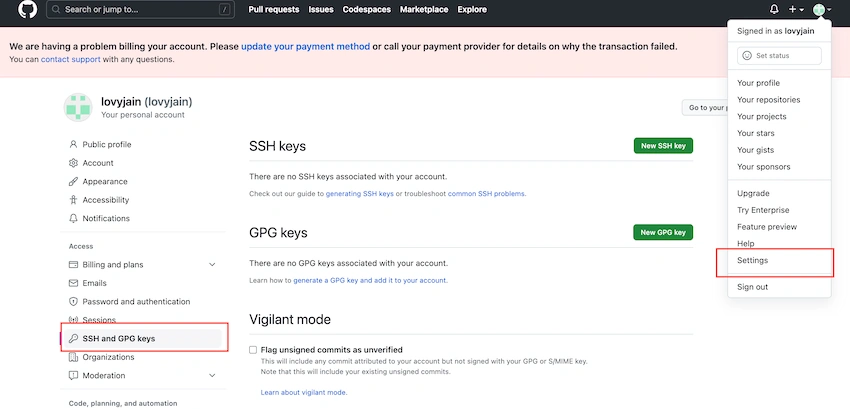
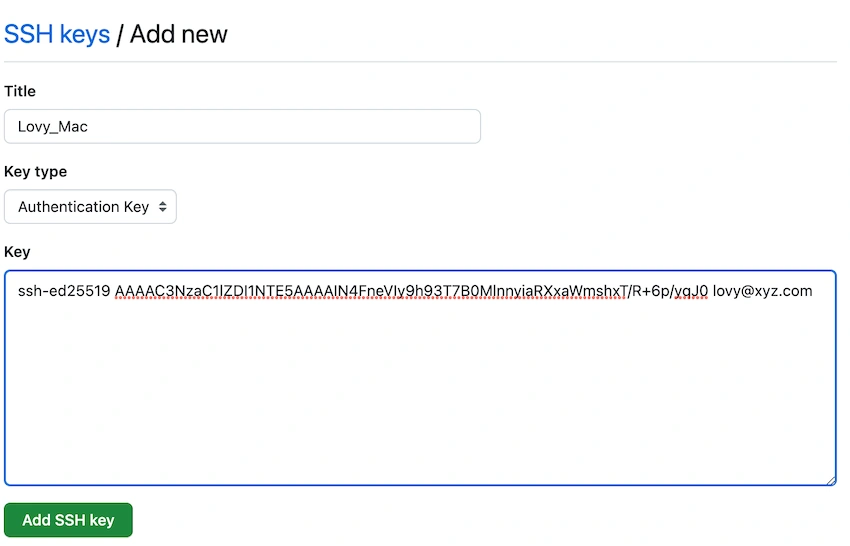
Step 2. Generating a new SSH Key You can generate a new SSH key on your local machine. After you generate the key, you can add the public key to your account on GitHub.com or any repo to enable authentication for Git operations over SSH. Type the below command on mac terminal.
ssh-keygen -t ed25519 -C "[email protected]"

Step 3. As in above change the file name to lovy_for_gitHub to differntiate the ssh keys genreated for which repo, in this case we are generating to connect with github profile.
Step 4. We will let passphrase as emply , but we can add paraphrase to secure the key.
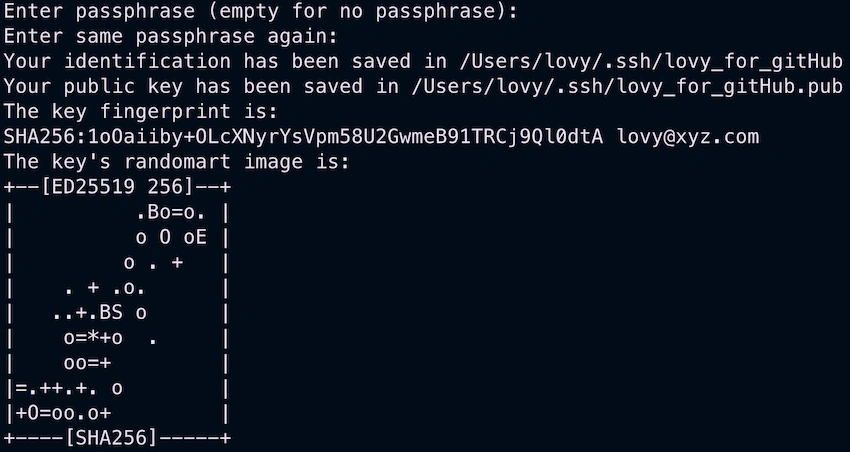
Step 5. The private and public keys for the ssh are generated under the folder as specefied (/Users/lovy/.ssh/)
Your identification has been saved in /Users/lovy/.ssh/lovy_for_gitHub
Your public key has been saved in /Users/lovy/.ssh/lovy_for_gitHub.pub




Join the conversation! Your thoughts help the community grow.