

Table of Contents
Introduction
The High Cost of Leaked Secrets in Healthcare
Real-World Scenario: HL7 FHIR Integration Engine
Why Azure Key Vault Is Non-Negotegotiable
Step-by-Step: Secure Secret Management in Azure Functions
Full .NET 8 Implementation with Managed Identity
Testing and Validation in Production-Like Environments
Enterprise Best Practices
Conclusion
Introduction
In enterprise cloud architecture, secrets are the crown jewels—and in healthcare, they’re also legal liabilities. A single exposed API key to a FHIR (Fast Healthcare Interoperability Resources) server can lead to massive HIPAA violations, regulatory fines, and loss of patient trust.
As a senior cloud architect who’s led Azure transformations for national health systems, I enforce one ironclad rule:
“No secrets in code. No secrets in config files. No exceptions.”
This article shows how to securely store and consume secrets in Azure Functions using Azure Key Vault + Managed Identity, demonstrated through a real-time HL7 FHIR integration engine—a system that exchanges patient records between hospitals, labs, and EHRs.
The High Cost of Leaked Secrets in Healthcare
Healthcare APIs often connect to:
Epic or Cerner EHR systems
Diagnostic lab portals
Pharmacy benefit managers (PBMs)
Each requires long-lived API keys, client secrets, or certificates. Hardcoding these—or even storing them in Function App settings as plaintext—creates massive risk:
Accidental commits to Git
Developer laptop theft
Insider threats
Azure Key Vault solves this by centralizing secrets, enforcing RBAC, and enabling audit trails.
Real-World Scenario: HL7 FHIR Integration Engine
A regional health information exchange (HIE) uses an Azure Function to:
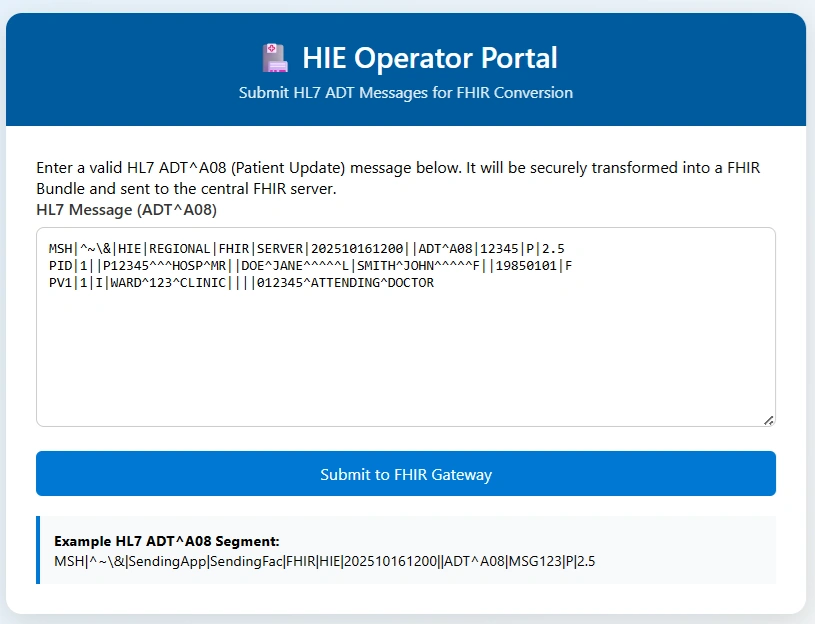
Receive HL7 ADT (Admit/Discharge/Transfer) messages via HTTPS
Transform them into FHIR bundles
Push to a third-party FHIR server using a confidential
client_idandclient_secret
The requirement
“The FHIR credentials must never appear in source code, deployment artifacts, or environment variables in plaintext.”
Why Azure Key Vault Is Non-Negotegotiable
Azure Key Vault provides:
Hardware-backed encryption (HSM options)
Granular access policies (e.g., “Function App X can get secret Y”)
Full audit logging via Azure Monitor
Automatic secret rotation integration
Critically, when paired with Managed Identity, your Function App authenticates to Key Vault without any credentials—eliminating the "secret to protect the secret" paradox.
Step-by-Step: Secure Secret Management in Azure Functions
1. Create Azure Key Vault
 az keyvault create \
  --name hie-fhir-kv \
  --resource-group healthcare-rg \
  --location eastus \
  --enable-rbac-authorization false  # Use access policies for simplicity
2. Store Secrets
 az keyvault secret set \
  --vault-name hie-fhir-kv \
  --name Fhir-ClientId \
  --value "a1b2c3d4-..."

az keyvault secret set \
  --vault-name hie-fhir-kv \
  --name Fhir-ClientSecret \
  --value "xYz!9@..."
3. Enable System-Assigned Managed Identity on Function App
 az functionapp identity assign \
  --name fhir-integration-func \
  --resource-group healthcare-rg
4. Grant Key Vault Access to Function Identity
 # Get Function App's principal ID
principal_id=$(az functionapp identity show \
  --name fhir-integration-func \
  --resource-group healthcare-rg \
  --query principalId -o tsv)

# Grant 'Get' permission on secrets
az keyvault set-policy \
  --name hie-fhir-kv \
  --object-id $principal_id \
  --secret-permissions get
5. Reference Secrets in Function App Settings
In Azure Portal → Function App → Configuration → Application settings:
Fhir__ClientId→@Microsoft.KeyVault(SecretUri=https://hie-fhir-kv.vault.azure.net/secrets/Fhir-ClientId)Fhir__ClientSecret→@Microsoft.KeyVault(SecretUri=https://hie-fhir-kv.vault.azure.net/secrets/Fhir-ClientSecret)
Azure automatically resolves these at runtime using the Function’s Managed Identity.
Full .NET 8 Implementation with Managed Identity
FhirIntegrationFunction.cs
using System.Net.Http.Headers;
using System.Text;
using System.Text.Json;
using Azure.Identity;
using Microsoft.AspNetCore.Mvc;
using Microsoft.Azure.Functions.Worker;
using Microsoft.Azure.Functions.Worker.Http;
using Microsoft.Extensions.Logging;

namespace Healthcare.Hie.Functions;

public class FhirIntegrationFunction
{
    private readonly HttpClient _httpClient;
    private readonly ILogger<FhirIntegrationFunction> _logger;
    private readonly IConfiguration _configuration;

    public FhirIntegrationFunction(
        IHttpClientFactory httpClientFactory,
        ILogger<FhirIntegrationFunction> logger,
        IConfiguration configuration)
    {
        _httpClient = httpClientFactory.CreateClient();
        _logger = logger;
        _configuration = configuration;
    }

    [Function("ProcessHl7ToFhir")]
    public async Task<IActionResult> Run(
        [HttpTrigger(AuthorizationLevel.Function, "post", Route = "fhir/convert")] HttpRequestData req)
    {
        // Read HL7 message (simplified)
        var hl7Content = await new StreamReader(req.Body).ReadToEndAsync();
        _logger.LogInformation("Received HL7 message of length {Length}", hl7Content.Length);

        // Get secrets from configuration (resolved from Key Vault at runtime)
        var clientId = _configuration["Fhir:ClientId"];
        var clientSecret = _configuration["Fhir:ClientSecret"];
        var fhirServerUrl = _configuration["Fhir:ServerUrl"];

        if (string.IsNullOrEmpty(clientId) || string.IsNullOrEmpty(clientSecret))
        {
            _logger.LogError("FHIR credentials missing. Check Key Vault references.");
            return new BadRequestObjectResult("Missing FHIR credentials");
        }

        // Authenticate to FHIR server (OAuth2 client credentials flow)
        var tokenResponse = await GetFhirAccessToken(clientId, clientSecret, fhirServerUrl);
        if (string.IsNullOrEmpty(tokenResponse?.AccessToken))
        {
            return new StatusCodeResult(500);
        }

        // Convert HL7 → FHIR (pseudo-logic)
        var fhirBundle = ConvertHl7ToFhir(hl7Content);

        // Push to FHIR server
        _httpClient.DefaultRequestHeaders.Authorization =
            new AuthenticationHeaderValue("Bearer", tokenResponse.AccessToken);

        var content = new StringContent(JsonSerializer.Serialize(fhirBundle), Encoding.UTF8, "application/fhir+json");
        var response = await _httpClient.PostAsync($"{fhirServerUrl}/Bundle", content);

        if (response.IsSuccessStatusCode)
        {
            _logger.LogInformation("Successfully pushed FHIR bundle");
            return new OkObjectResult(new { status = "success" });
        }
        else
        {
            _logger.LogError("FHIR server returned {StatusCode}", response.StatusCode);
            return new StatusCodeResult((int)response.StatusCode);
        }
    }

    private async Task<TokenResponse?> GetFhirAccessToken(string clientId, string clientSecret, string fhirServerUrl)
    {
        try
        {
            using var client = new HttpClient();
            var authUrl = $"{fhirServerUrl}/auth/token"; // Adjust per FHIR server

            var formData = new Dictionary<string, string>
            {
                ["grant_type"] = "client_credentials",
                ["client_id"] = clientId,
                ["client_secret"] = clientSecret,
                ["scope"] = "system/*.write"
            };

            var response = await client.PostAsync(authUrl, new FormUrlEncodedContent(formData));
            var json = await response.Content.ReadAsStringAsync();

            if (response.IsSuccessStatusCode)
            {
                var token = JsonSerializer.Deserialize<TokenResponse>(json);
                return token;
            }
            else
            {
                _logger.LogError("Token request failed: {Response}", json);
                return null;
            }
        }
        catch (Exception ex)
        {
            _logger.LogError(ex, "Failed to acquire FHIR access token");
            return null;
        }
    }

    private object ConvertHl7ToFhir(string hl7) => new { resourceType = "Bundle", type = "transaction" };
}

public record TokenResponse(string AccessToken, int ExpiresIn);
Program.cs (Minimal Hosting Model)
using Microsoft.Extensions.Azure;
using Microsoft.Extensions.Hosting;

var host = new HostBuilder()
    .ConfigureFunctionsWorkerDefaults()
    .ConfigureServices(services =>
    {
        services.AddApplicationInsightsTelemetryWorkerService();
        services.ConfigureFunctionsApplicationInsights();
        services.AddHttpClient();
    })
    .Build();

host.Run();
local.settings.json (for local dev with Azure CLI auth)
{
  "IsEncrypted": false,
  "Values": {
    "AzureWebJobsStorage": "UseDevelopmentStorage=true",
    "FUNCTIONS_WORKER_RUNTIME": "dotnet-isolated",
    "Fhir:ServerUrl": "https://fhir-server.example.com"
  }
}
Local Development Tip: Use
az loginand grant your user account Key Vault access. The Azure SDK will use your CLI identity automatically.
Testing and Validation in Production-Like Environments
Verify secret resolution:
In Azure Portal → Function App → Diagnose and solve problems → Key Vault Application Settings DiagnosticsTest with invalid secret:
Temporarily remove Key Vault access → function should fail with400 Bad Request, not expose secret valuesAudit trail:
In Key Vault → Logs → confirmGetSecretevents show your Function App’s identity
Enterprise Best Practices
Never use connection strings or secrets in code—even during local dev (use Azure CLI auth)
Rotate secrets quarterly using Key Vault’s auto-rotation with Azure Event Grid
Use RBAC (not access policies) for new vaults—finer control with Azure AD groups
Store certificates in Key Vault for mutual TLS with FHIR servers
Fail fast: Validate secret presence at startup using
IHostedService
Conclusion
In regulated industries like healthcare, secret management isn’t an ops task—it’s a compliance imperative. By combining Azure Key Vault, Managed Identity, and secure configuration references, you eliminate secrets from your codebase while enabling full auditability. This pattern—demonstrated here with a FHIR integration engine—is used across finance, government, and critical infrastructure. It’s not just secure; it’s architecturally sound, operationally simple, and regulatorily defensible. As cloud architects, we don’t just build systems that work. We build systems that protect what matters most—one secret at a time.
Join the conversation! Your thoughts help the community grow.