

Introduction
Today, in this article let's play around with an interesting and very useful concept in Entity Framework.
What is a compiled query?
In simple terms "A query that is compiled once then executed several times".
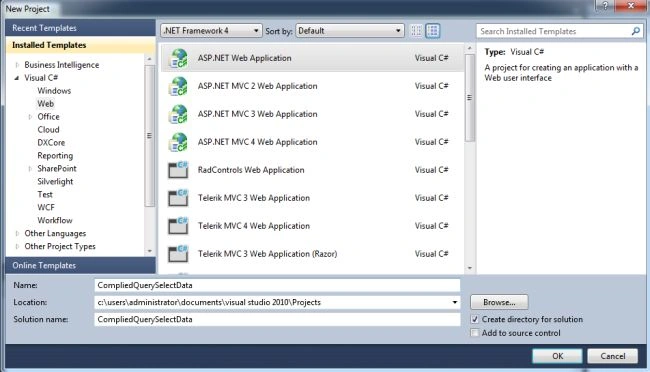
Step 1. Create a new web application.
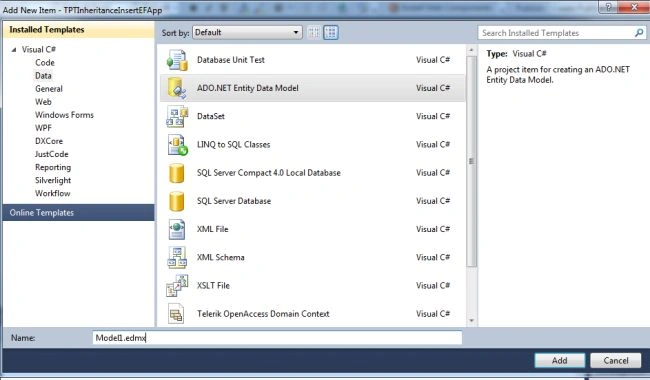
Step 2. Add a new Entity Data Model Framework.
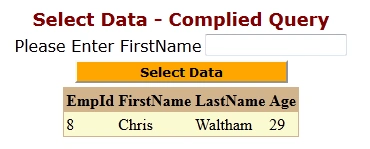
Step 3. The complete code of WebForm1.aspx looks like this.
<%@ Page Language="C#" AutoEventWireup="true" CodeBehind="WebForm1.aspx.cs" Inherits="CompliedQuerySelectData.WebForm1" %>

<!DOCTYPE html PUBLIC "-//W3C//DTD XHTML 1.0 Transitional//EN" "http://www.w3.org/TR/xhtml1/DTD/xhtml1-transitional.dtd">
<html xmlns="http://www.w3.org/1999/xhtml">
<head id="Head1" runat="server">
    <title></title>
</head>
<body>
    <form id="form1" runat="server">
        <div>
            <center>
                <table>
                    <tr>
                        <td colspan="2" align="center">
                            <asp:Label ID="Label1" runat="server" Text="Select Data - Complied Query" Font-Bold="true" Font-Size="Large" Font-Names="Verdana" ForeColor="Maroon"></asp:Label>
                        </td>
                    </tr>
                    <tr>
                        <td>
                            <asp:Label ID="Label2" runat="server" Text="Please Enter FirstName" Font-Names="Verdana"></asp:Label>
                        </td>
                        <td>
                            <asp:TextBox ID="TextBox1" runat="server"></asp:TextBox>
                        </td>
                    </tr>
                    <tr>
                        <td colspan="2" align="center">
                            <asp:Button ID="Button1" runat="server" Text="Select Data" Font-Names="Verdana" Width="213px" BackColor="Orange" Font-Bold="True" OnClick="Button1_Click" />
                        </td>
                    </tr>
                    <tr>
                        <td colspan="2" align="center">
                            <asp:GridView ID="GridView1" runat="server" CssClass="grid" BackColor="LightGoldenrodYellow" BorderColor="Tan" BorderWidth="1px" CellPadding="2" ForeColor="Black" GridLines="None">
                                <AlternatingRowStyle BackColor="PaleGoldenrod" />
                                <FooterStyle BackColor="Tan" />
                                <HeaderStyle BackColor="Tan" Font-Bold="True" />
                                <PagerStyle BackColor="PaleGoldenrod" ForeColor="DarkSlateBlue" HorizontalAlign="Center" />
                                <SelectedRowStyle BackColor="DarkSlateBlue" ForeColor="GhostWhite" />
                                <SortedAscendingCellStyle BackColor="#FAFAE7" />
                                <SortedAscendingHeaderStyle BackColor="#DAC09E" />
                                <SortedDescendingCellStyle BackColor="#E1DB9C" />
                                <SortedDescendingHeaderStyle BackColor="#C2A47B" />
                                <EmptyDataTemplate>
                                    No Records Found!
                                </EmptyDataTemplate>
                            </asp:GridView>
                        </td>
                    </tr>
                    <tr>
                        <td colspan="2" align="center">
                            <asp:Label ID="Label3" runat="server" Font-Names="Verdana" Font-Bold="true"></asp:Label>
                        </td>
                    </tr>
                </table>
            </center>
        </div>
    </form>
</body>
</html>

Gowtham RajamanickamPosted Mar 11, 2015, 8:45 AM
NIce articel...