

Introduction
Today, in this article let's play around with one of the interesting and most useful concepts in Silverlight.
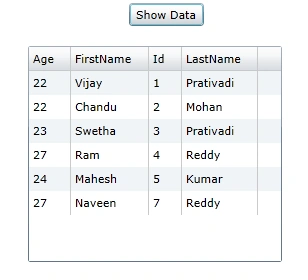
Question: What is select data using Silverlight RIA enabled service?
In simple terms "This application enables selection of data in the database with help of a Silverlight RIA enabled service. It uses a base platform of Entity Framework to communicate with the database".
Step 1: Create a database named "Company" with employee table in it.
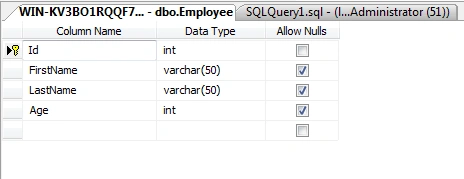
Step 2: Open up Visual Studio and create a new Silverlight application enabled with RIA Services
Step 3: When the project is created. Right-click on the RIA Service project and add a new entity data model framework and set it up for the previously created database.
Step 4: Again right-click on the RIA service project and add a Domain Service Class as a new item.
Step 5: The complete code of EmployeeDomain.cs looks like this (Domain Service Class):
namespace SilverlightRIASelectApp.Web
{
using System;
using System.Collections.Generic;
using System.ComponentModel;
using System.ComponentModel.DataAnnotations;
using System.Data;
using System.Linq;
using System.ServiceModel.DomainServices.EntityFramework;
using System.ServiceModel.DomainServices.Hosting;
using System.ServiceModel.DomainServices.Server;
// Implements application logic using the CompanyEntities context.
// TODO: Add your application logic to these methods or in additional methods.
// TODO: Wire up authentication (Windows/ASP.NET Forms) and uncomment the following to disable anonymous access
// Also consider adding roles to restrict access as appropriate.
// [RequiresAuthentication][EnableClientAccess()]
public class EmployeeDomain : LinqToEntitiesDomainService<CompanyEntities>
{
// TODO:// Consider constraining the results of your query method. If you need additional input you can
// add parameters to this method or create additional query methods with different names.
// To support paging you will need to add ordering to the 'Employee'
query.public IQueryable<Employee> GetEmployee()
{
return this.ObjectContext.Employee;
}
public void InsertEmployee(Employee employee)
{
if ((employee.EntityState != EntityState.Detached))
{
this.ObjectContext.ObjectStateManager.ChangeObjectState(employee, EntityState.Added);
}
else
{
this.ObjectContext.Employee.AddObject(employee);
}
}
public void UpdateEmployee(Employee currentEmployee)
{
this.ObjectContext.Employee.AttachAsModified(currentEmployee, this.ChangeSet.GetOriginal(currentEmployee));
}
public void DeleteEmployee(Employee employee)
{
if ((employee.EntityState != EntityState.Detached))

Join the conversation! Your thoughts help the community grow.