

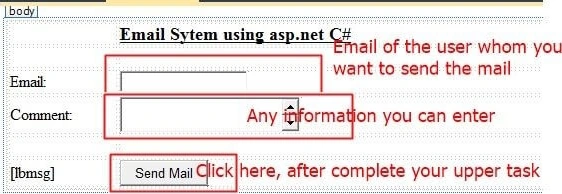
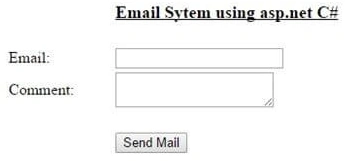
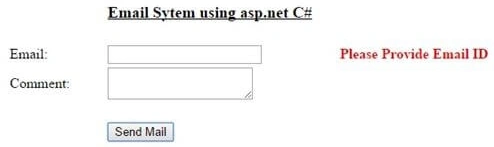
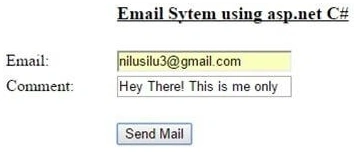
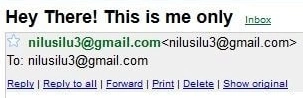
We took two TextBoxes, one for the To email address and the other for making comments or any information you want to send. We used one label too that shows that the email is sent to the desired location.
Initial chamber
Step 1. Open Your Visual Studio 2010 and create an Empty Website, provide a suitable name (Email_demo).
Step 2. In Solution Explorer you get your empty website, add a web form by going as in the following.
For Web Form
Email_demo (your empty website) right-click then select Add New Item -> Web Form. Name it Email_demo.aspx.
Design chamber
Next, we will create a design for our application where we drag some control from the toolbox. So open your Email.aspx page and write code like this.
<%@ Page Language="C#" AutoEventWireup="true" CodeFile="Default.aspx.cs" Inherits="_Default" %>

<!DOCTYPE html PUBLIC "-//W3C//DTD XHTML 1.0 Transitional//EN" "http://www.w3.org/TR/xhtml1/DTD/xhtml1-transitional.dtd">

<html xmlns="http://www.w3.org/1999/xhtml">
<head runat="server">
    <title></title>
    <style type="text/css">
        .style1 {
            width: 106px;
        }
        .style2 {
            text-decoration: underline;
            font-size: large;
            width: 257px;
        }
        .style3 {
            width: 257px;
        }
    </style>
</head>
<body>
    <form id="form1" runat="server">
        <div>
            <table style="width:100%;">
                <tr>
                    <td class="style1"></td>
                    <td class="style2"><strong>Email System using ASP.NET C#</strong></td>
                    <td></td>
                </tr>
                <tr>
                    <td class="style1"></td>
                    <td class="style3"></td>
                    <td></td>
                </tr>
                <tr>
                    <td class="style1">Email:</td>
                    <td class="style3">
                        <asp:TextBox ID="TextBox1" runat="server"></asp:TextBox>
                    </td>
                    <td>
                        <asp:RequiredFieldValidator ID="RequiredFieldValidator1"
                            ControlToValidate="TextBox1" runat="server"
                            ErrorMessage="Please Provide Email ID" Font-Bold="True" ForeColor="Red">
                        </asp:RequiredFieldValidator>
                    </td>
                </tr>
                <tr>
                    <td class="style1">Comment:</td>
                    <td class="style3">
                        <asp:TextBox ID="TextBox2" runat="server" TextMode="MultiLine"></asp:TextBox>
                    </td>
                    <td></td>
                </tr>
                <tr>
                    <td class="style1"></td>
                    <td class="style3"></td>
                    <td></td>
                </tr>
                <tr>
                    <td class="style1">
                        <asp:Label ID="lbmsg" runat="server"></asp:Label>
                    </td>
                    <td class="style3">
                        <asp:Button ID="Button1" runat="server" OnClick="Button1_Click" Text="Send Mail" />
                    </td>
                    <td></td>
                </tr>
            </table>
        </div>
    </form>
</body>
</html>

ansal ibrahimPosted Aug 1, 2024, 9:09 AM
I used this code and got one error - 'The SMTP server requires a secure connection or the client was not authenticated. The server response was: 5.7.0 Authentication Required.'
vishal fondekarPosted Sep 26, 2018, 3:39 AM
How do i add captcha ???
Arul RPosted Oct 28, 2015, 5:37 AM
Good one !!!
Rajeesh MenothPosted Jul 18, 2015, 1:06 AM
Good One Nilesh Jadav
Former memberPosted Jul 17, 2015, 7:26 AM
god one sir. but next time we want to seen mail sending along with file attachment application... thanks sir
Former memberPosted Jul 17, 2015, 7:25 AM
this is nice one.this is really good for fresher like me but next time
Sibeesh VenuPosted Jul 17, 2015, 5:56 AM
Thanks for the information
Gopi ChandPosted Jul 17, 2015, 5:41 AM
Great work
SharadPosted Jul 17, 2015, 3:35 AM
good one...
RakeshPosted Jul 17, 2015, 12:25 AM
Nice one
Rahul PrajapatPosted Jul 16, 2015, 10:55 PM
NIce article sir
Pankaj Kumar ChoudharyPosted Jul 16, 2015, 6:42 PM
Nice Explain Sir........