

Serialization is the process of converting an object into a format that can be easily stored or transmitted, such as XML, JSON, SOAP, or binary format. Deserialization is the reverse process, converting the serialized data back into an object.
Types of Serialization Process
- XML Serialization
- JSON Serialization
- Binary Serialization
- SOAP Serialization
1. XML Serialization
XML serialization in .NET involves the process of transforming an object into an XML format, which facilitates easy storage, transfer, or sharing across different systems. In contrast to binary or SOAP serialization, XML serialization primarily focuses on the public fields and properties of an object, thereby providing a more straightforward and transparent method for data representation.
Features
- Transform an object into XML format.
- The predominant form of serialization is utilized for interoperability.
- Public properties and fields undergo serialization, while private ones remain excluded.
- Frequently employed in web services, configuration files, and for storage that is easily readable by humans.
Step 1. Create a class for XML serialization like the one below.
EmployeeDetails.cs
public class EmployeeDetails
{
    public string Name { get; set; }
    public int Age { get; set; }
    public string Address { get; set; }
    public string Hobbies { get; set; }
    public string EmployeeType { get; set; }
}
Step 2. Serialize the class EmployeeDetails.cs and save it according to the specified path.
public partial class MainWindow : Window
{
    EmployeeDetails employee;

    // Specify the file path where the XML file will be saved
    string filePath = @"C:\Users\sanjay\Desktop\Sanjay\SerailizedPath\"; // Change this to your desired location
    public MainWindow()
    {
        InitializeComponent();
        employee = new EmployeeDetails
        {
            Name = "Sanjay Kumar",
            Age = 30,
            Address = "Delhi",
            EmployeeType = "Permanent",
            Hobbies = "Cricket"
        };
    }
    private void XmlSerialization_Click(object sender, RoutedEventArgs e)
    {
        // Create the XmlSerializer for the EmployeeDetails type
        XmlSerializer serializer = new XmlSerializer(typeof(EmployeeDetails));
        // Serialize the object to the specified location
        using (StreamWriter writer = new StreamWriter(Path.Combine(filePath, "Employee.xml")))
        {
            serializer.Serialize(writer, employee);
        }
    }
}
Step 3. DeSerialize the class EmployeeDetails.cs like below.
private void XmlDESerialization_Click(object sender, RoutedEventArgs e)
{
    XmlSerializer serializer = new XmlSerializer(typeof(EmployeeDetails));
    using (StreamReader reader = new StreamReader(Path.Combine(filePath, "Employee.xml")))
    {
        EmployeeDetails employeeDetails = (EmployeeDetails)serializer.Deserialize(reader);
        MessageBox.Show($"Name: {employeeDetails.Name}, Age: {employeeDetails.Age}, Address: {employeeDetails.Address}, EmployeeType: {employeeDetails.EmployeeType}, Hobbies: {employeeDetails.Hobbies}");
    }
}
2. JSON Serialization
In C#, JSON serialization is the process of transforming an object into a JSON string, while deserialization involves converting a JSON string back into an object. The System.Text.Json or Newtonsoft.Json libraries can be utilized for these operations.
Features
- Transform an object into JSON format.
- It is commonly utilized for web APIs, configuration files, and efficient data storage.
- JSON serialization is supported by both the System.Text.Json and Newtonsoft.Json libraries.
Step 1. Create a class for JSON serialization like the one below.
EmployeeDetails.cs
public class EmployeeDetails
{
    public string Name { get; set; }
    public int Age { get; set; }
    public string Address { get; set; }
    public string Hobbies { get; set; }
    public string EmployeeType { get; set; }
}
Step 2. Serialize the EmployeeDetails.cs class into JSON format and save it to the specified location based on your requirements.
public partial class MainWindow : Window
{
    EmployeeDetails employee;

    // Specify the file path where the json file will be saved
    string filePath = @"C:\Users\sanjay\Desktop\Sanjay\SerailizedPath\"; // Change this to your desired location

    public MainWindow()
    {
        InitializeComponent();
        employee = new EmployeeDetails
        {
            Name = "Sanjay Kumar",
            Age = 30,
            Address = "Delhi",
            EmployeeType = "Permanent",
            Hobbies = "Cricket"
        };
    }

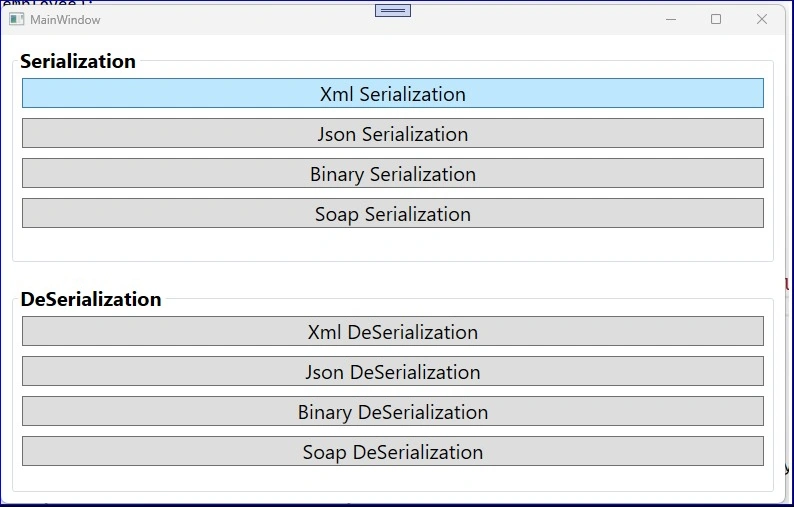
    private void JsonSerialization_Click(object sender, RoutedEventArgs e)
    {
        string jsonString = JsonConvert.SerializeObject(employee, Formatting.Indented);
        File.WriteAllText(Path.Combine(filePath, "Employee.json"), jsonString);
        Debug.WriteLine("Object serialized to employee.json");
    }

    private void JsonDESerialization_Click(object sender, RoutedEventArgs e)
    {
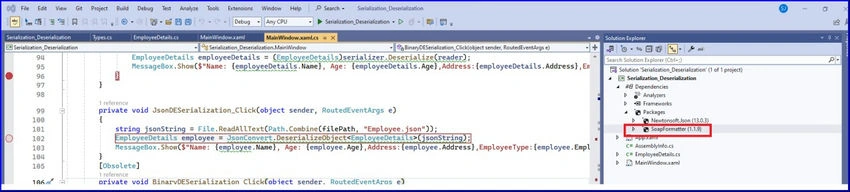
        string jsonString = File.ReadAllText(Path.Combine(filePath, "Employee.json"));
        EmployeeDetails employee = JsonConvert.DeserializeObject<EmployeeDetails>(jsonString);
        MessageBox.Show($"Name: {employee.Name}, Age: {employee.Age}, Address: {employee.Address}, EmployeeType: {employee.EmployeeType}, Hobbies: {employee.Hobbies}");
    }
}
Mariusz PostolPosted Oct 21, 2024, 4:00 PM
More about serialization you could learn by checking out "Information Computation Mastery: Serialization" available in the public domain at <https://www.c-sharpcorner.com/article/information-computation-mastery-serialization/>. I f you have any questions just ask.
Mariusz PostolPosted Oct 21, 2024, 3:56 PM
In my opinion, this one could also be useful "External Streaming Data - Bitstream Format" at <https://www.c-sharpcorner.com/article/external-streaming-data-bitstream-format/>
Mariusz PostolPosted Oct 21, 2024, 3:53 PM
I recommend my article <https://www.c-sharpcorner.com/article/external-data-file-and-stream-concepts/> titled "External Data - File and Stream Concepts".
Mariusz PostolPosted Oct 21, 2024, 3:50 PM
You said "Serialization is the process of converting an object into a format that can be easily stored or transmitted," How to distinguish a format "that can be easily..."? How to distinguish easy and difficult format?
Mariusz PostolPosted Oct 21, 2024, 3:48 PM
As far as I know, XML is also a binary representation (it has associated coding), so what is the difference between binary format and XML?